17
Installation and Wirin
Cha
ter 2
2.2 Installation of PV310
2.2.1 Countermeasure for Heat Radiation
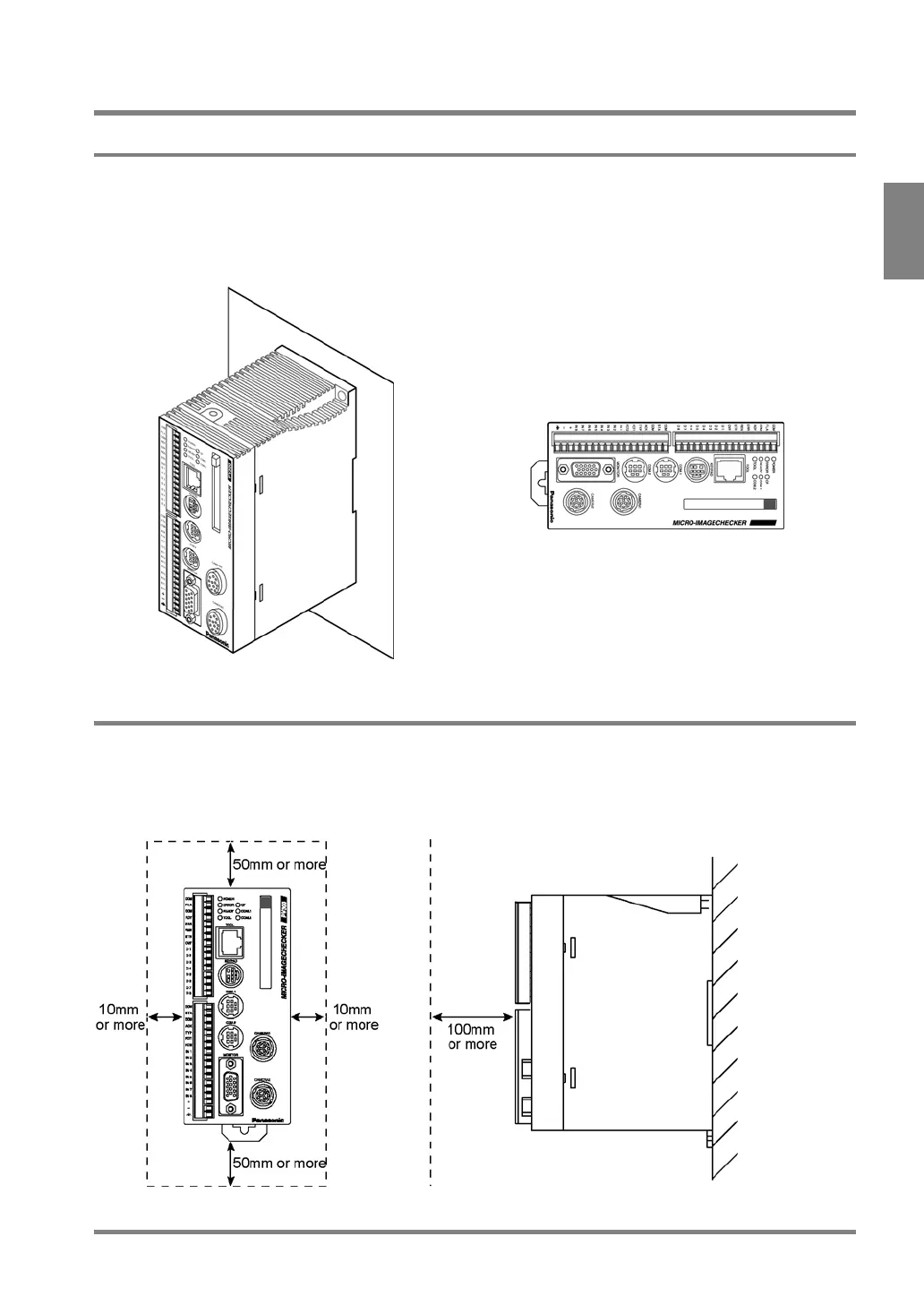
Install the PV310 in the correct direction (see the figures below) for heat radiation not to block the ventilator. Do
not mount the unit sideways. It might cause a malfunction due to the internal heat retaining.
Do not mount above the high heat generators including a heater, a transformer and a high-capacity resistor.
When installing PV310 on a control board, attach a cooling system such as a fan motor to release the heat
generated by PV310.
Correct Wrong
2.2.2 About Mounting Space
Keep 50 mm or more space from other equipment to facilitate the unit exchange and cable wiring.
When mounting a device in front of the PV310 (on the door of the control box, etc.) keep 100 mm or more space
between them in order to prevent an impact from noise radiation or heating.
Always keep 100 mm or more space from front of the PV310 to facilitate a keypad connection or a wiring.



 To Next Page