318
Troubleshootin
Cha
ter 15
15.2 Error Code Number Is Displayed in SETUP Mode
If the values to be detected are incorrect but error signal is not output when performing inspection (for example, 0 is
output as detection data ), inspection may not performed properly with each checker. Check the settings of
checkers first, make sure for correct settings by following the procedure below.
Setting procedure:
1. Switch to SETUP mode.
2. Select “CHECKER”.
3. Point the cursor to the checker of incorrect inspection result and the checker for position and
rotation adjustment.
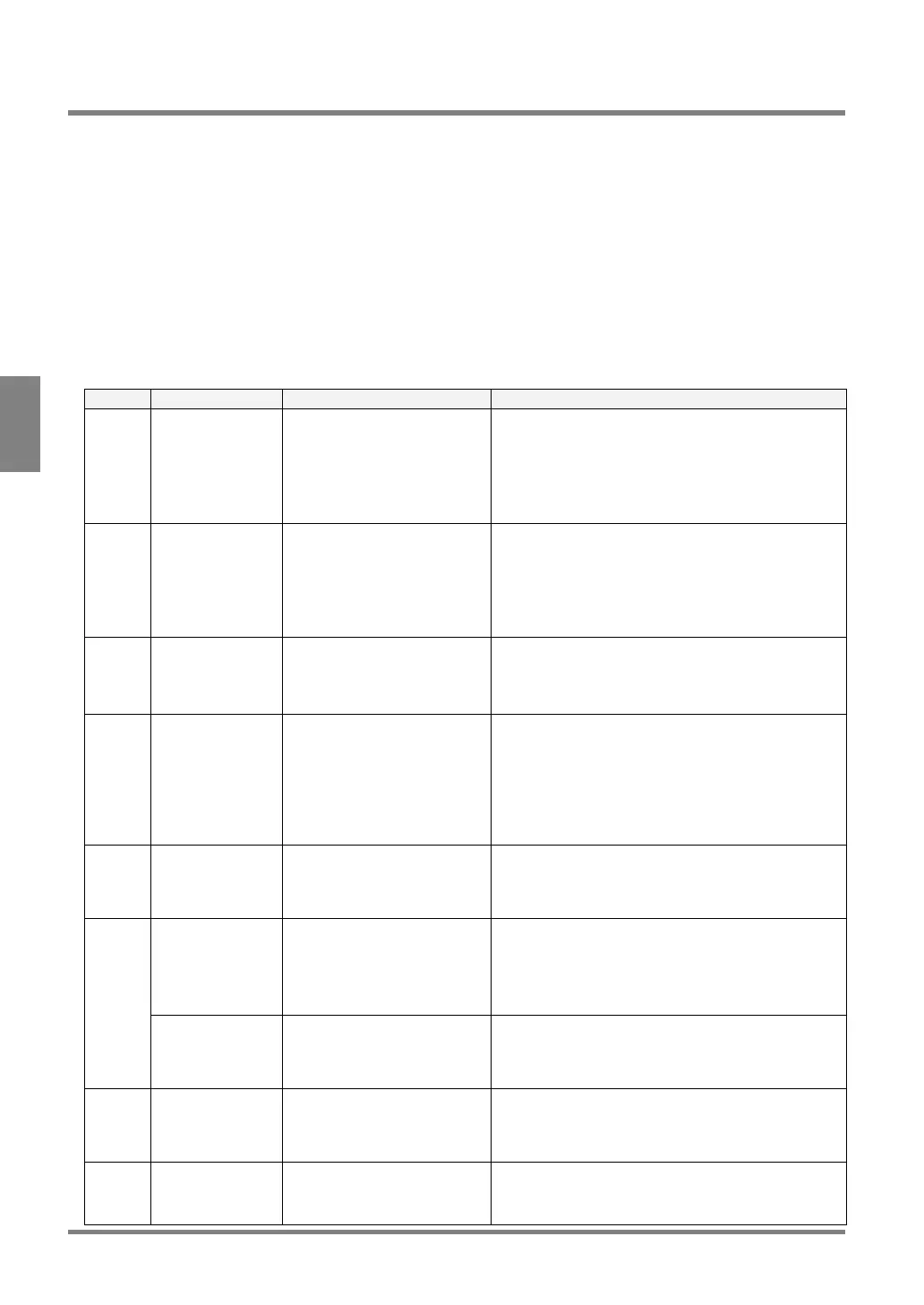
4. Check whether or not the following codes are displayed in the status display area.
Code Relative checker Problem Solution
E0044 Position
adjustment
/Rotation
adjustment
• Gray edge
• Binary edge
Cannot detect an edge that
fulfils the specified limits.
Change each setting value for the checkers or adjust
image brightness by adjusting the size of the aperture
of a lens and slice level so that edge can be detected.
E0045 Position
adjustment
/Rotation
adjustment
• Feature
extraction
Area (a group of pixels) that
fulfills the specified limits
cannot be detected.
Make sure the areas you want to detect fulfill the
specified conditions.
• Properly adjust max. or min. area limit for the
areas you want to detect.
• If the areas to be detected may position on the
area frame, activate “Boundary Process“.
E0046 Rotation
Adjustment
• Feature
Extraction
The theta of detected area (a
group of pixels) cannot be
detected.
For the figure of which principal axis angle such as
square, perfect circle, equilateral triangle, cross joint
cannot be detected. In this case, set “Theta” to “No”.
E0047 Position
adjustment
/Rotation
adjustment
• Matching
• Contour
matching
Image that fulfills the specified
limits cannot be detected.
Check the set conditions
• Are you taking the same object as the object that
has been registered as a template?
• Is “Coor.” Set to an appropriate value? The higher
“Coor.” Value the more tough inspection is. The
initial value is “0.60”. Change the value as
necessary.
E0049 Position
adjustment
/Rotation
adjustment
No base position is registered. Register a base position.
Feature extraction The pixel area fulfilling the
specified conditions (more
than 2001 pixel groups) were
detected
To avoid detecting unnecessary areas, refer to the
followings:
• Adjust max. or min. area limit.
• Adjust aperture on the lens and slice level to
detect only the areas that should be captured.
E0073
Smart matching The number of pixel clusters
having the difference in the
grayscale exceeds 128.
Adjust the setting values of Subtraction Threshold,
Filter and Subtraction Area Min. so that the number of
pixel clusters having the difference in grayscale does
not exceed 128.
E0074 All Frame of inspection area is
set out of the screen display
after position adjustment and
rotation adjustment.
Set the inspection frame within the display area by
minimizing the frame of inspection area in size or
extending the view range.
E0076 All The Position Adjustment or
Rotation Adjustment checker
cannot detect the object.
Adjust a parameter of the checker for position
adjustment or rotation adjustment so that the object
can be detected.



 To Next Page