256
Parallel Communication
Cha
ter 10
10.5.4 Restoring the Setting Data Stored in Compact Flash Memory Card
Overview
Up to 99 setting data stored in Compact Flash memory card can be restored in the PV310 by inputting signals
from the external device. When signals are inputted from the external device, one setting data are copied to the
setting data area of the PV310. Note that the setting data such as product type data that have been stored in the
PV310 are deleted. Assign the setting data numbers to signals IN1-7 to restore the setting data upon the FCT1
(FCT2) signal input. To do this, it is necessary to assign the CF restore function to FCT1 or FCT2 signal. Refer to
Section 9, “Environment Settings” (page 221) for the settings of FCT1 and FCT2 signals.
Specifying the Number of the Setting Data in Compact Flash Memory Card.
No. IN7 IN6 IN5 IN4 IN3 IN2 IN1
1 OFF OFF OFF OFF OFF OFF OFF
2 OFF OFF OFF OFF OFF OFF ON
3 OFF OFF OFF OFF OFF ON OFF
4 OFF OFF OFF OFF ON ON ON
5 OFF OFF OFF OFF ON OFF OFF
6 OFF OFF OFF OFF ON OFF ON
7 OFF OFF OFF OFF ON ON OFF
:
92 ON OFF ON ON OFF ON ON
93 ON OFF ON ON ON OFF OFF
94 ON OFF ON ON ON ON OFF
95 ON OFF ON ON ON ON OFF
96 ON OFF ON ON ON ON ON
97 ON ON OFF OFF OFF OFF OFF
98 ON OFF OFF OFF OFF OFF ON
Assign the number of the setting data stored in
Compact Flash memory card you want to restore in
the PV310 to IN1 - 7 (7 bit). Specify the value
subtracted one from the actual setting data number in
the binary data form. Refer to the table shown right. If
you switch the display images when signals IN1 to
IN7 are input by a combination undefined in the table
below* of signals and display images, an error signal
is output.
Example) IN1 – 7 =ON
99 ON OFF OFF OFF OFF ON OFF
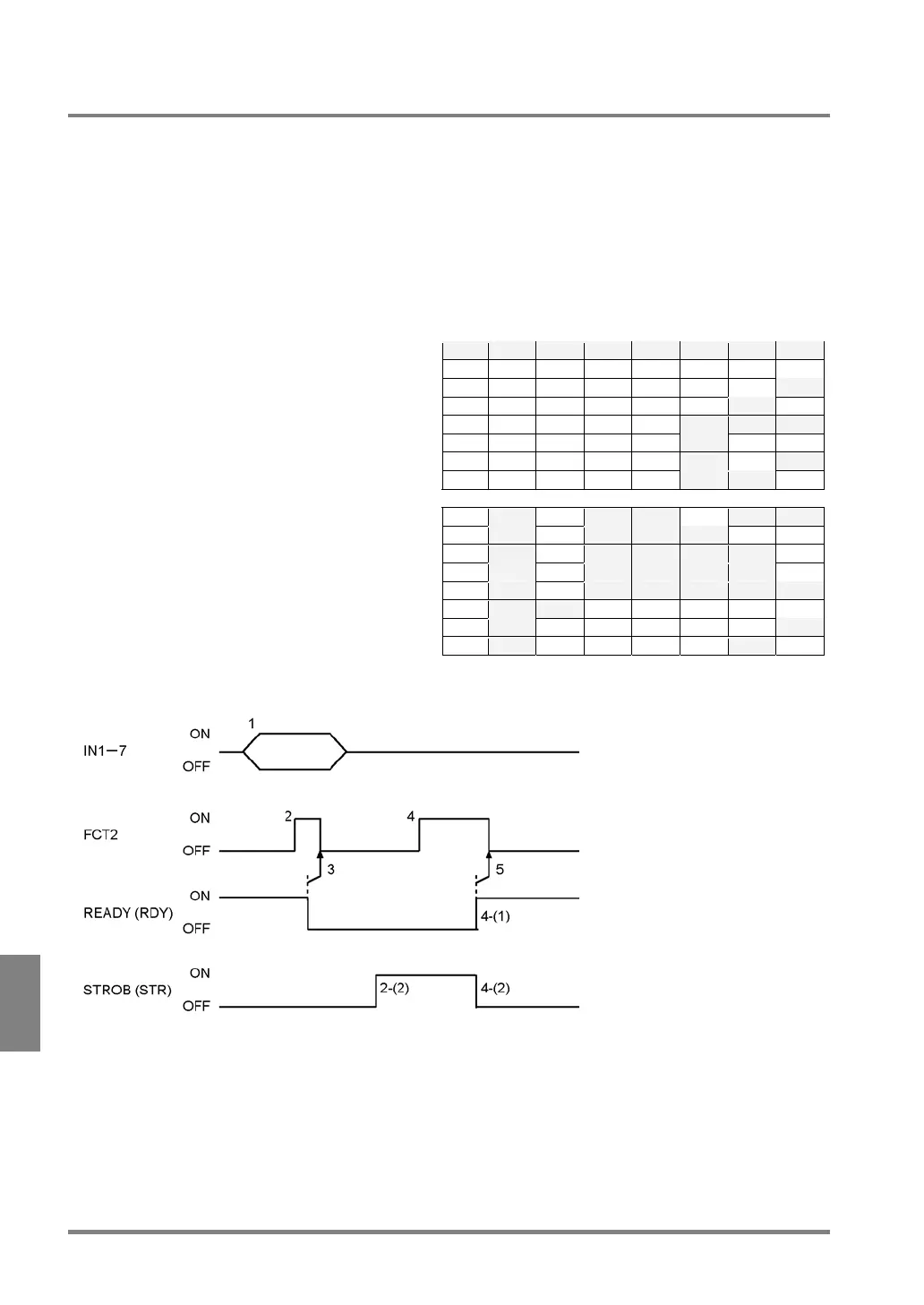
Timing chart (When “CF Restore” is assigned to FCT2.)
1. Assign the numbers of the setting data to restore to the signals IN1-7. (Input the data more than 1
ms before FCT2 signal input)
2. Make sure that READY signal is on and input FCT2 signal.
After READY signal is turned off, the setting data are restored.
3. Make sure that the ready signal is off and then turn the FCT2 signal off.
After restoration of the setting data is completed, the READY signal is turned on.



 To Next Page