12
Names and Functions of Parts
Cha
ter 1
1.3 Keypad
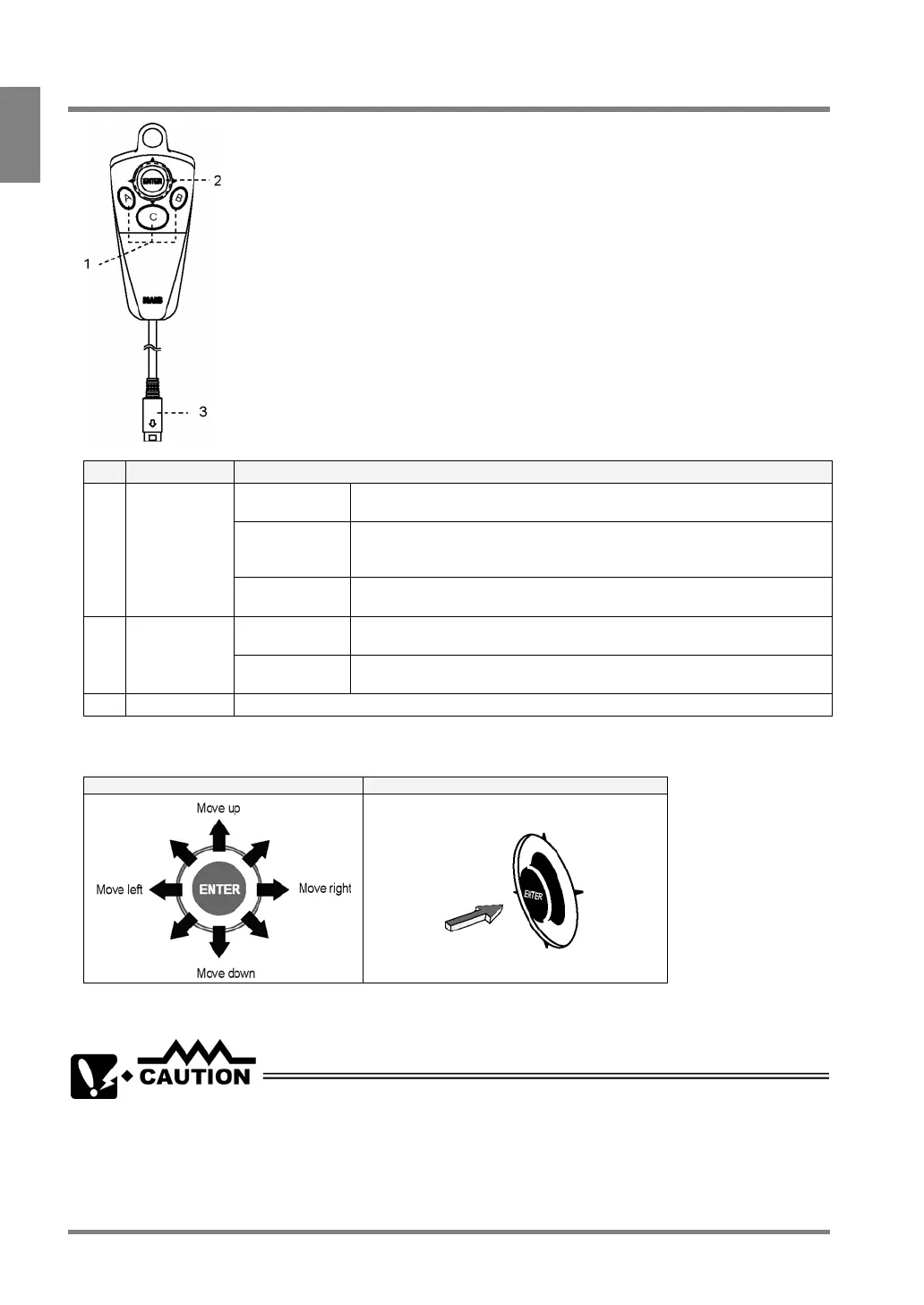
No. Name Description
A key Starts an inspection.
Executes a test in SETUP mode and an inspection in RUN mode.
B key Displays a sub-menu for each menu. Press and hold down this key for
more than one second to save the screen copy on the Compact Flash
memory card.
1 A, B, C keys
C key Switches between SETUP mode and RUN mode. Goes back to the
previous hierarchy or close the window.
Cursor
Operation
Moves the cursor in the up to 8 directions.
Use this lever to select the menu and move the start and end points.
2 ENTER key
Confirmation
Operation
Executes (or Determines) the selected option.
3 Connector Connects the keypad to the PV310.
Cursor Operation and Determination Operation with the Cursor Lever
Cursor operation Determination (ENTER) key operation
If you try to move the cursor while pressing and holding down the ENTER key, the highlighted option can be
determined. Release and move the ENTER key when you move the cursor.
Connect only the designated keypad (ANM852XX) to the PV310.



 To Next Page