64
Procedure for Settin
Ins
ection Conditions
Cha
ter 5
5.6 Inspection Overview
To support for various inspection purposes, the PV310 has multiple types of inspection functions, which are
performed in accordance with the inspection conditions being different for each inspection function. In PV310, the
inspection function is called a checker. Only basic concepts of checker are described here, but if you want to
need more information about checkers, please refer to Section 6.
The Types of Checkers
Binary Window Counts the number of white or black pixels in a specified area and judges as OK or NG
using the measured number
Gray Window Calculates the gray average values of all pixels in a specified area and judges as OK or
NG using the measured number
Binary Edge Detects the edges between white and black and judges as OK or NG using the
measured number
Gray Edge Detects the point of a certain variation in brightness in accordance with the gray value
of each pixel and judges as OK or NG based on the number of detected pixels
Feature Extraction Detects a cluster of black or white pixels in a binary image and judges as OK or NG
depending on the measured number
Smart Matching Detects an image being equal to the saved image (template) based on the gray scale
value and judges as OK or NG
Contour Matching Detects an image similar to the saved image (template) based on the contour
information and judges as OK or NG in accordance with the correlation value
Flaw Detection Calculates a gray average value within the segmented range (cell). The PV310 judges
as OK or NG based on the difference in the gray average of neighboring cells
The PV310 has a support function, which enables you to execute the inspections shown in the table above in
accordance with the position or angle of an object.
Position Adjustment Detects the position of an object and executes inspection in the position where the
object was adjusted
Rotation Adjustment Executes inspection by rotating the object by the adjusted angle
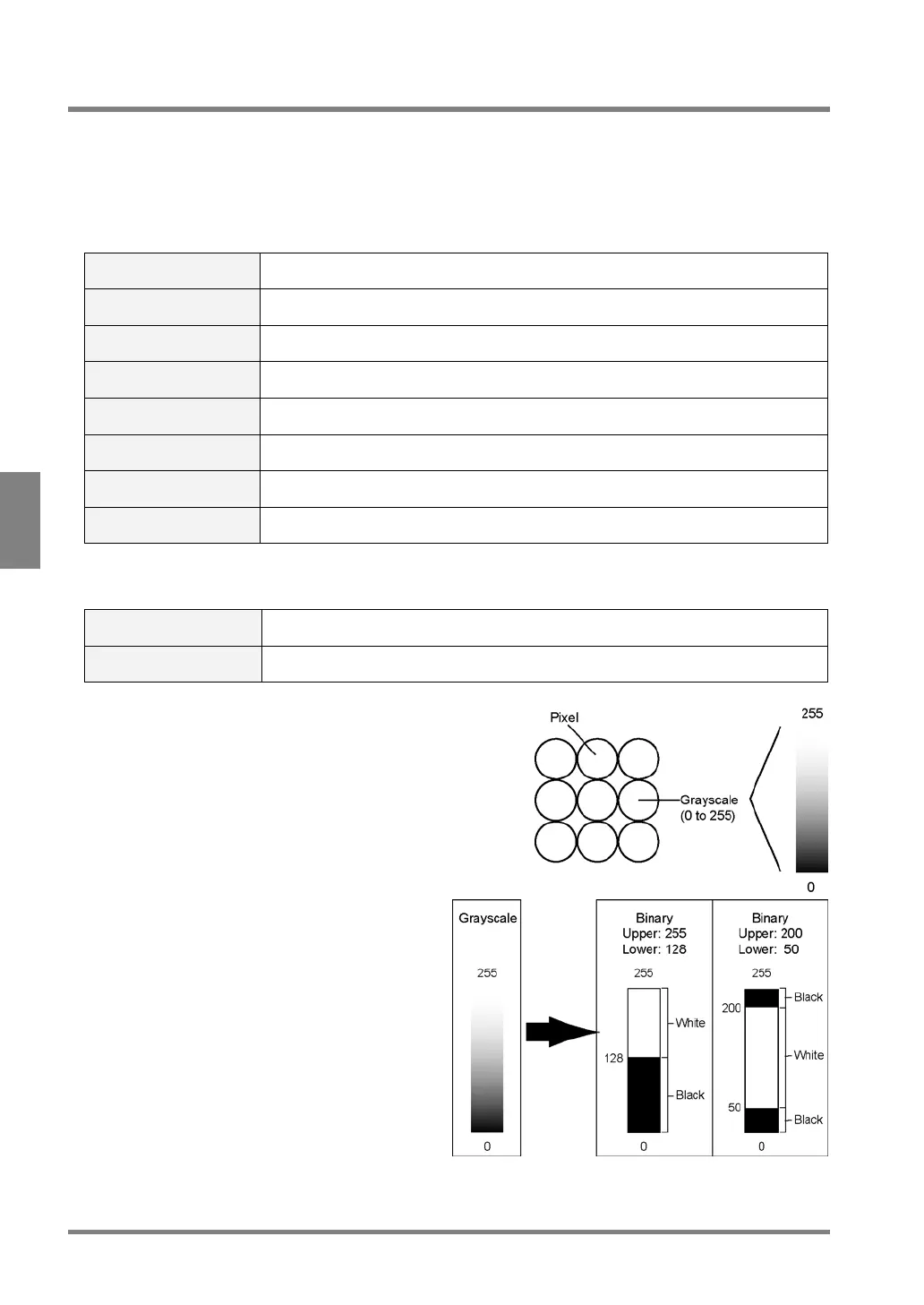
Gray Scale:
The process of capturing the signals from a camera as a 256
(0 to 255) grayscale image. The brightness of 256 grayscale is
called a gray value. The higher gray value the brighter pixel
and the lower gray value the darker pixel.
Binary Image:
In binary images, all pixels within the certain range
of gray scale are turned white and all pixels out of
the certain range of gray scale level are turned
black. The range of gray scale is called a slice
level]. Eight slice levels (A to H) can be saved for
each product type. Since the color information that
a binary image has is binary (white and black) color
information, the amount of the color information in a
binary image is smaller than that in a grayscale or
differential image. As a result, checkers can
process binary images faster than grayscale
images. Note that if the brightness of the image or
inspection object changes during inspection, a pixel
may change from white to black or vice versa.



 To Next Page