58
Procedure for Settin
Ins
ection Conditions
Cha
ter 5
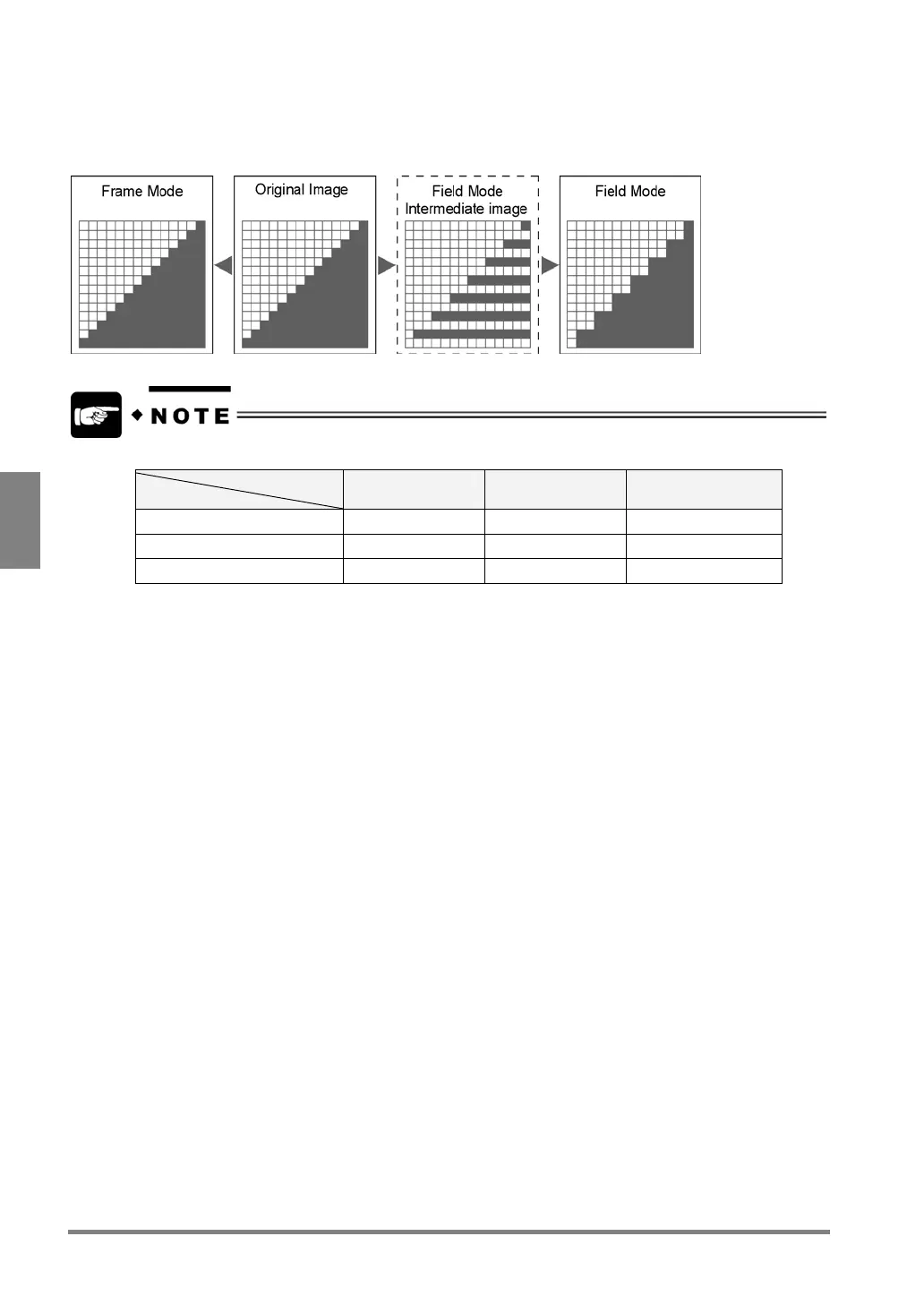
* Each in Normal Field and Int. Sync Field modes, image resolution in the vertical direction drops to 240 pixels,
compared with the frame mode. This is because the PV310 captures in total only 240 lines of the image by
skipping every other line in Field mode. For example, when the device captured the odd-numbered lines, it copies
them to the even-numbered lines, and then an image composed of 480 lines is created.
There are some limitations of camera connections depending on the camera mode.
Camera port
Camera mode
To CAMERA1 port To CAMERA2 port To CAMERA 1 port +
CAMERA2 port
D.S. Random Frame/Field
OK NG OK
Normal Frame/Field
OK OK OK
Int. Sync Mode Frame/Field
OK NG NG
• When connecting only one camera to the PV310 in D.S. Random Frame mode, be sure to connect to the
CAMERA1 port. If you execute image capture while connecting the camera to the CAMERA 2 port only,
E0071 error occurs and an error signal is output.
• In “Int. Sync Mode Frame” mode, you can connect t only one camera to PV310. Use the CAMERA 1 port.



 To Next Page