285
Cha
ter 11
RS-232C Communication
Output format of Judgment data:
Output Data Data in 4-bit unit per output
(Four data are saved starting with LSB per word from PLC.)
Number of Data Up to 96 data
Values To Be Output OK= 1 in hexadecimal form (0001 in binary form)
NG= 0 in hexadecimal form (0000 in binary form)
Error= E in hexadecimal form (1110 in binary form)
Unset = data are not output. (But if the Judgment data Nos. before and after the unset
data No. are set to output, PV310 outputs E in 16-digit form (1110 in binary form).
Output format of Scans, Numeric Calculation and Statistics data:
Output Data 16 bits / 32 bits (differ depending on the settings of the output data)
Range (16 bits) between -32768 and 32767
Range (32 bits) between -2147483648 and 2147483647
Number of Data Up to 96 data
Values To Be Output Normal= Calculation results (-2147483648 to +2147483647)
More than the setting value of “Output Data” (parallel output signal “OVF” is output.) =
0 (including the overflowing numeric calculations and the results)
Error= 0
Unset = data are not output.
Output Examples
Data Conditions
• Number of Scans = 1234
• Judgment: JD01 = OK, JD2 = Unset, JD03 = NG, after JD04 = Unset
• Numeric Calculation: CA01= 215, CA02 = Unset, CA03 = 2184, after CA04 = Unset
• Statistics: QS01 = 13912, after QS02 = Unset
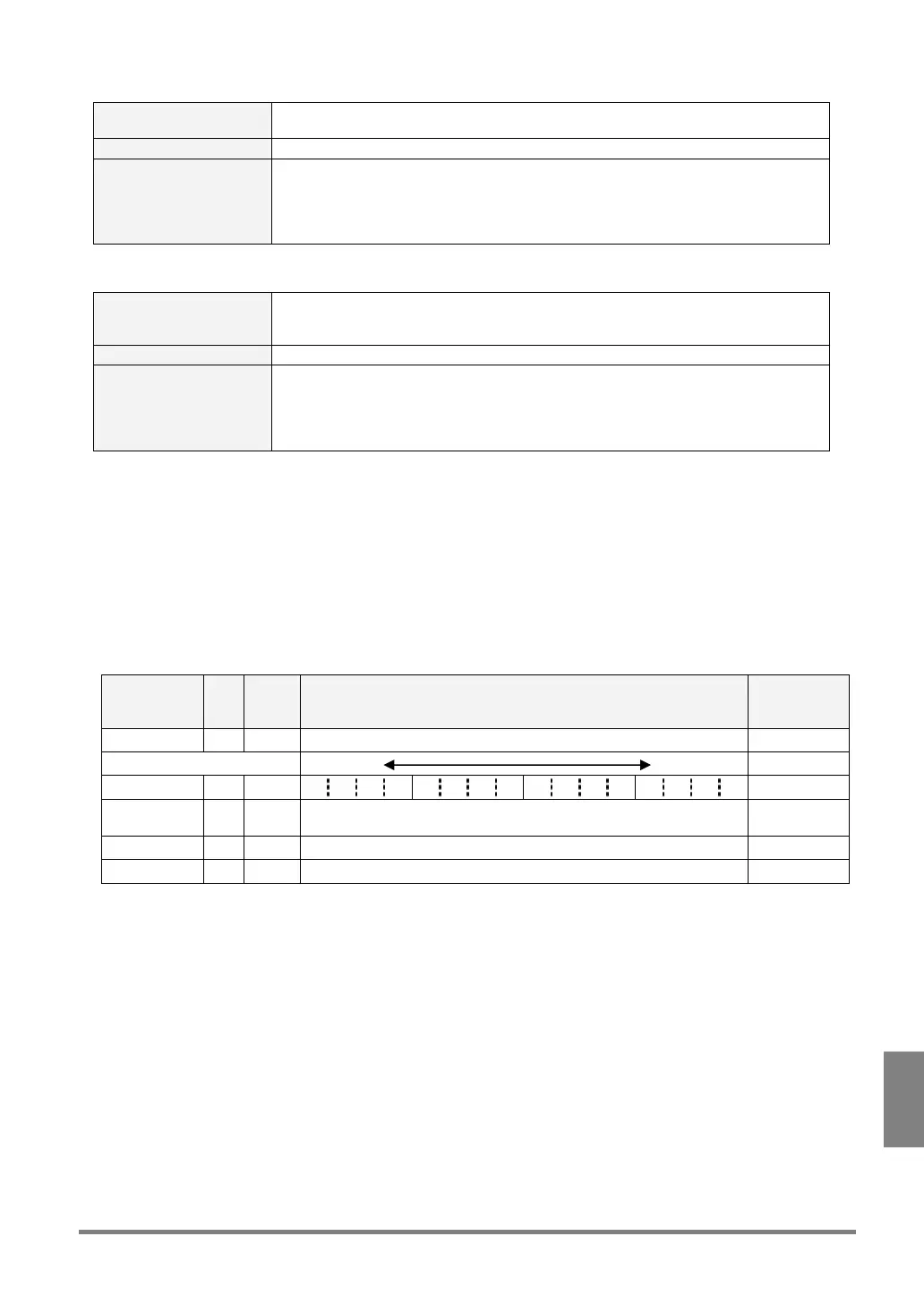
Output Result: Output Data = 16 bit, the top of Output Registers = 10
Data Regi
ster
No.
Value
(Hex.)
Description Remarks
No. of scans 10 04D2 The value 1234 is stored. No. of scans
Bit 15 Bit 0
Judgment 11 E0E1 1 1 1 0 0 0 0 0 1 1 1 0 0 0 0 1 JD04-JD01
Numeric
Calculation
12 00D7 The value 215 is stored. CA01
13 0888 The value 2184 is stored. CA03
Statistics 14 3658 The value 13912 is stored. QS01
Concept:
• The number of scans is stored in the start register.
• Four Judgment data are stored per word. The data of JD02 are not set to output, but “E” is output
because the data before and after JD02 are set to output.
• Only the data of Numeric Calculation that are set to output are output. (In the case where the data of
CA01 or CA03 is out of the range between -32768 and +32767, “0” is stored in the registers 12 and 13.)
• One word is used for storing the number of scans. For Numeric Calculation, only the data that have been
set to output are output.
• When "Data Type" is set to "32-bit", four Judgment data are stored per word as described above. But the
data of each of Number of Scans, Numeric Calculation and Statistics is stored in two words (in this case,
lower bytes are stored in the registers with smaller numbers).



 To Next Page