5 Operation
Handling the battery
6
2
11 4
5
5060_003-128_V3
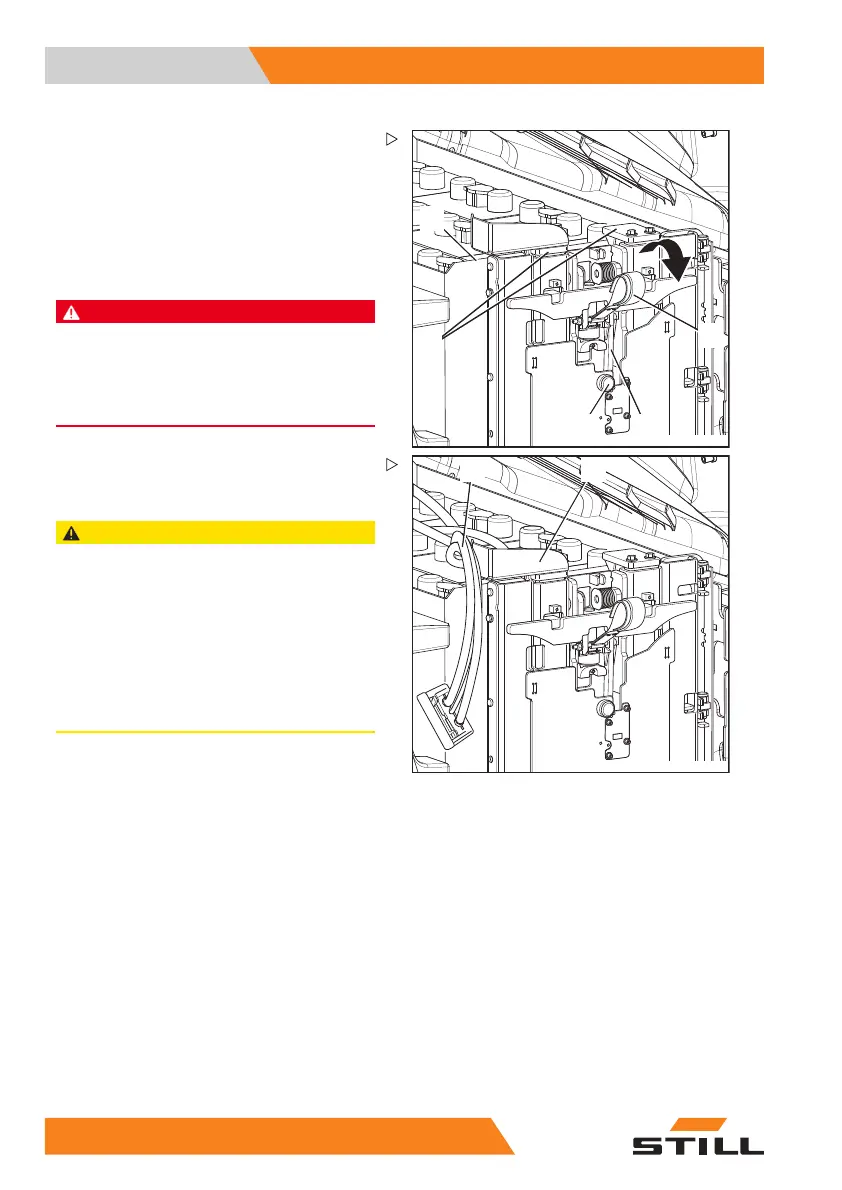
– To fold down the bridge support, raise the
red web belt (2) and keep it raised so as to
free the lock (4).
– Push the release button (11) and hold it.
– Slowly fold the bridge support
right down.
– Release the web belt and the release
button.
DANGER
If the battery is not locked correctly, the battery
can slide out of the truck, with potentially fatal
consequences!
– Ensure that the battery stop (5) is fully pushed in
and engaged behind the battery tray (6).
5060_003-155_V2
12 10
– Always lay the batt
ery cable (12) to the left
of the cable guide (
10), as shown in the
diagram.
CAUTION
The battery cable may be damaged by becoming
trapped — there is risk of short circuit due to crus-
hing!
If the battery cable (12) is laid to the right of the cable
guide (10), the battery cable will become trapped
between the battery bridge and the battery door.
This can lead to the battery cable or battery male
connector becoming damaged and a short circuit.
– Ensure that the battery cable is correctly positio-
ned.
– Connect the battery male connector.
– Close the battery door.
– Close the battery hood.
26
8 55048011501 EN - 12/2015



 To Next Page