Operation 5
Handling the battery
5060_003-134
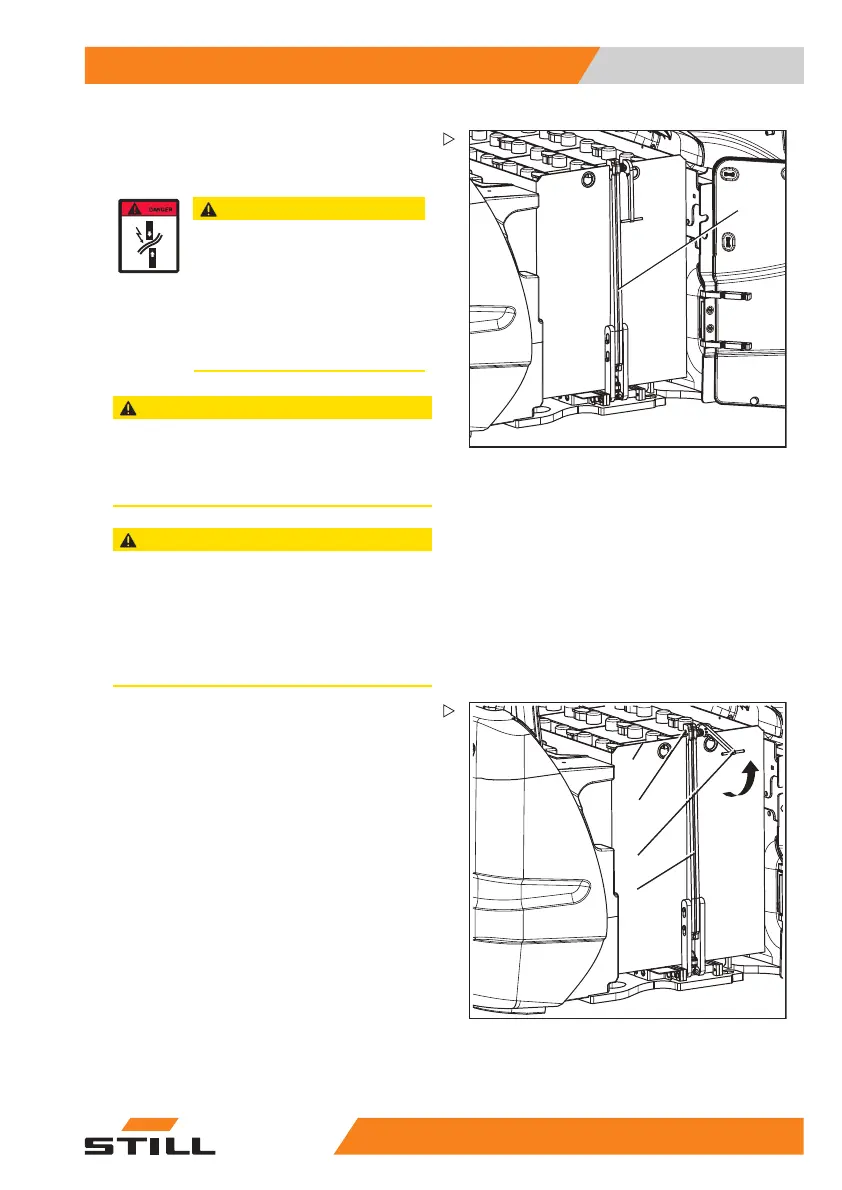
1
The battery lock (1) is now freely accessible
and must be swung down and pushed under
the battery tray prior to removing the battery.
CAUTION
If the battery cable is trapped it
may be damaged, there is a risk of
crushing!
– Position the battery cable on the
battery in such a way that it cannot
be crushed - either when removing
or inserting the battery, or when
closing the battery door.
CAUTION
The battery door may be damaged if it is struck by
the battery!
– Ensure that the battery door is fully open and
secured during battery removal.
CAUTION
If the battery rolls out of the battery compartment
when no external device is present, this can lead to
material damage.
– Before removing the battery, always position
an external device (such as an external roller
channel; see chapter "Replacing the battery
using an external roller channel").
4
3
2
1
5060_003-135
– Lift the lock (1) at the handle (2).
– Ensure that the lock catch (3) is clear of the
edge of the battery tray (4).
55
048011501 EN - 12/2015 271



 To Next Page