INSTALLATION AND STARTUP
1MANUL220 Belanger, Inc.® * PO BOX 5470. * Northville, MI 48167-5470 * Ph (248) 349-7010 * Fax (248) 380-9681 4-65
Chapter 4 Frame and Carriage Assembly
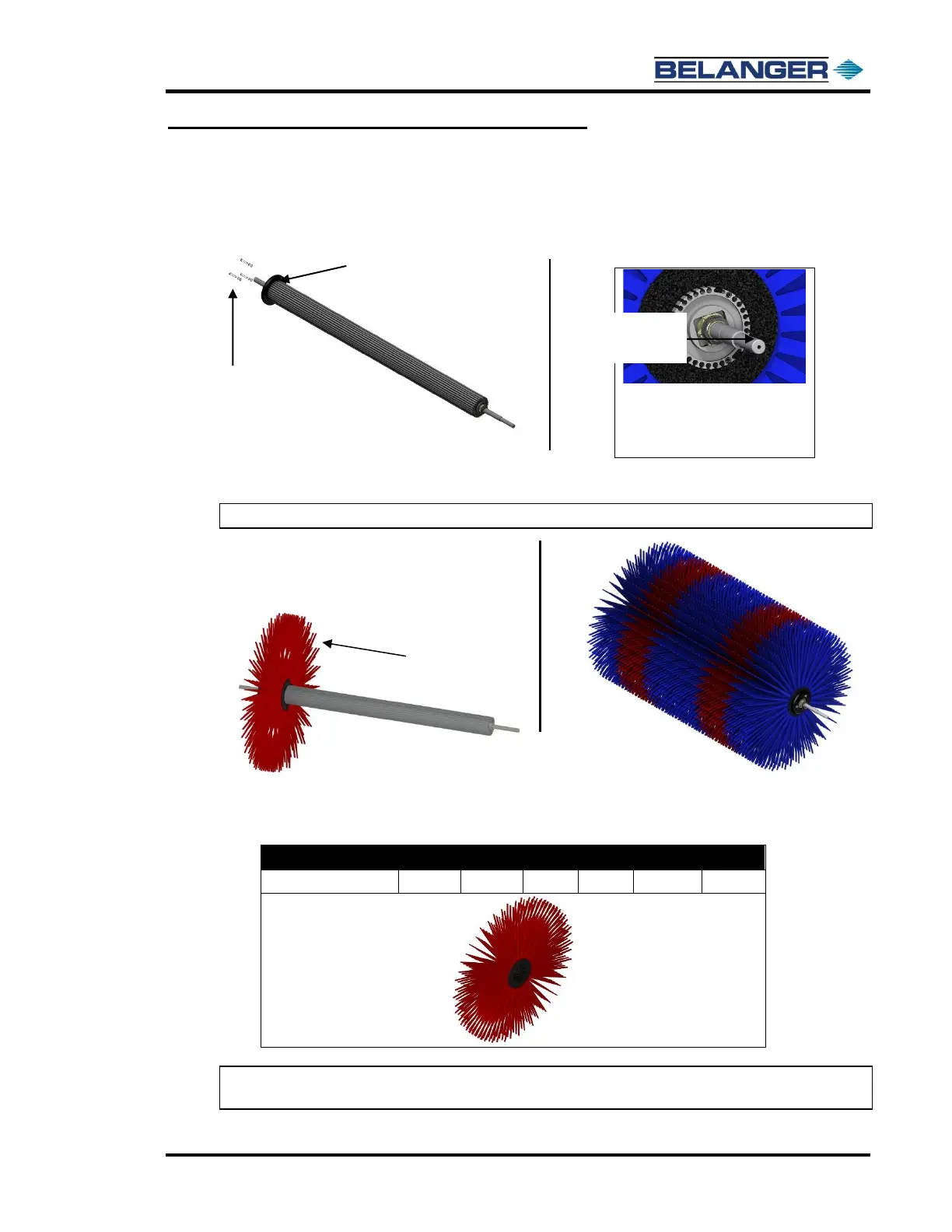
Loading Optional Top Wheel Whisper Wheel®
Installing the Cleaning Material
1) Locate 2 Compression Caps and the accompanying fasteners.
Secure one assembly on the Driver side of the Hub as shown below.
2) Locate 12 of the Fill packs shown below.
3) Slide the 12 Fill Packs onto the hub one at a time until all are in place. See side image for
alignment details.
Note: There are 8 primary-colored packs and 4 secondary-colored packs.
4) Reassemble the hub.
The table below lists the part numbers for the individual Fill Packs
Note: If you are installing the Whisper Wheel® option, you will have to add the “additional weight
bar” covered on the next page.
End View of Fill Pattern.
Notice the tabs on the Fill Packs go
into the blot-spaces of the hub
The Compression Cap is removed to
make the hub visible.



 To Next Page