63
Software
C
C
8.1.3. Editing Measurements in a View
Measurements can be added or removed from a particular View by using the EDIT button in the Series of
measurements belonging to the selected view area of the CTC Views dialog box.
Measurements can also be excluded from a Cultivation Time Chart without being removed from the series.
All measurements selected for a series that are marked with a (4) in the checkbox of the Use column will be
displayed in the Cultivation Time Chart. If you do not want to display a particular single measurement, the
measurement can be unselected by removing the (4) in the Use column with a mouse click.
Step-by-step instructions for editing measurements in a view are provided in Section C, Chapter 1, “Monitoring
Growth of Cells Over Time” in the Cedex HiRes Analyzer User Training Guide.
Measurements added to a View cannot be deleted from the database. Before deleting archived measurements
from the database, confirm that they are not assigned to a View.
8.1.4. Viewing List of Measurements in a Series
If measurements have been added to a View, a simplified list of the series will appear in the left-hand side of the
Series of measurements belonging to the selected view area of the CTC Views dialog box. To see the full list of
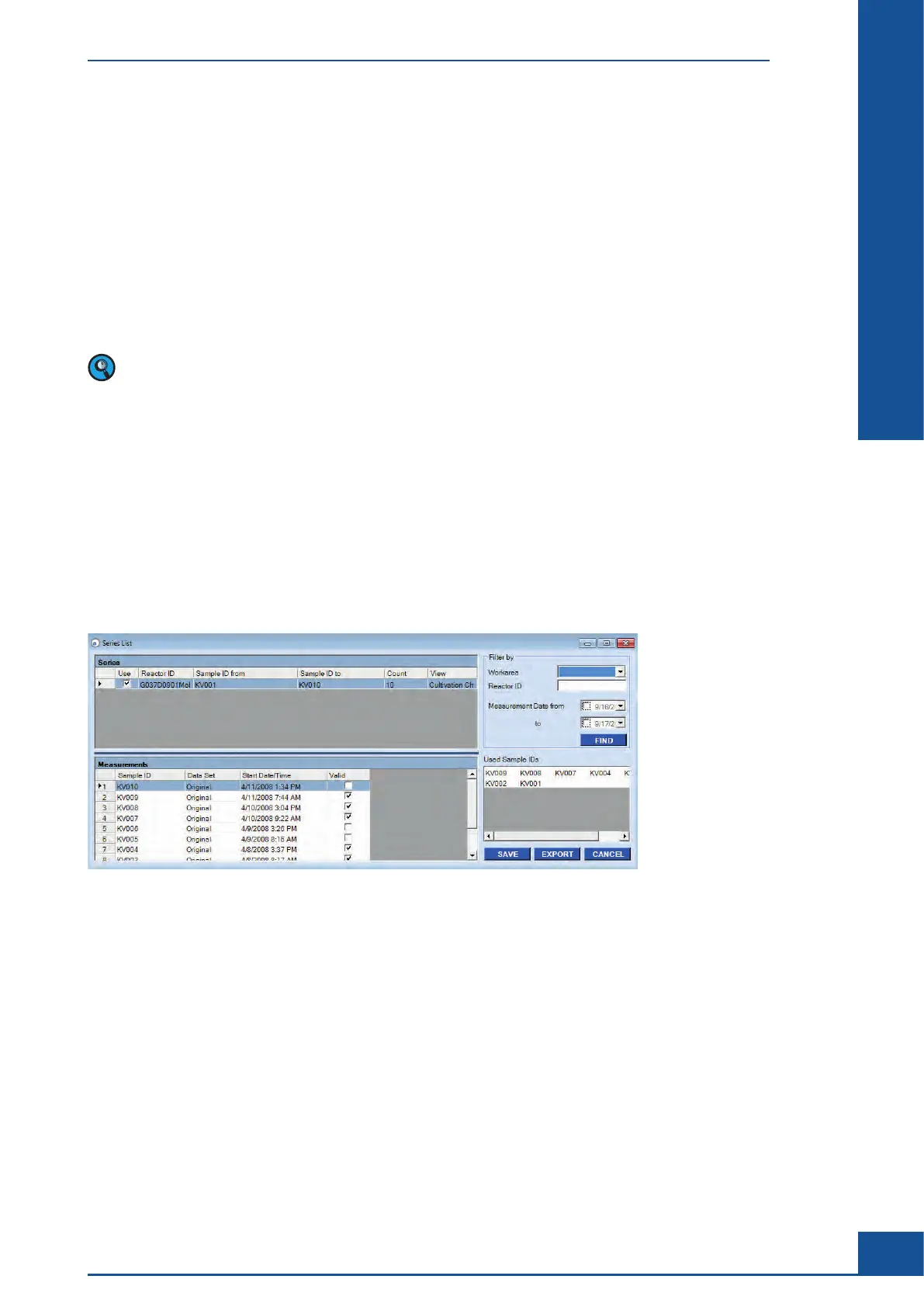
all measurements from all series created, click on the LIST button. This will open the Series List dialog box (see
Figure 27). Specific measurements in the list can be searched for using the Filter By area in the upper right-hand
corner of the Series List dialog box. Searches can be made by Workarea, Reactor ID, or date of measurement.
Once the filter parameters have been set, click on the FIND button. The measurements that fit the parameters
will be displayed in the Measurements area in the lower left-hand corner. Only series that contain measure-
ments with the correct parameters will be displayed in the Series area in the upper left-hand corner of the Series
List dialog box.
Figure 27: Series List dialog box
8.1.5. Deleting Views and Series
Entire Views can be deleted by highlighting the View and clicking on the DELETE button in the View area of
the CTC Views dialog box. If one series of a particular View should be deleted, highlight the relevant View in
the View area, then highlight the series to be deleted in the Series of measurements belonging to the selected
view area. Click on the DELETE button in the Series of measurements belonging to the selected view area.
8.1.6. Exporting a View
The series of measurements in a view can be exported via the EXPORT button in the CTC Views dialog box.
Select the View to be exported in the View area of the CTC Views dialog box and click on the EXPORT button.
An EXPORT dialog box will open in which the desired settings and parameters can be selected (see “Export to
File”).
Cultivation Time Chart
The CTC View Dialog Box



 To Next Page