71
Software
C
C
9.2.2. Import
Once the measurement package has been exported from one system to external storage, the data can then be
imported into another DB. To import the measurement package into a different Cedex Software 2.4 database:
1
Ensure that the two files generated when the measurement package was exported are placed in the same
folder (see “Export”):
c
.cx2 file
c .sig file
2
In the Cedex Control Center, choose Functions>Data Exchange>Import.
3
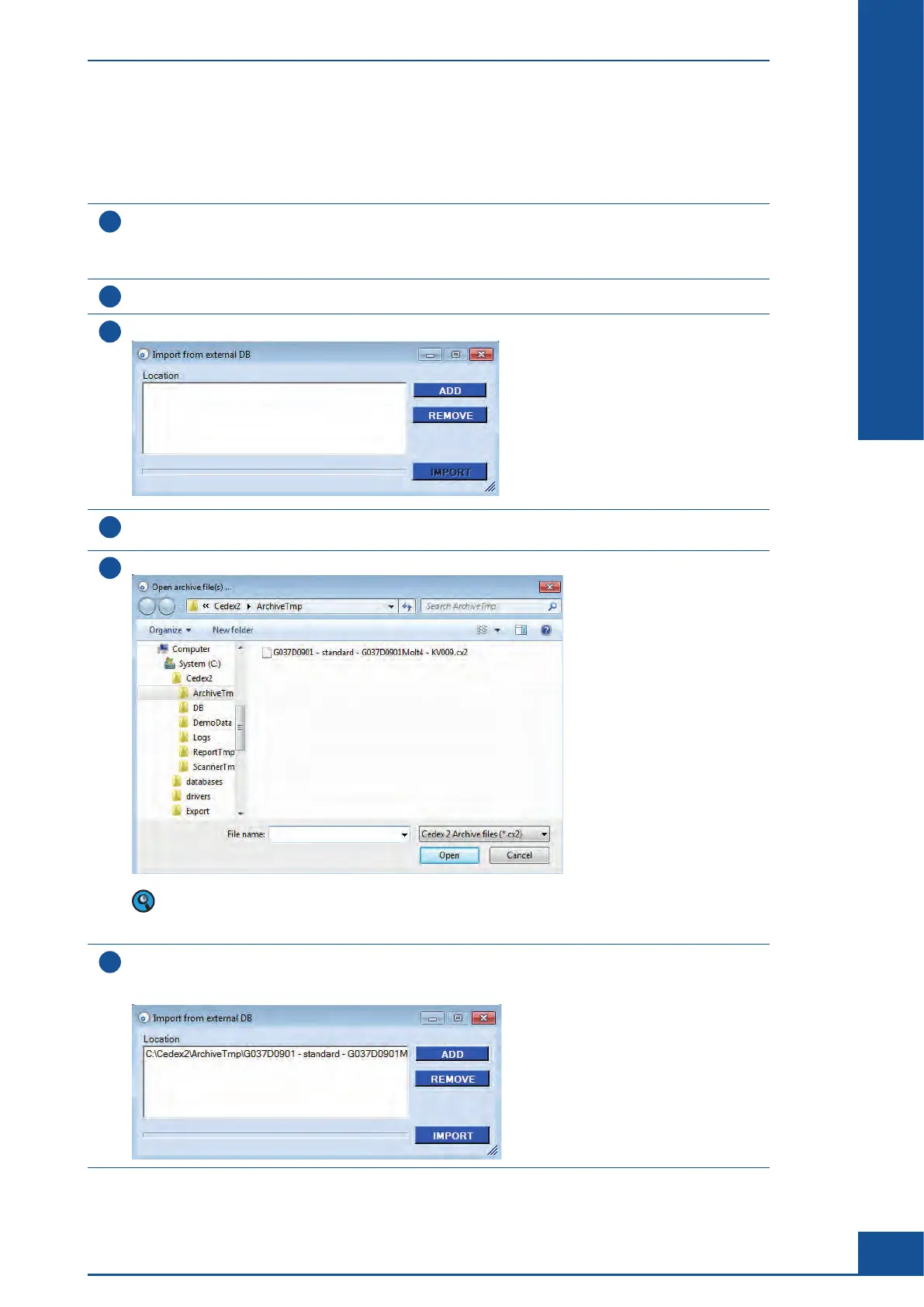
The Import from external DB dialog box appears, with ADD and REMOVE buttons located on the right-hand side:
4
Click on the ADD button; an Open archive files(s)… dialog box opens in which measurements to be
imported are selected.
5
Navigate to the folder where the exported measurement files are stored:
Only the .cx2 file is shown in the Open archive files(s)… dialog box. The .sig file must be in the same
location in order for the measurement package to be successfully imported, but it is not visible in the
Open archive files(s)… dialog box.
6
Select the measurements to be imported, and click on Open.
The Import from external DB dialog box reappears showing the measurement selected for importing and with
the IMPORT button activated:
ccc
General Functions of the System
Data Exchange



 To Next Page