103
Software
C
C
10.8.1. Instrument Configuration – Remote Control Area
The Remote Control function enables the user to control the Cedex HiRes Analyzer via separate, onsite auto-
mation application software, which allows for integration of the Cedex HiRes Analyzer in automated environ-
ments and/or remote cabinets. The connection is set up via TCP/IP. Measurements and liquid management are
controlled by remote interface. Export of measurement data, including histograms, via XML, is also possible.
Obtained measurement data can automatically be forwarded to higher level Laboratory Information Manage-
ment Systems (LIMS).
To turn on the Remote Control function:
1
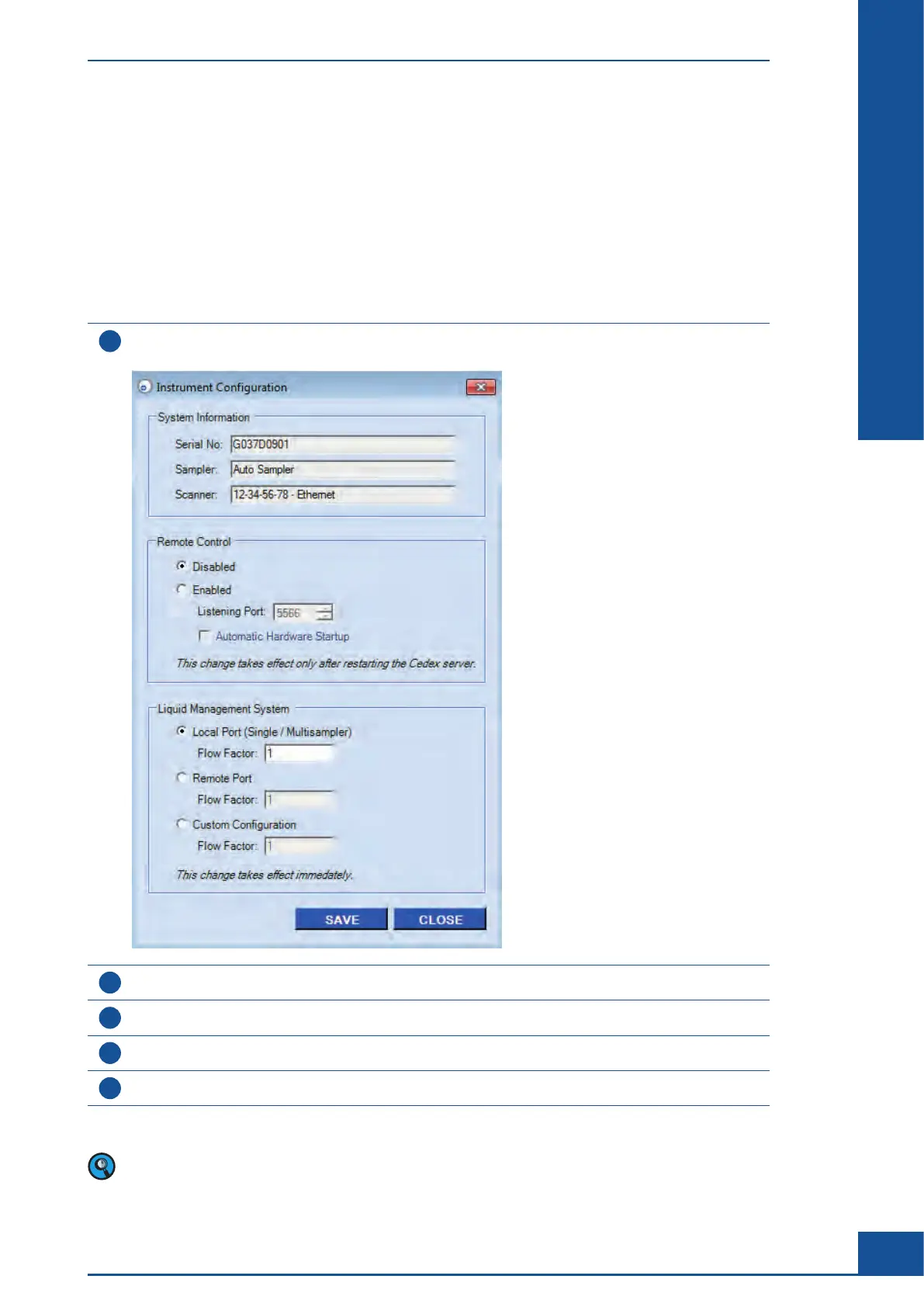
Choose Setup>Instrument Configuration in the Cedex Control Center.
The Instrument Configuration dialog box is displayed:
2
Select the checkbox Enabled, and adapt the values in the Listening Port field, as required.
3
Ensure that the option Automatic Hardware Startup is checked.
4
Click on SAVE.
5
Close and then reopen the Cedex Client and Cedex Server to apply the changes.
■
For more information about working with the Remote Control, refer to the Cedex HiRes Host Interface
Manual, Software version 2.4.
Administrator Functions
Instrument Configuration



 To Next Page