16
Cedex HiRes Analyzer Software Version 2.4 - Training Guide
B
B
3 Setting Up a Single Measurement in the
Measurement Dialog Box
To set up a measurement in the Measurement dialog box:
c
Open the Measurement dialog box.
c
Define the Sample Parameters in the Sample Parameters group.
c Define the Measurement and Analysis Parameters in the Processing Parameters group.
3.1 Open the Measurement Dialog Box and Define the Sample Parameters
1
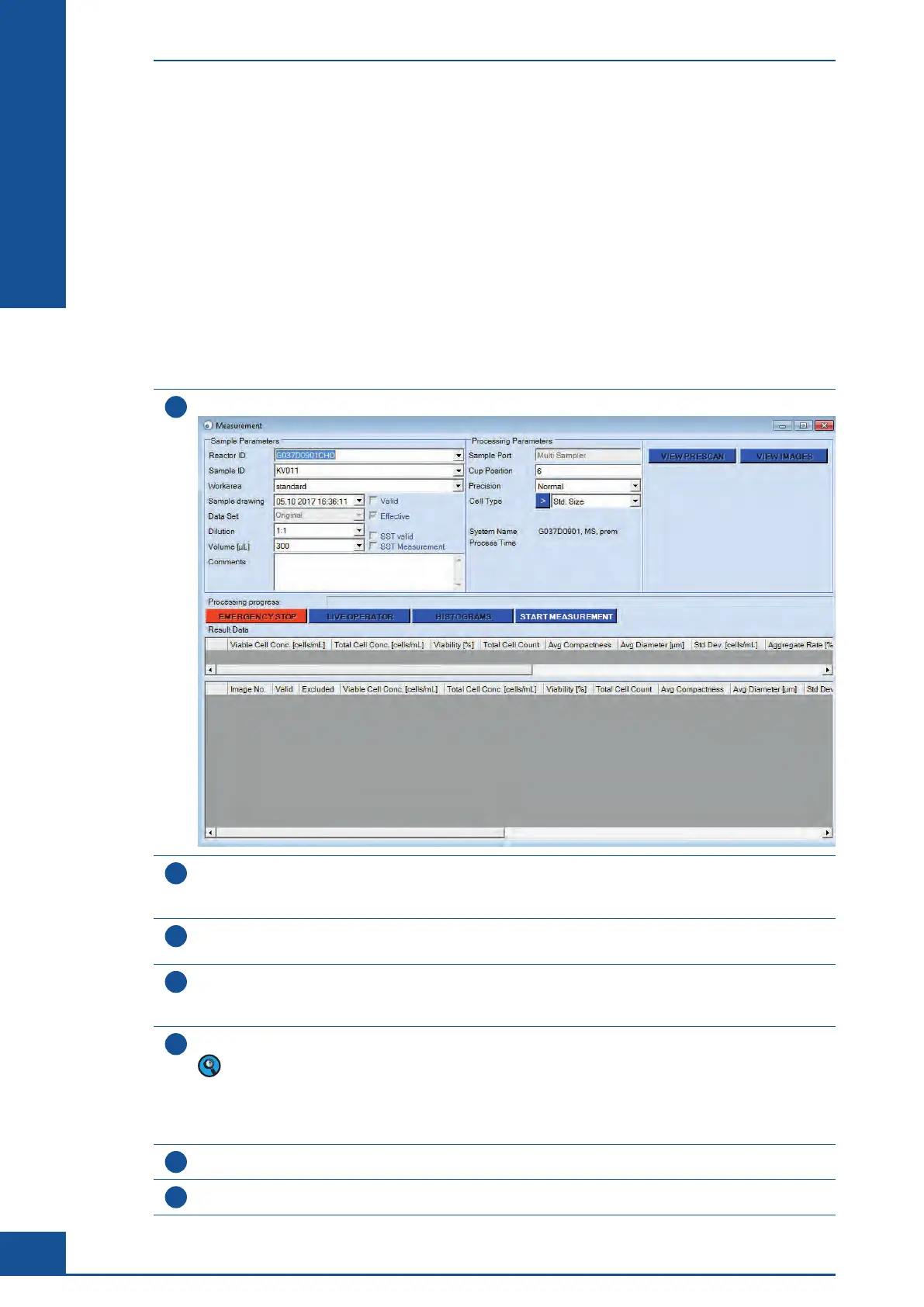
In the Cedex Control Center shortcuts area, click on the MEASURE button. The Measurement dialog box opens:
2
In the Sample Parameters group of the Measurement dialog box, enter a Reactor ID by either selecting
a name from the drop-down list or entering a new Reactor ID. The Reactor ID describes the sample
(e.g., the name of the cell culture) and consists of up to 20 alphanumeric characters.
3
Enter a Sample ID (e.g., P001). Select a name from the drop-down list or enter a new Sample ID.
A Sample ID consists of up to 20 alphanumeric characters.
4
If you wish, select a date from the Sample Drawing list. The sample drawing date indicates when the sample
was drawn. An additional date and time (the process time) is automatically added by the Software reflecting
the actual date and time the sample was measured.
5
Choose the appropriate dilution factor from the Dilution list. For undiluted samples, enter a dilution factor of 1:1.
The dilution ratio chosen from the list only relates to the manual dilution of the sample prior to placing
the sample on the system. For undiluted samples, enter a dilution factor of 1:1. When a dilution of 1:2
is prepared, then 1 part cell suspension has been added to 1 part dilution medium. A dilution of 1:3
means that 1 part cell suspension has been added to 2 parts dilution medium. The dilution factor will be
automatically taken into account in the results.
6
Select the sample volume of 300 µl in the Volume drop-down menu.
7
(Optional) Enter comments on the sample in the Comments text field.
n
Setting Up a Single Measurement in the Measurement Dialog Box
Open the Measurement Dialog Box and Define the Sample Parameters



 To Next Page