43
Additional Applications
C
C
2.2.1 Create a New Cell Type
To create and save a new Cell Type:
1
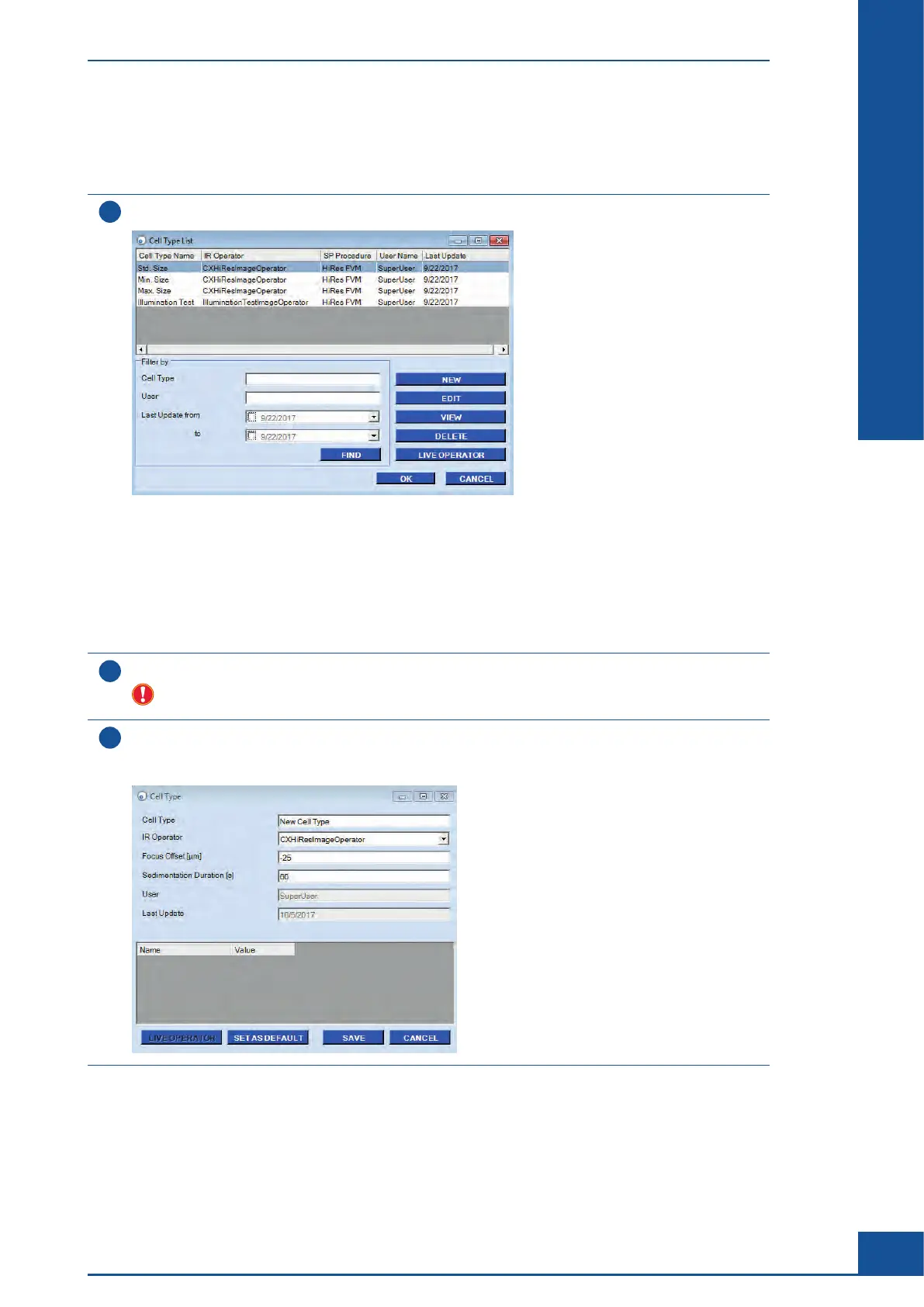
Open the Cell Type List dialog box by selecting the Cell Type List option in the Master Data menu.
Several options are available in this dialog box:
c NEW: Create new Cell Types
c EDIT: Modify existing Cell Types
c VIEW: View existing Cell Types
c DELETE: Delete existing Cell Types
c LIVE OPERATOR: Open the Live Operator dialog box
2
Select the existing Cell Type on which the new Cell Type should be based, and click on the NEW button.
Do not select the Cell Type option Illumination Test. This Cell Type is designed for service purposes
only and is not intended for analysis of cells. The parameters for this Cell Type should not be changed.
3
A message will be displayed asking if the new Cell Type should be based on the highlighted Cell Type in
the list. Click on YES.
The Cell Type dialog box opens:
ccc
Analyzing Unusual Cells
Example of Cells Not Recognized by the Cell Type Std. Size



 To Next Page