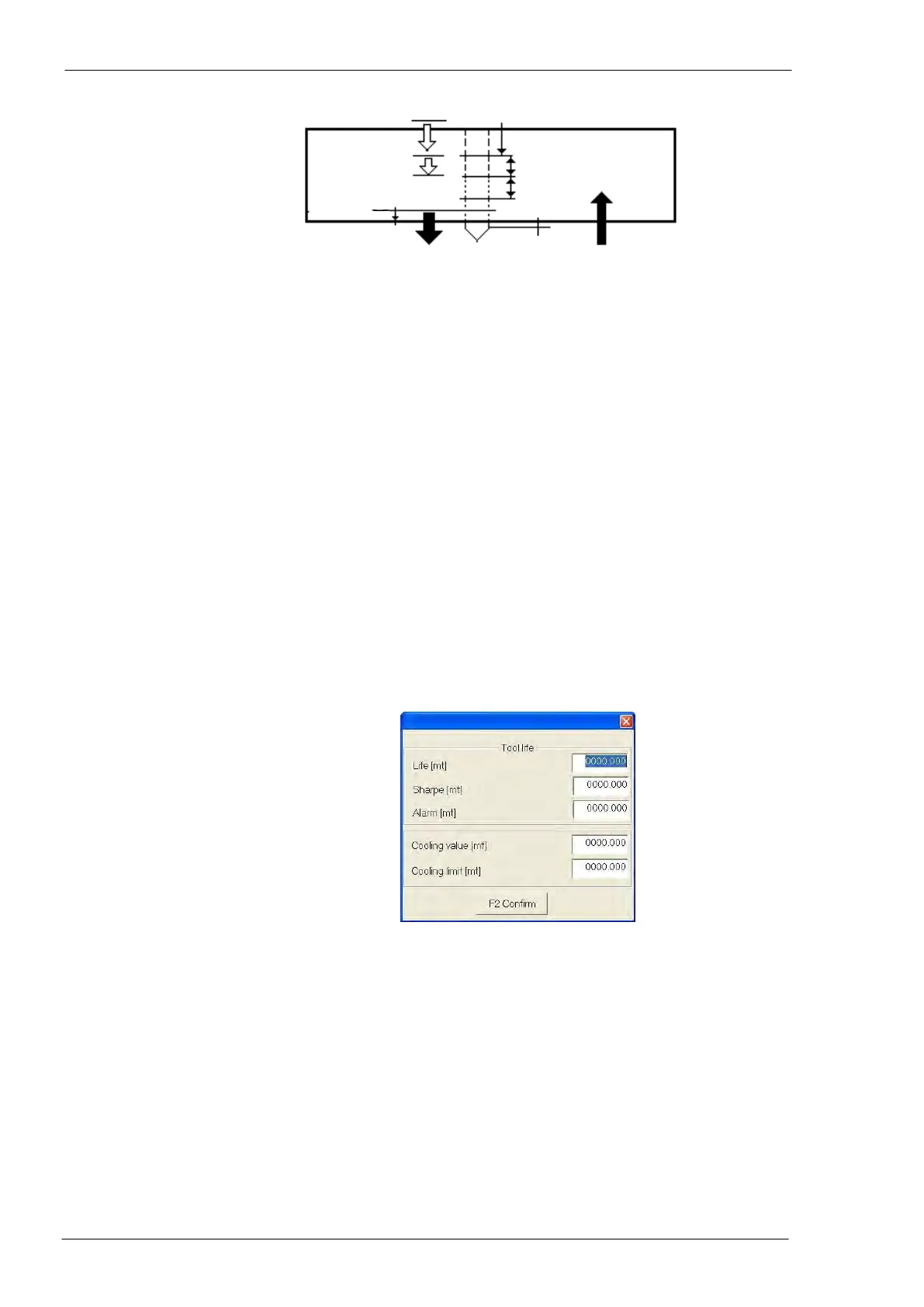
Drilling only: distance from material surface in which the speed of item 15 becomes the
one specified at item 04 (see “Tables” field 12)
Drilling only: value (percentage) of the current threshold of the tool forward motor; if this
value is exceeded, a message like “motor under stress” is displayed
The operator can use the “+” and “-“ keys of the PC keyboard or directly touch the
screen to change the forward speed by steps of 10%.
Pressing this push-button, a window is displayed where it is possible to define
the maximum working life of the selected tool.
Field “Life”: display the amount of thickness drilled by the selected tool from its
first insertion in the setup of the machine.
Field “Sharpe”: when the tool reaches the value here set, the CNC software
generates a message for the operator asking for tool sharpening.
Field “Alarm”: when the tool reaches the value here set, the CNC software
generates a message for the operator asking for tool replacement.
Field “Cooling value”: amount of thickness drilled by the selected tool from its
last insertion in the spindle.
Field “Cooling limit”: when the tool reaches the value here set, the CNC auto-
matically replaces the tool by a similar one with same diameter present in the
tool magazine.
To alternate tools with same diameter during the program in process, it is
necessary to select the option “Multiple diameters” in the “Execution parame-
ters” window (see Execution parameters - reference 08, page 77).



 To Next Page