5.2 Setting Basic Settings of Measurement
151
5
Chapter 5 ANALYZER Function (IM3533-01)
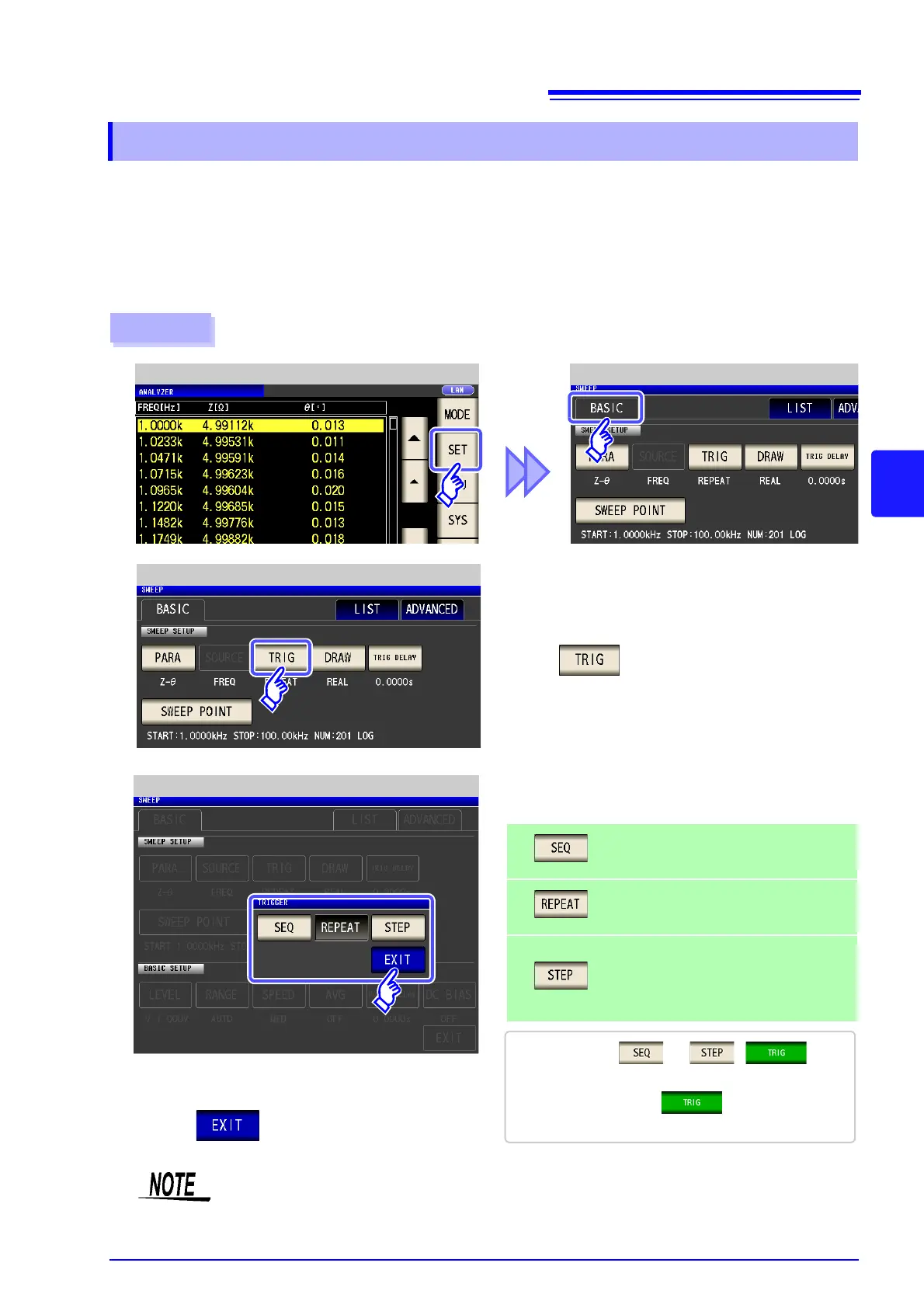
Set the trigger. In ANALYZER mode, sweeping is performed in accordance with the trigger setting that is set
for this item. The following three types of trigger can be set as the trigger setting.
• Sequential sweep
• Repeat sweep
• Step sweep
For details on each of the triggers, refer to step
3.
5.2.2 Setting the Trigger
The trigger setting that is set for this item differs from the trigger setting of LCR mode.
(It does not influence the trigger setting of LCR mode.)
Procedure
ANALYZER Measurement Screen ANALYZER Basic Settings
1
Press .
2
ANALYZER Basic Settings
4
Press to close the setting screen.
3
Trigger Setting
Select the trigger setting.
Performs a sequential sweep.
When an external trigger is input, sweep
measurement is performed once only.
Performs a repeat sweep.
An internal trigger results in a sweep being
performed repeatedly.
Performs a step sweep.
When an external trigger is input, measure-
ment is performed at the current measure-
ment point and then the process moves to
the next measurement point.
• If this is set to or , is dis-
played in the measurement screen.
• Each time you press , a sequence sweep
or step sweep is performed.



 To Next Page