EasyManua.ls Logo

Hioki IM3533 - 5.2 Setting Basic Settings of Measurement

Hioki IM3533
400 pages
Print Icon
To Next Page IconTo Next Page
To Previous Page IconTo Previous Page
Loading...
4.5 Setting Application Settings
142
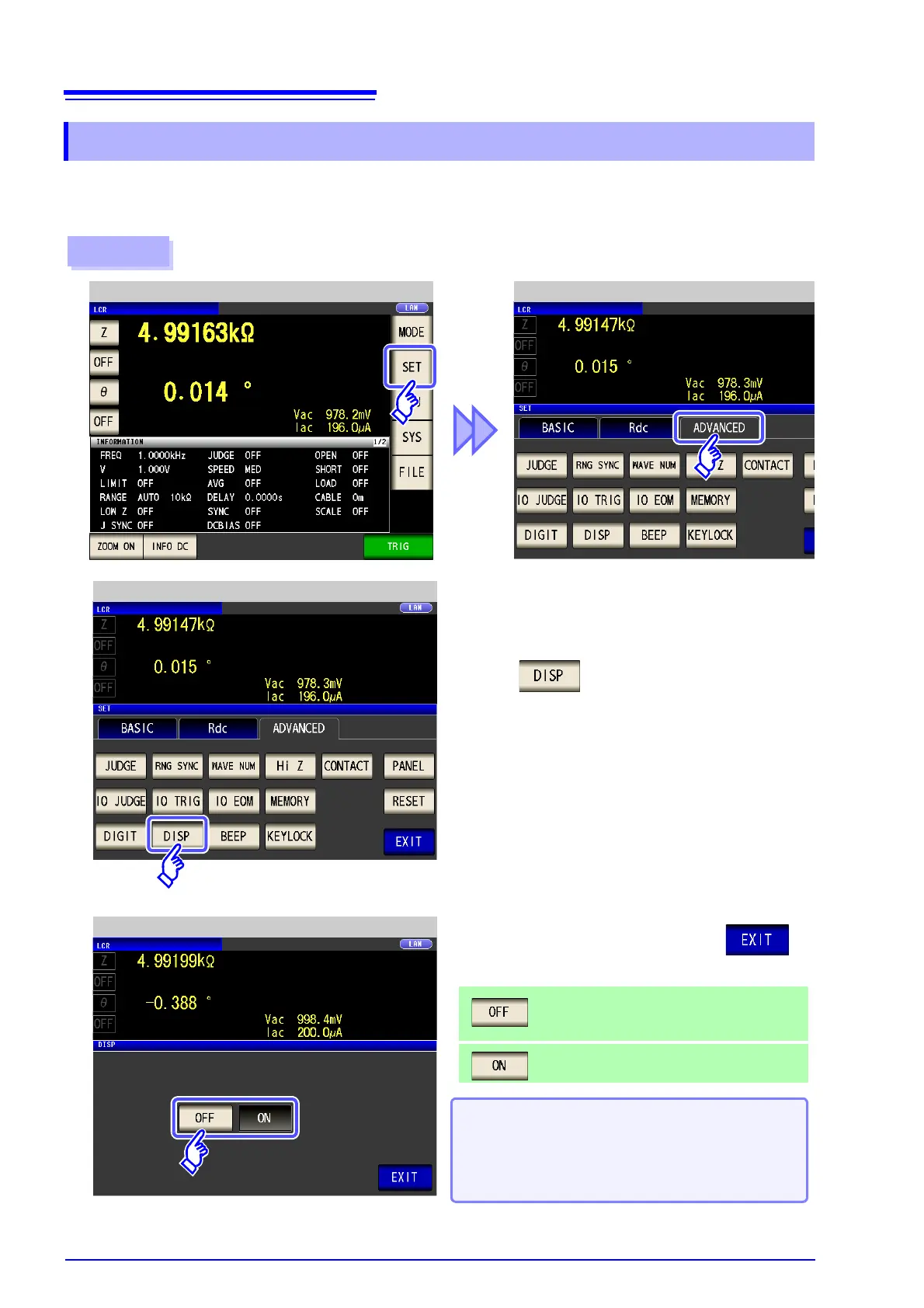
You can turn the LCD ON/OFF.
Setting the LCD to OFF saves power because the LCD turns off if the panel is not touched for 10 seconds.
4.5.10 Setting the LCD to ON/OFF
Procedure
LCR Application SettingsLCR Measurement Screen
1
Press .
2
LCR Application Settings
When you want to turn the backlight on again:
If you touch the touch panel while the backlight is off,
the backlight will turn on again.
The backlight will turn off again if you do not touch the
touch panel for about 10 seconds.
3
LCD setting
Turns OFF the LCD.
The LCD turns off after approximately 10 seconds
elapse since the touch panel was last touched.
Sets the LCD to always on.
Select the LCD setting, and press to
close the setting screen.


Table of Contents

Related product manuals