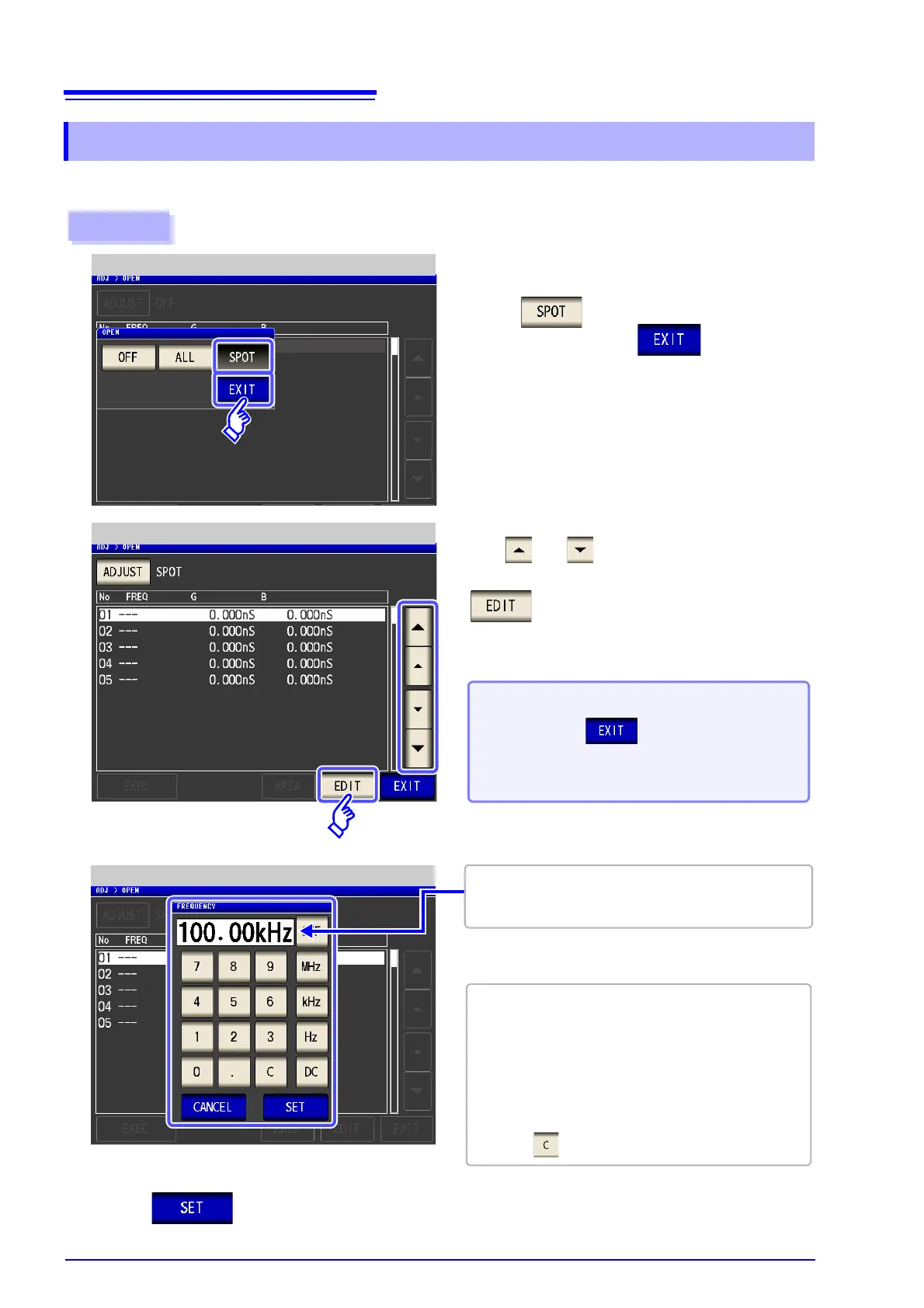
for up to five points.
Procedure
1
Select in the open circuit compensa-
tion screen, and press to confirm the
selection.
Open Compensation Setting
Use or to select the compensation
point you want to set or edit, and press
.
2
Open Compensation (Spot Compensation)
When you do not want to perform compen-
sation: Press .
Compensation is not performed and the compensa-
tion screen is redisplayed.
3
Spot Compensation Value Setting
Until one of these keys is pressed for input of a numer-
ical value, the previous frequency for which SPOT
compensation was performed is displayed.
• Settable range: DC, 1 mHz to 200 kHz
• If a value in excess of 200 kHz is entered, the
measurement frequency will automatically set to
200 kHz.
• If a frequency of less than 1 mHz is set, the value will
be automatically changed to 1 mHz. However, very
small values will cause the DC setting to be used.
• If you make a mistake during input:
press to cancel the input and start again.
Use the numeric keypad to enter a frequency
for compensation.



 To Next Page