11.1 Inserting and Removing USB flash drive
274
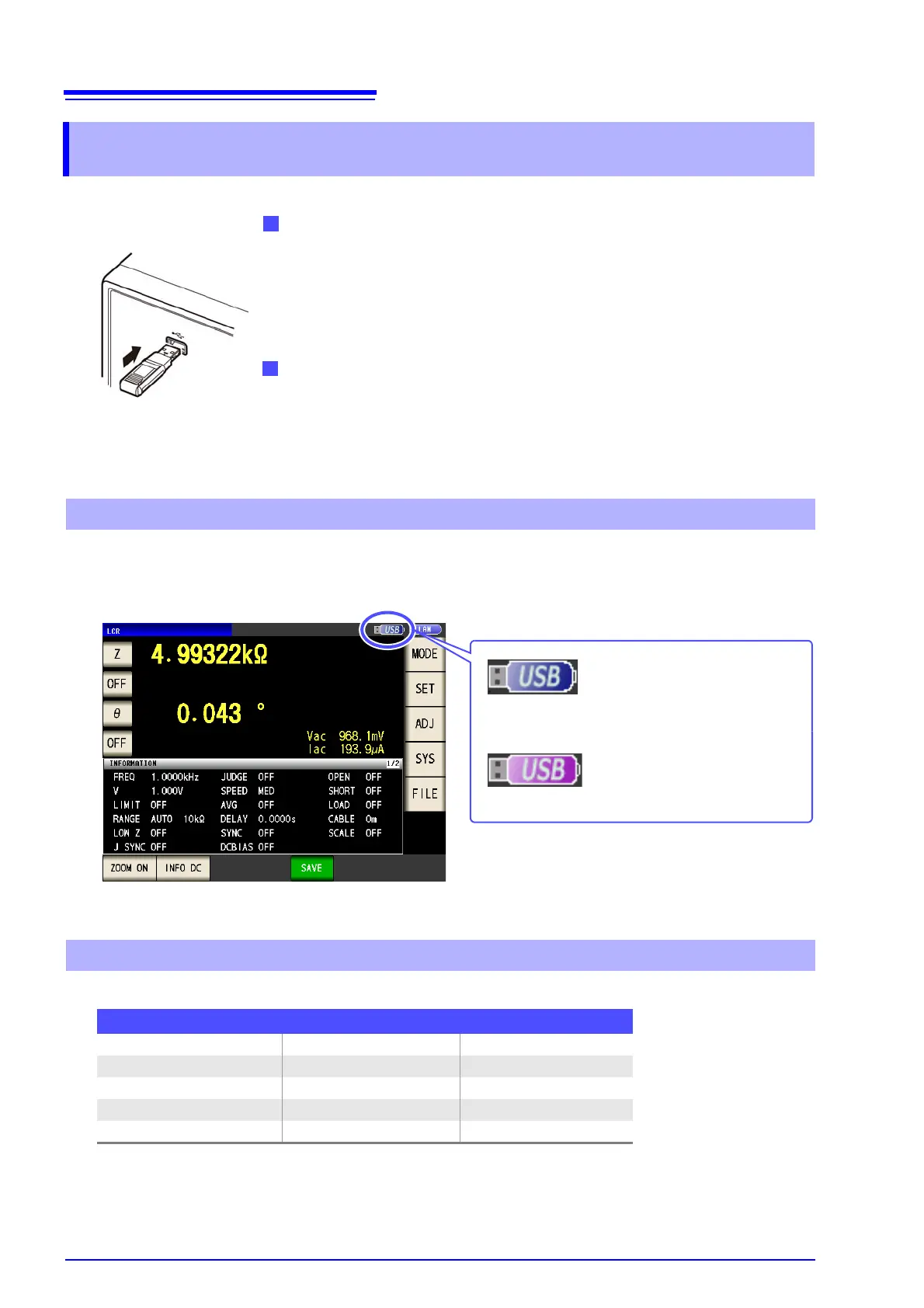
When a USB flash drive has been recognized properly, the USB flash drive icon is displayed at the top of
the measurement screen.
The icon is red while the USB flash drive is being accessed.
The following files can be handled by the instrument.
The instrument cannot display double-byte characters (Japanese, etc.). A double-byte characters is
replaced by "??."
11.1 Inserting and Removing USB flash drive
Inserting a USB flash drive
Inert the USB flash drive into the USB port on the front panel of the
instrument.
• Do not insert a USB flash drive that is not Mass Storage Class compatible.
• Not all commercially available USB flash drives are compatible.
• If a USB flash drive is not recognized, try using another USB flash drive.
Removing a USB flash drive
Check that the USB flash drive is not being accessed (saving, reading,
etc.) by the instrument, and then remove it.
(No remove operation needs to be performed on the instrument.)
Front
Screen Display when Using USB
When the instrument recognizes
the USB flash drive
When USB is being accessed
(Blue)
(Red)
About File Types
Content Type (file extension) Indication on instrument
- Folder FDR
Measurement data CSV file CSV
Screen copy data BMP file BMP
Instrument settings data Settings file SET
Panel save data Panel settings file PNL



 To Next Page