INSTRUMENTS (AND AVIONICS) / INSTRUMENTS AND AVIONICS GENERAL MAINTENANCE 13-19
CHANGE C2 ICON A5 / MAINTENANCE MANUAL
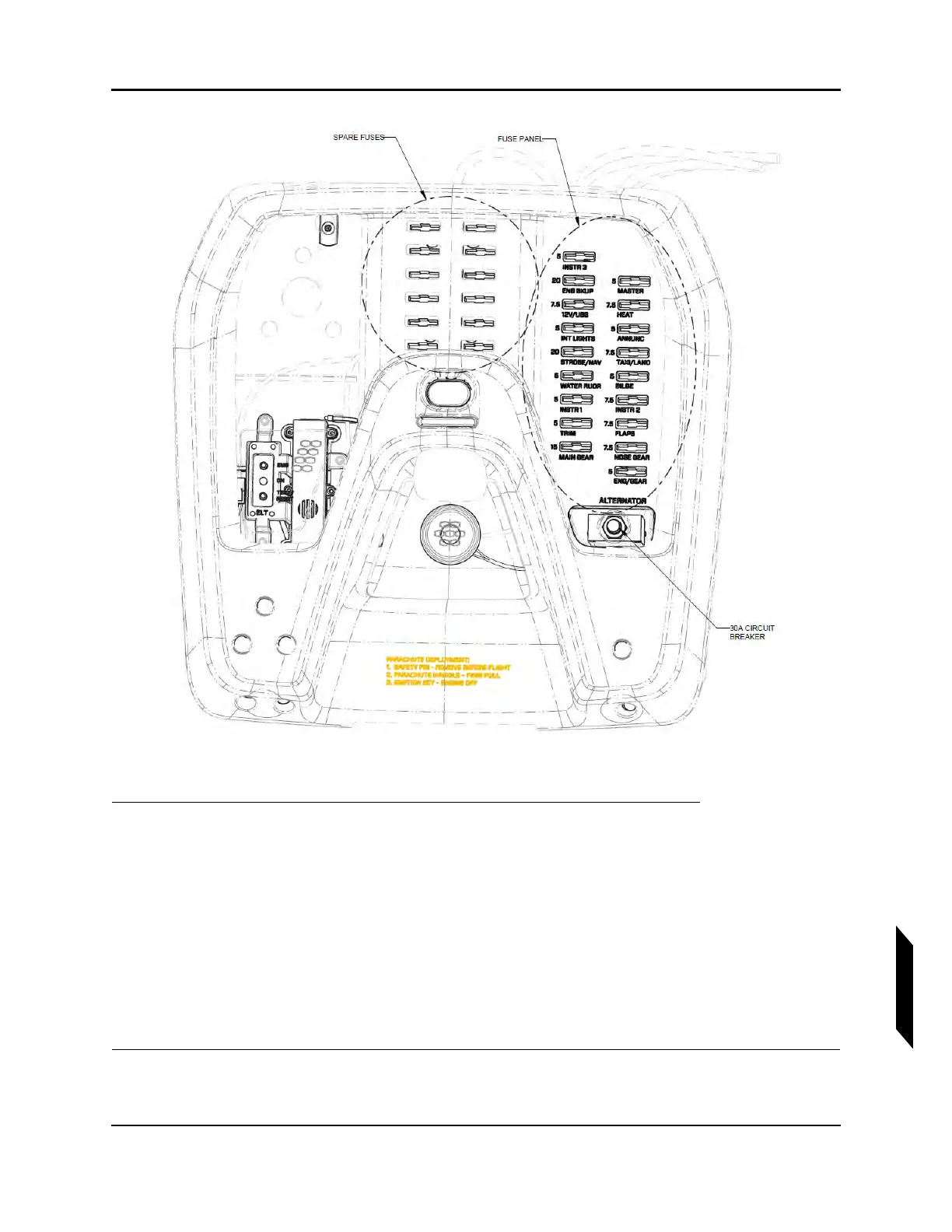
FIGURE 13-1
BOTTOM VIEW OF OVERHEAD CONSOLE AND FUSES.
1. Use and the associated table to identify the blown fuse to replace.
NOTE: A blown fuse will light up when the master switch is ON. Alterna-
tively, visually check that the fuse is blown by removing it from the
fuse panel.
2. Pull down on the fuse to remove it from the overhead fuse panel.
3. Select the appropriate spare fuse. The spare fuses are located in the middle of the overhead
console as shown in Figure 13-1. The fuse should match the blown fuse in both color and amp
rating. Discard the blown fuse.
4. Insert the spare fuse firmly into the appropriate location identified in Step 1.



 To Next Page