13-78 INSTRUMENTS (AND AVIONICS) / PITOT-STATIC-ANGLE OF ATTACK (AOA) SYSTEM
ICON A5 / MAINTENANCE MANUAL CHANGE C2
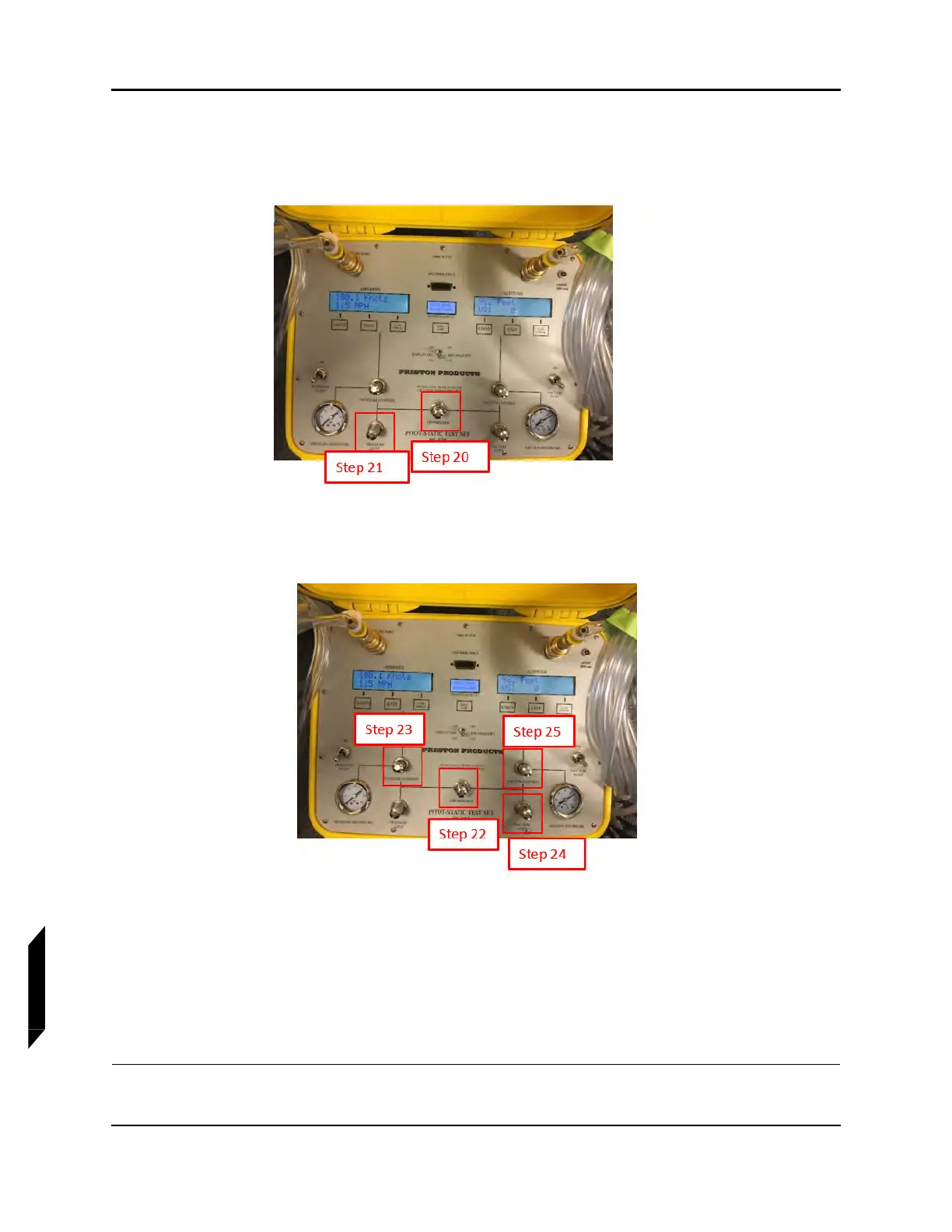
20. Return the system to ambient pressures by carefully opening the Crossbleed valve ensuring not
to exceed 4,000 ft/min on the Altitude display. Proceed until the Airspeed display shows 0.0
knots.
21. Lower the altitude by carefully opening the Pressure Vent ensuring not to exceed 4,000 ft/min
on the Altitude display.
22. Close the Crossbleed valve.
23. Carefully open the Pressure Control valve to bring the Pressure Reservoir indicator to 0 psi.
24. Carefully open the Vacuum Vent valve.
25. Carefully open the Vacuum Control valve until the Vacuum Reservoir indicator shows 0 inHg.
26. Open the Crossbleed valve for storage.
27. Turn the PS-525 tester unit power to Display Off.
28. Record the results of the pitot leak check and static leak check in the Verification Method form
of the parent task. (See “Pitot-Static-AOA Leak Test Procedures” on page 13-70.)



 To Next Page