19-30 ICON PARACHUTE SYSTEM (IPS) / EXTRACTION ROCKET
ICON A5 / MAINTENANCE MANUAL CHANGE C1
04035-01 (Screw, 10-24 x 5/8” S.S.)
04055-01 (Washer, Ext. Tooth, #10 S.S)
017004-01 (Screw, 10-24 x 3/8” PH)
005033-01 (Plug, Non-Threaded, 1/2”)
Aircraft System and Number
16—ICON Parachute System (IPS)
Consumables
LOCTITE
®
242
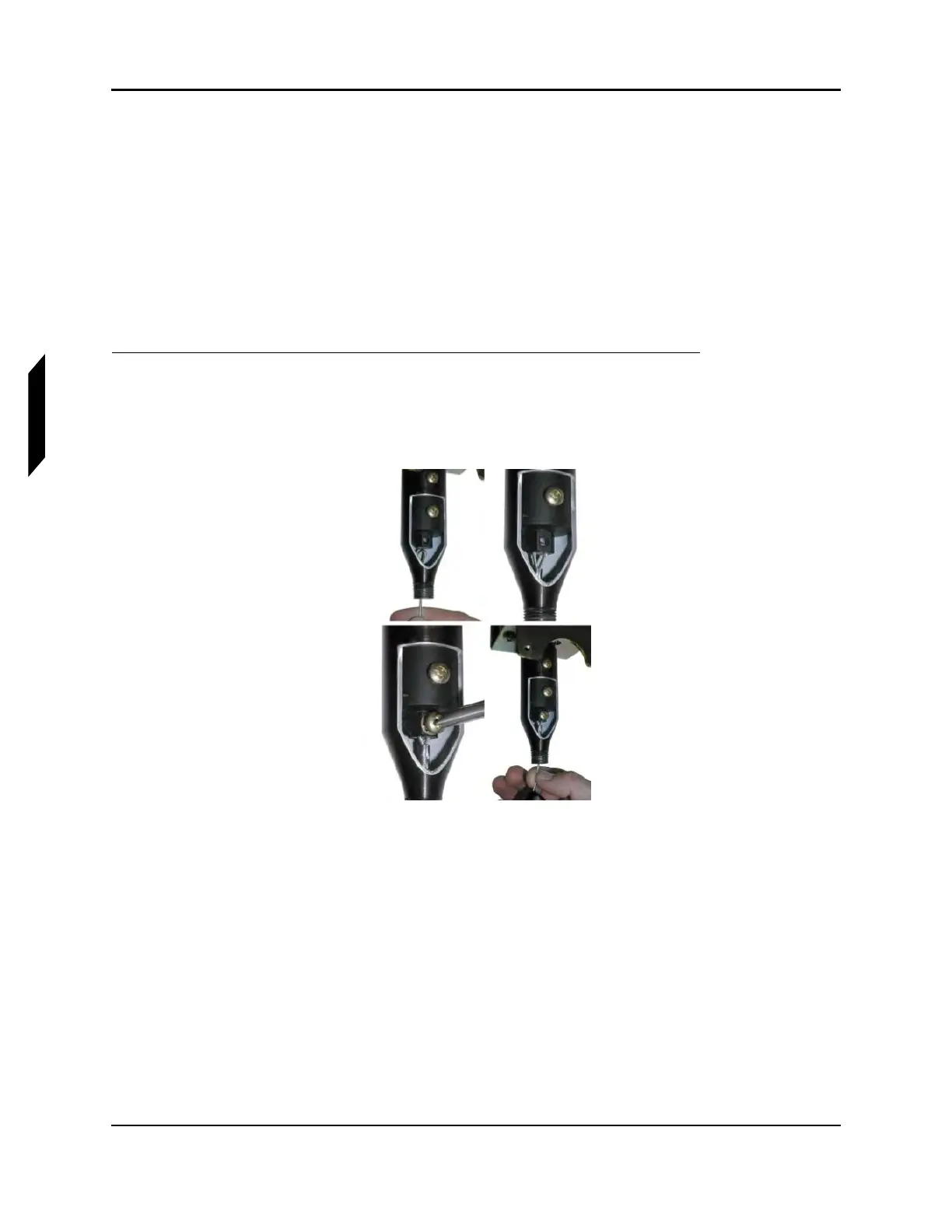
1. Thread activation cable end loop through the cone and insert the loop into the slot on the end of
the actuator. Put a drop of LOCTITE Blue 242 threadlocker on the threads of 10-24 stainless
steel screw. Install screw through the unthreaded end of the actuator first, with exterior tooth
star washer into hole and through loop in cable. The torque value for this screw is 1.8 lb-ft.
FIGURE 19-23
THREADING ACTIVATION CABLE LOOP
2. Ensure that the screw is tightened with a torque of 1.8 lb-ft, through the unthreaded side before
completing this step. Assure screw is through the activation cable loop by checking security with
a VERY light finger-tip pull (<1/2 pound force) on cable before reinstalling cone.



 To Next Page