Remote RMX-3200 Version 5.2x Configuration Guide
Configuring a Site VPN Connection: Configuration Example
8-3
Configuration Example
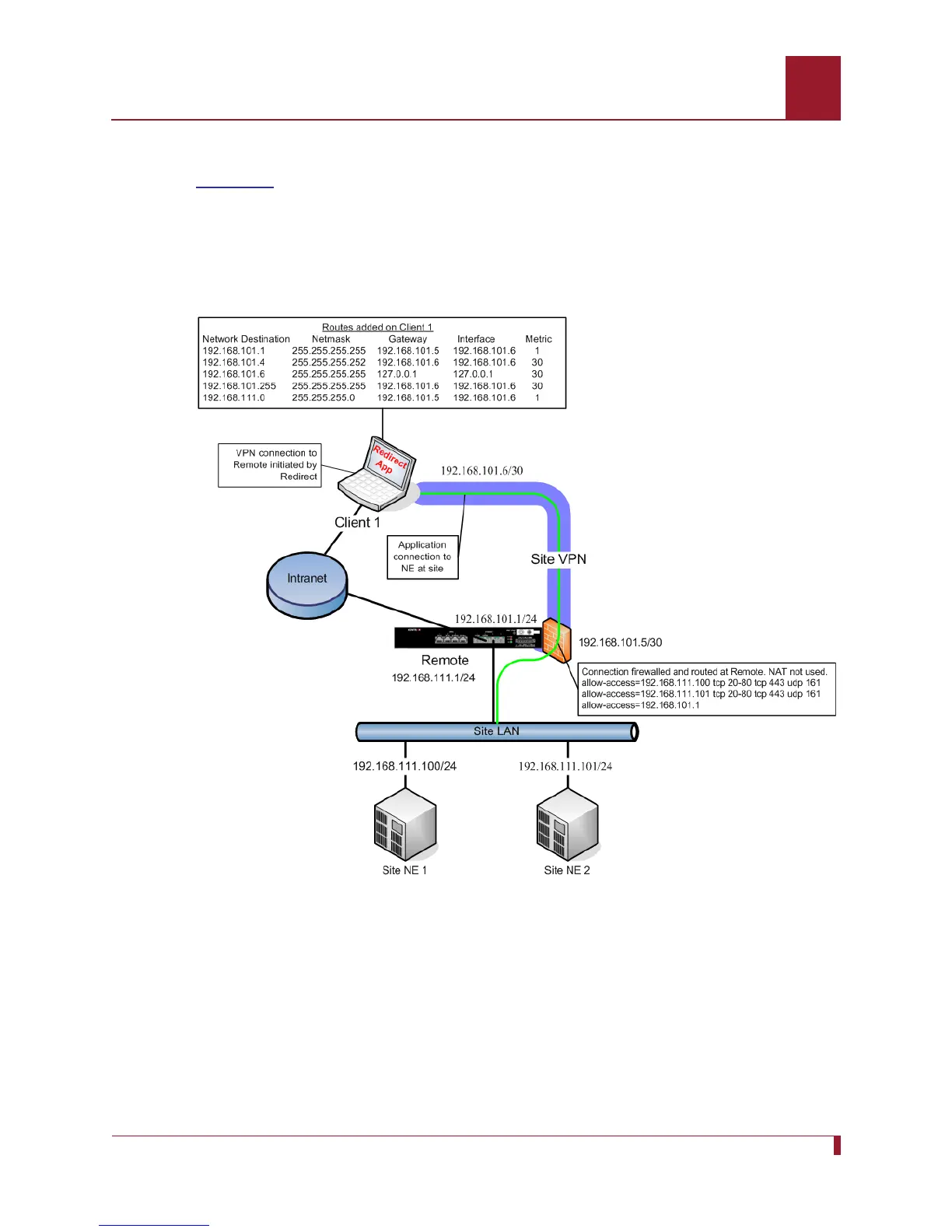
Figure 8-1 provides a detailed example of how the site VPN connection between
Client 1 and Remote RMX-3200 is configured.
In the following example, both Client 1 and Remote RMX-3200 are connected to the
Intranet. Redirect on Client 1 uses the IP address of the Remote RMX-3200 on the
Intranet to establish the site VPN connection to access Site NE 1 and Site NE 2.
Figure 8-1 Site VPN Connection between Client 1 and the Remote RMX-3200
The site LAN network in this example is
192.168.111.0/24. The IP address of Site
NE 1 is
192.168.111.100/24. The IP address of Site NE 2 is 192.168.111.101/24.
The IP address of the site VPN interface on the Remote RMX-3200 is
192.168.101.1/24.



 To Next Page