MD-11 Flight Crew Operations Manual
k
Automatic Flight -
Controls and Displays
Auto.30.4
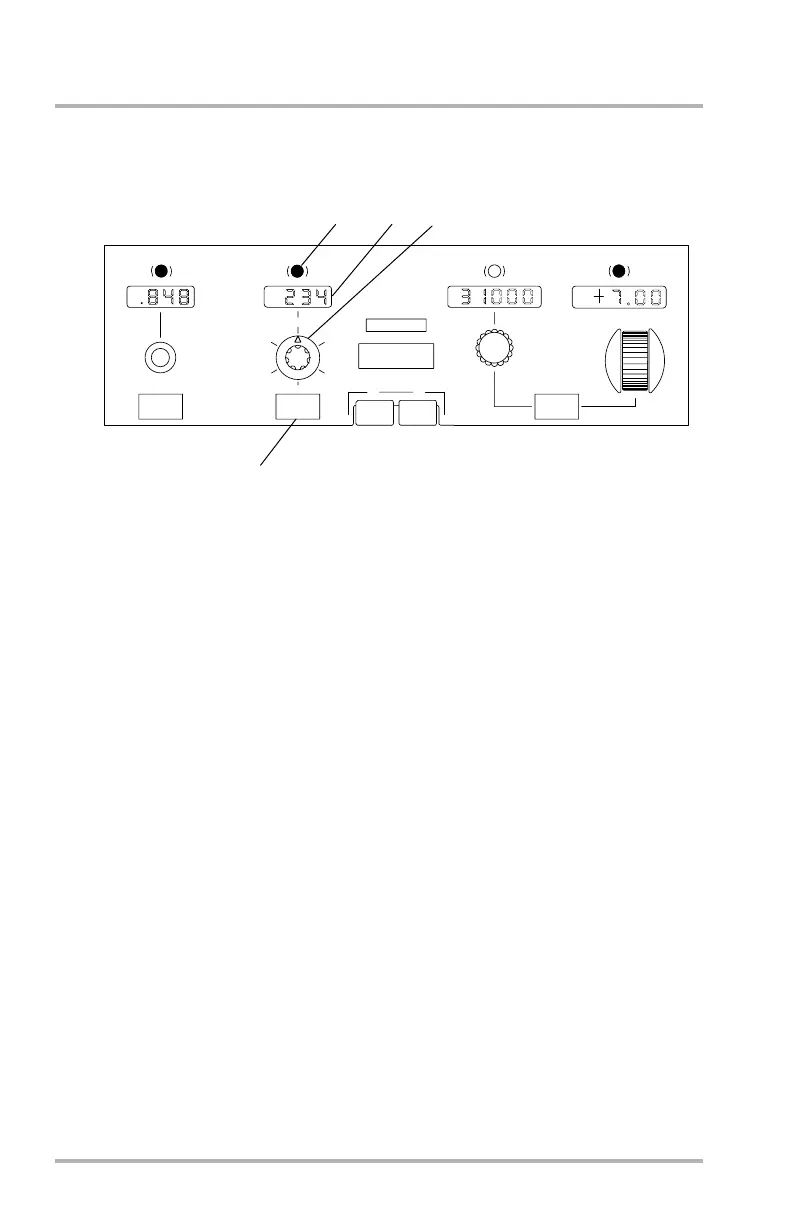
Heading/ Track Controls and Display
1. HDG/TRK Changeover Button
Pushing permits alternate selection of either heading (HDG) or track (TRK)
to be displayed in the HDG/TRK display window and on the ND. Operation
of this button before HDG/TRK HOLD does not affect the window target
number. Operation of the button in the HDG/TRK mode compensates the
window target to account for any difference in the magnetic heading and track
angle but does not change existing control mode or AP/FD reference until the
HDG/TRK selector is pushed or pulled.
2. HDG/TRK Display Window
Shows selected HDG or TRK. Window is blank when the AFS is controlling
to the FMS flight plan. At initial powerup the window shows 000 as a
preselected value if a valid magnetic heading is not available. If a valid
magnetic heading is available at powerup, this is displayed. For powerup
while airborne, the current heading is shown as the preselected value.
3. HDG/TRK and Bank Angle Limit Selectors
HDG/TRK Selector (Inner Knob) - Turn to preselect:
• Rapid rotation causes large changes.
• Resolution for slow knob rotation is one degree per detent.
Pull to select:
• Disengages the NAV mode (if engaged).
LB1-3-0038
1
PROF
15
5
25
AUTO
10
20
NAV
FPA
V/S
FMS
METER
FEET
APPR / LAND
HDG
TRK
HDG
FPA
FT
IAS
MACH
AUTO FLIGHT
AFS OVRD OFF
2
MACH
SPD
CENTER GLARESHIELD
1
1
2
3
4
October 02, 2006



 To Next Page