MD-11 Flight Crew Operations Manual
k
FMS -
Controls and Displays
FMS.30.18
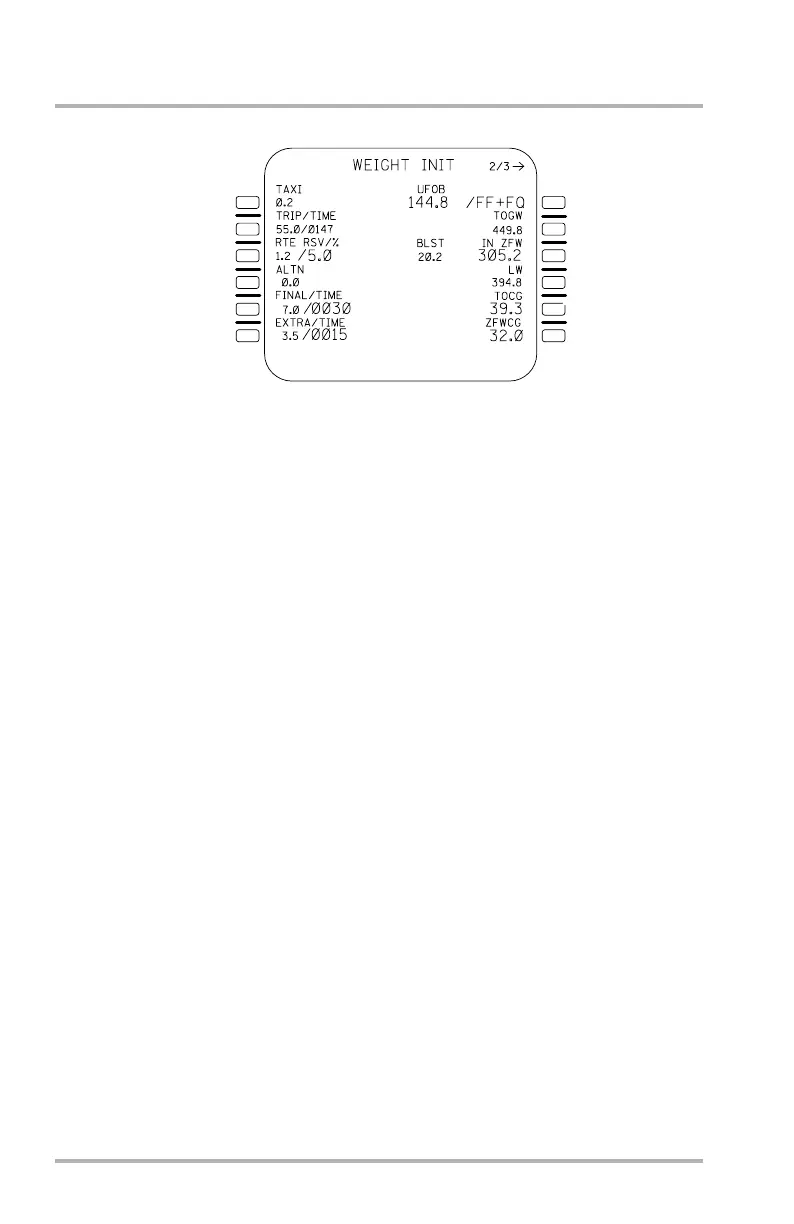
WEIGHT INIT Page
At engine start the TAXI field in 1L disappears, the BLOCK and TOGW fields
change, and ZFW will be displayed in large font whether or not it was pilot entered
or calculated. Large font boxes will be displayed in data line 3R if ZFW was never
entered or calculated prior to engine start. CHECK ZFW is displayed in the
MCDU SP if the absolute value of UFOB minus BLOCK is > 500 KG.
The BLOCK field changes to show the sensors used for UFOB calculation
(FF+FQ) in the data line and the label line is blank. FF represents the fuel flow
sensor and FQ represents the fuel quantity sensor. The flight crew may deselect
either sensor used for calculating UFOB, or may re initialize UFOB by entering a
new value (thereby deselecting the fuel quantity sensor). After deselecting either
sensor, the flight crew may re-select it by clearing the 1R field. Should UFOB be
invalid, the INITIALIZE WEIGHTS message will also be displayed in the
scratchpad.
The TOGW field changes to GW and displays dashes, a calculated value, or an
accepted flight crew entry.
If an entry is made into the ZFW, GW, or UFOB field, the pilot entry will be
displayed in large font and the computed value will be displayed in small font.
The TOCG field is displayed until airborne, at which time the field disappears.
Entries into the TOCG field on the WEIGHT INIT page will cause the display on
the TAKEOFF pages to change as well.
NOTE: If the UFOB is invalid (dashed) and GW is invalid (dashed), the
pilot must first enter UFOB before entering GW. When UFOB is
pilot updated, the fuel quantity (FQ) is removed from the UFOB
computation and only fuel flow (FF) is used to update UFOB.
1L
2L
3L
4L
5L
6L
1R
2R
3R
4R
5R
6R
LB1-3-0067
After Engine Start
October 02, 2006



 To Next Page