MD-11 Flight Crew Operations Manual
k
Warning and Alerting -
Controls and Displays
Warn.30.2
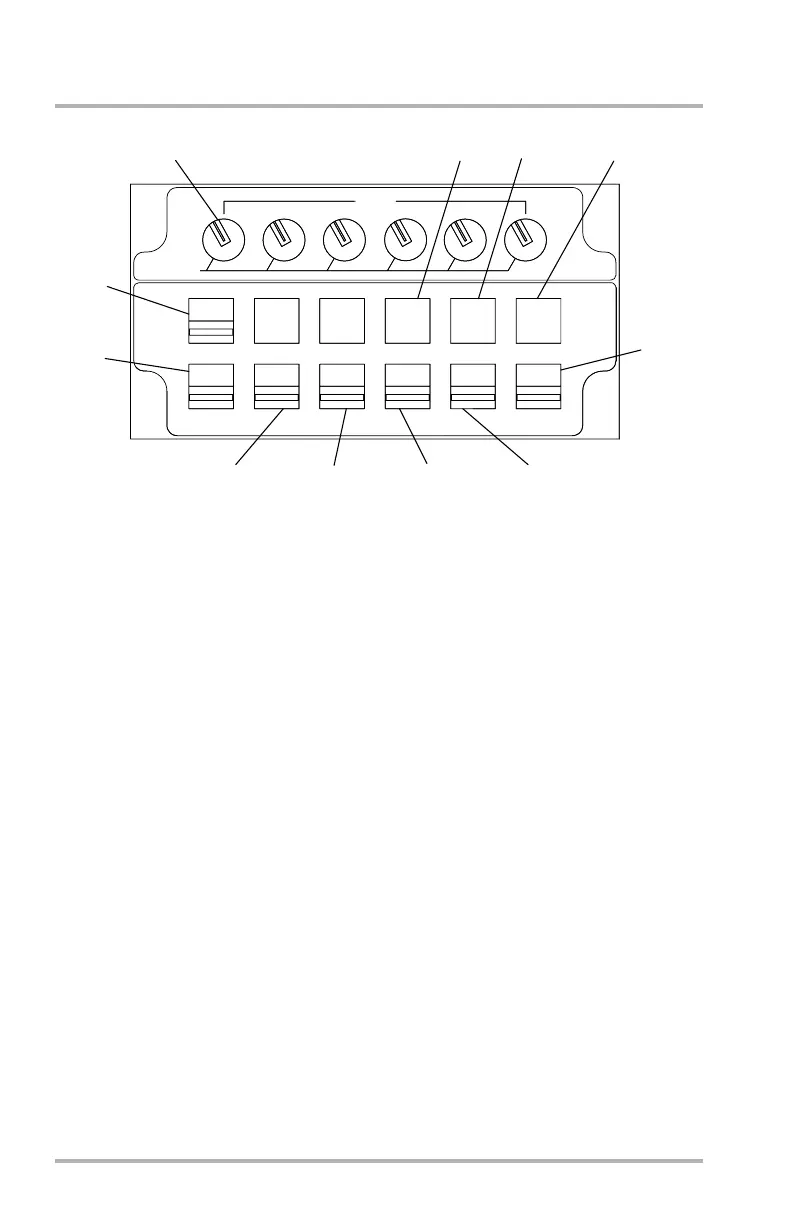
System Display Control Panel
1. ND Switch - white
Pushing this switch with 1 or more DUs inoperative causes the existing SD to
become an ND. If all DUs are operative, THIRD NAV DISPLAY NOT
AVAILABLE message will appear on DU4.
2. CONSEQ Switch - white
When pushed, the COSEQUENCES page will appear on the SD. The
CONSEQUENCES page displays consequences associated with level 2 and
level 3 alerts. The alerts are grouped by level and appear in the same order as
they appear on the EAD. The consequences associated with an alert are
displayed adjacent to that alert. When additional consequences pages are
required, PRESS CONSEQ AGAIN TO CONTINUE message will appear at
the bottom of the page.
3. STATUS Switch - white
When pushed, the STATUS page will appear on the SD. The STATUS page
displays a list of all alerts included on the systems pages. The alerts are shown
in three columns in the same format as on the EAD. A separate section for
maintenance alerts is after the MISC system alerts. This section is titled
MAINT. MAINT alerts appear on STATUS page 1 and can only be level 1.
The STATUS pages can display up to 51 alerts. When additional STATUS
pages are required, PRESS STATUS AGAIN TO CONTINUE message will
appear at the bottom of the page.
1
2
3
4
5
6
7
8
9
10
11
LB1-3-0193
ENG
HYD
ELEC
AIR
FUEL
CONFIG
MISC
STATUS
CONSEQ
ND
BRT
1
2
3
4
5
6
OFF
AFT PEDESTAL
October 02, 2006


 To Next Page