MD-11 Flight Crew Operations Manual
k
FMS -
Controls and Displays
FMS.30.40
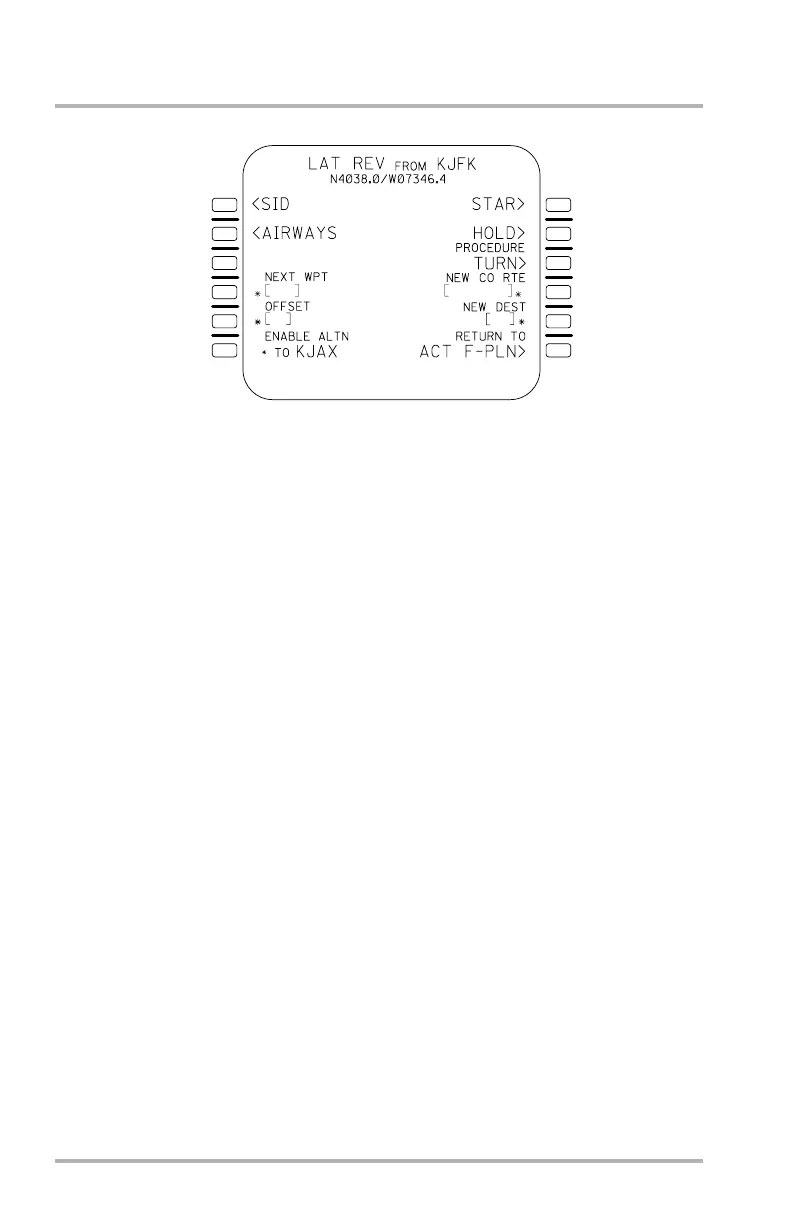
LAT REV Page
This page allows the flight crew to revise the definition of the lateral flight plan.
It will be displayed automatically when a left LSK is pushed on either of the ACT
F-PLN pages or either of the SEC F-PLN pages. The waypoint next to the pushed
LSK forms the title of the LAT REV page and the prompts displayed provide a
menu of all revisions allowed at that waypoint.
Lines 1L SID, 2L AIRWAYS, 1R STAR, 2R HOLD, and 3R PROCEDURE
TURN provide access to the stipulated menu pages. The SID prompt is accessible
only during pre-takeoff operation, and only when the left LSK for the origin
airport or runway is selected on the F-PLN page. In this case the STAR and
PROCEDURE TURN prompts do not appear. When any other left LSK on the
F-PLN page is selected, the SID prompt does not appear but all other applicable
prompts do.
Line 4L allows entry of the next waypoint after the accessing waypoint. The next
waypoint may be entered through the SP as an identifier of the database waypoint,
navaid, airport, runway, or as a latitude/longitude/place/ bearing/distance. In the
latter two cases, the FMS automatically assigns an identifier as one of up to 40
flight crew-defined waypoints.
Line 4R allows entry of a new company route from the waypoint named in the
page title. Line 5R allows entry of a new destination.
When this page is accessed with the FROM waypoint of the flight plan and the
current leg is a great circle path to a fixed waypoint, 5L allows entry of a lateral
offset. Otherwise, 5L is blank.
Line 6L allows the flight plan to the alternate destination to be enabled. This only
affects the portion of the active flight plan. Selection will not change the
secondary flight plan.
The entry fields in 4L, 5L, 6L, 4R, and 5R will appear with an asterisk when the
entry data affects the active flight plan. No asterisk will appear on lateral revisions
to the secondary flight plan following the revise point.
1L
2L
3L
4L
5L
6L
1R
2R
3R
4R
5R
6R
LB1-3-0084
October 02, 2006



 To Next Page