MD-11 Flight Crew Operations Manual
k
FMS -
Controls and Displays
FMS.30.43
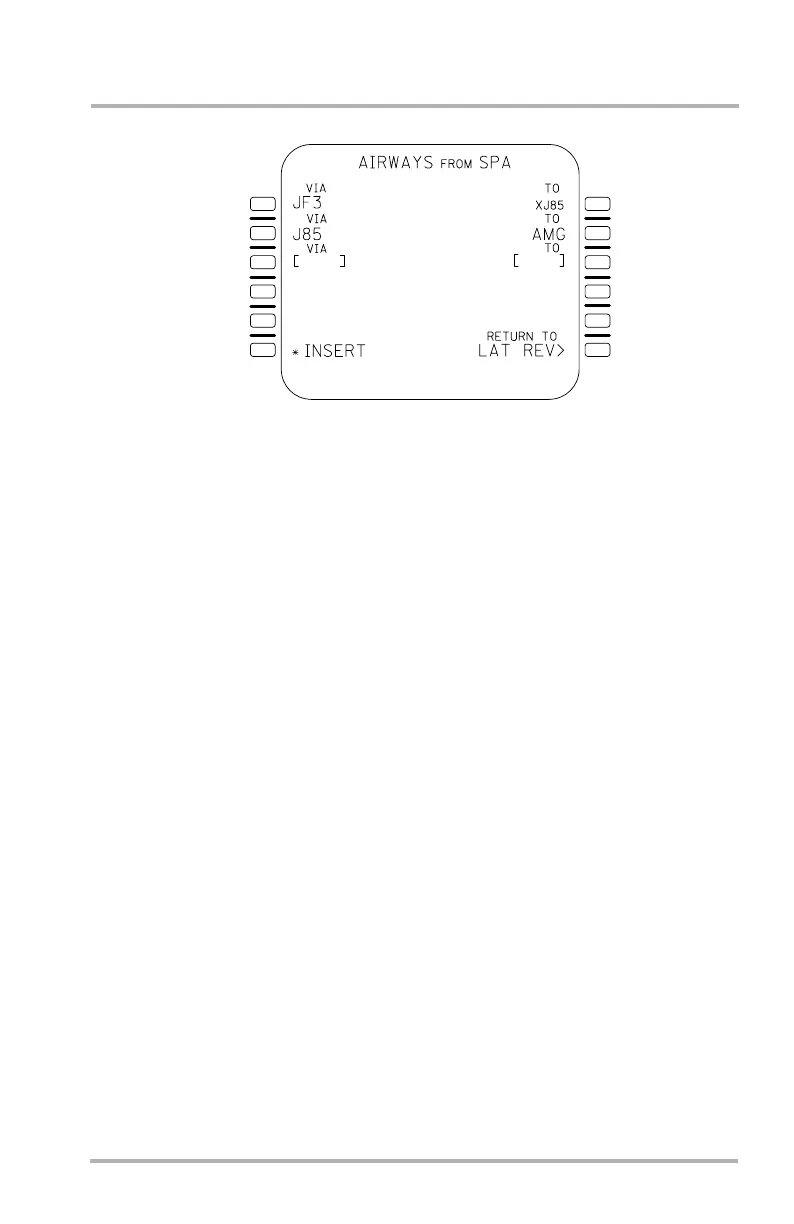
AIRWAYS Page
The AIRWAYS page, accessed from the LAT REV page, allows entry of the
desired airway in 1L under VIA and the desired termination on the airway under
TO. After the initial VIA entry, VIA and TO appear in 2L and 1R soliciting the
next stage of airway routing. The flight crew may then choose between entry of a
TO waypoint in 1R, or entry of the next intersecting airway in 2L. For the latter
entry the intersection of the two airways is computed. If the airways intersect at a
database waypoint, then the identifier of this waypoint is automatically inserted in
1R. Otherwise, an identifier composed of X followed by the second airway's
identifier is inserted to represent the calculated intersection. Subsequent airway
segments cannot be entered until completion of the intercept computation.
The INSERT prompt is displayed in 6L after entering an exit fix for the last
entered VIA. Selection of this prompt inserts the airway in the flight plan and
returns to the originating ACT F-PLN or SEC F-PLN page. The asterisk will only
be displayed when this page has been accessed from the ACT F-PLN page.
Pushing LSK 6R allows return to the appropriate LAT REV page without
insertion of the airway routing.
LB1-3-0086
1L
2L
3L
4L
5L
6L
1R
2R
3R
4R
6R
5R
October 02, 2006



 To Next Page