MD-11 Flight Crew Operations Manual
k
FMS -
Controls and Displays
FMS.30.38
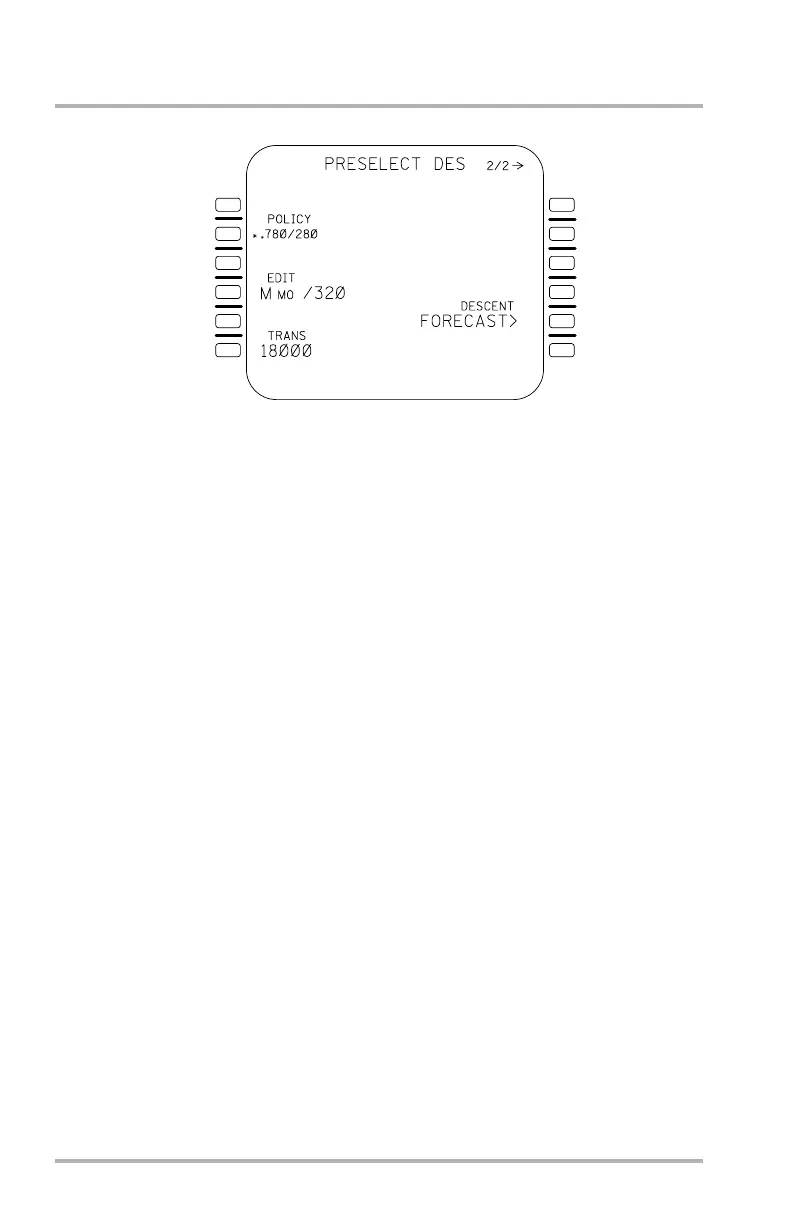
PRESELECT DES Page
The PRESELECT DES page is accessed from either the PRESELECT CRZ page
or the active CRZ page with the NEXT PAGE key.
• ECON - Most economical Mach/CAS for time and fuel trade-off, based
on the cost index entry (not editable).
• POLICY - Same as ECON mode, except with a flight crew-selected CAS
(intended to suit an airline descent policy).
• EDIT - Flight crew-selected Mach and/or CAS. A Mach entry without a
specified CAS causes VMO to be the associated CAS. A CAS entry
without a specified Mach causes MMO to be the associated Mach. Prior
to any selection, brackets are displayed. If EDIT is preselected for descent
via the CRZ page, then the associated cruise Mach is displayed with
VMO as the CAS.
The flight crew can choose to replace the display of ECON speed mode with
POLICY mode for descent by entering the desired CAS in 2L of the PRESELECT
DES page while the aircraft is on the ground. The flight crew may choose to return
the display to ECON mode at any time with the CLR key. In either case, the speed
mode displayed at takeoff for a given flight leg (ECON or POLICY) is displayed
in preflight for the next flight leg.
The flight crew may preselect a speed mode by pushing the LSK adjacent to the
corresponding speed. If the flight crew has no preference for preselection, then
ECON mode (or POLICY, if applicable) is shown as preselected by default. The
preselected mode is used both for descent predictions and for initializing the speed
mode of the active DES page, causing that speed mode to be activated when the
descent portion of the flight begins.
The transition altitude is displayed at lower left and is not editable. Access the
DESCENT FORECAST page with LSK 5R. Access the active PERF page with
the NEXT PAGE key.
1L
2L
3L
4L
5L
6L
1R
2R
3R
4R
5R
6R
LB1-3-0083
October 02, 2006



 To Next Page