MD-11 Flight Crew Operations Manual
k
FMS -
Controls and Displays
FMS.30.21
Route Selection Page
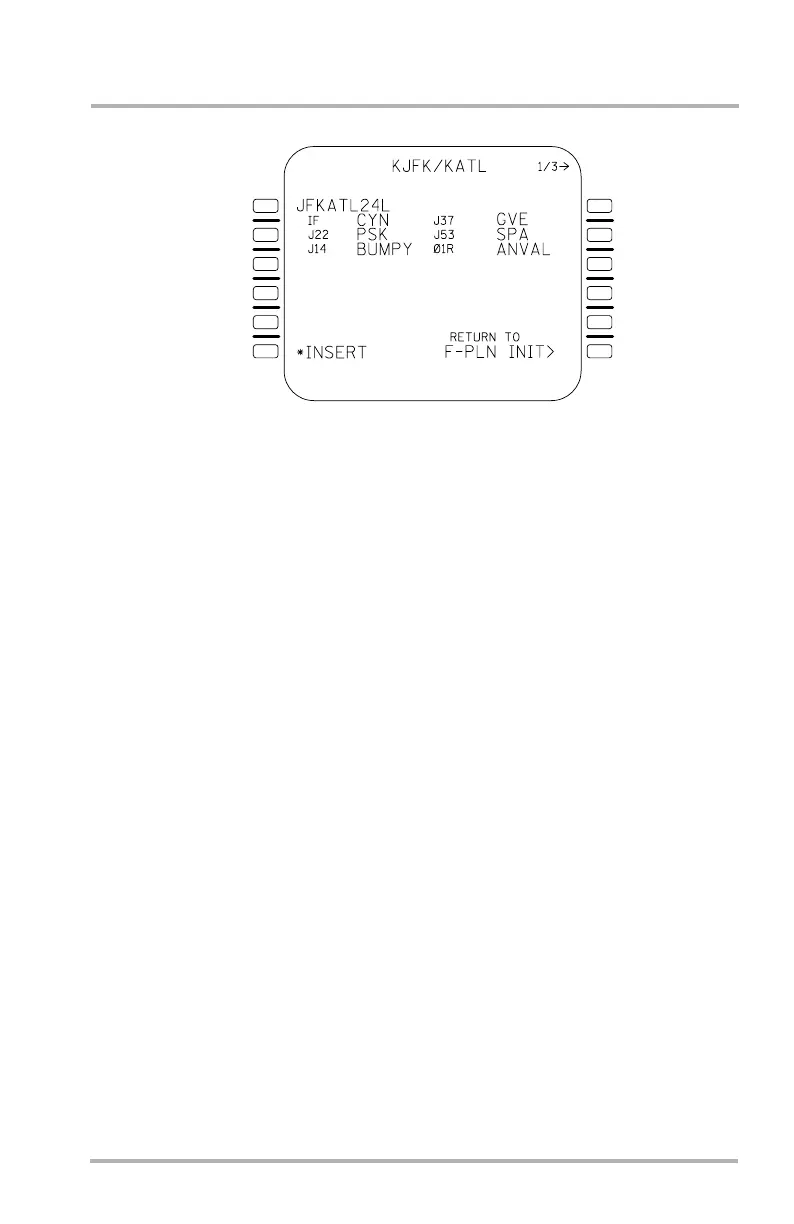
This page allows review of defined routes from the entered origin to the entered
destination, and insertion of one if desired.
Accessed from either F-PLN INIT or SEC F-PLN INIT page due to entry of a
FROM/TO or ALTN, the route selection page displays the route number in 1L and
the route elements in 2 through 5. If there are no defined routes, NONE is
displayed in 1L. In this sample there are three company routes, one per page, as
indicated by the 1/3 in the title line. The PAGE key allows display of the
additional defined routes.
Pushing 6L *INSERT (without asterisk if accessed from SEC F-PLN INIT page)
enters the route in the appropriate flight plan (primary or secondary depending on
how this page was accessed) and changes the display back to the previous page.
Pushing 6R changes the display back to the previous page without entering the
route.
If the company route contains a procedure that is not allowed, the page will
display blanks where the procedure would be displayed and the SP will display the
error message INVALID CO RTE PROC. Upon insertion into the flight plan of a
company route with a non allowable procedure, the SP will again display the
INVALID CO RTE PROC message and the flight plan will string a discontinuity
in place of the non allowable procedure. If there are any transitions associated with
the non allowable procedure, blanks will be displayed for the transition also.
LB1-3-0072
1L
2L
3L
4L
5L
6L
1R
2R
3R
4R
5R
6R
October 02, 2006


 To Next Page