MD-11 Flight Crew Operations Manual
k
FMS -
Controls and Displays
FMS.30.91
System Monitoring Pages
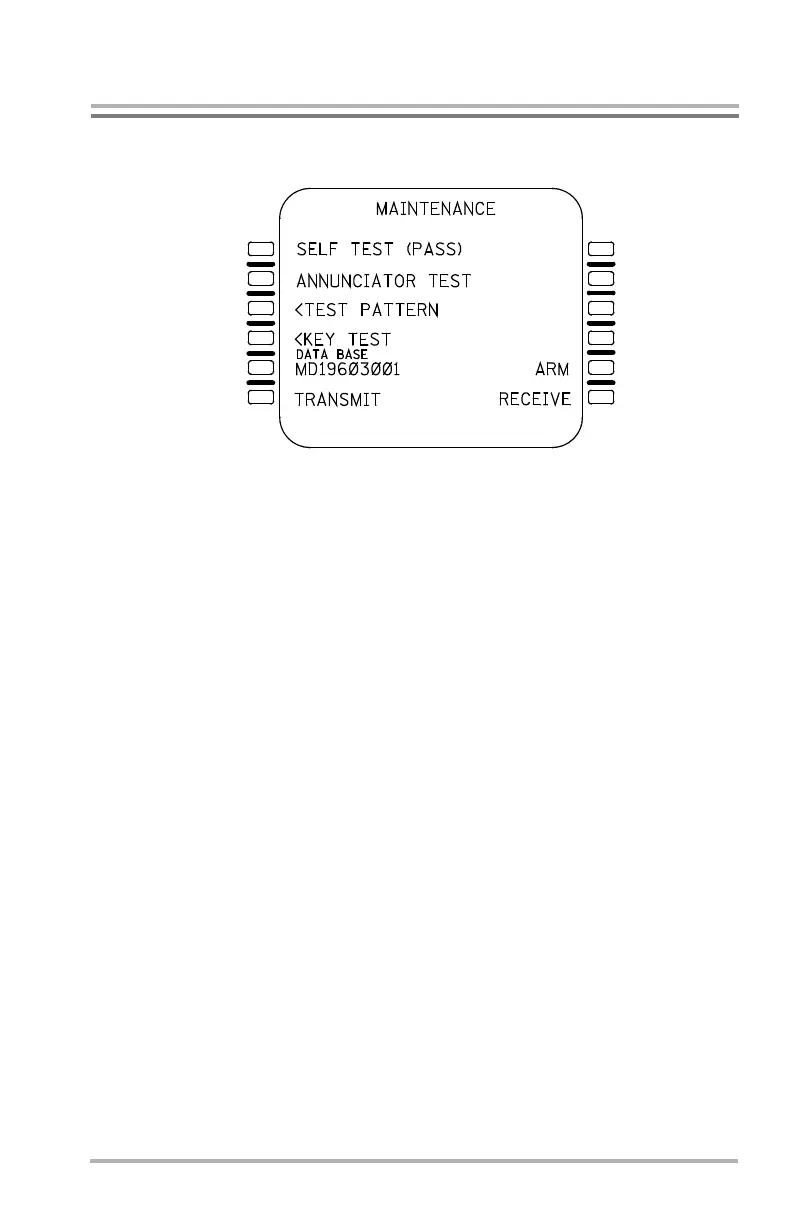
MAINTENANCE Page
The MAINTENANCE page allows FMS test functions to be performed. This page
is only available during preflight or after completion of a flight plan, and cannot
be displayed in the takeoff, climb, cruise descent or approach phases of flight. This
page is accessed by pushing the REF mode key, then when REF INDEX is
displayed, by pushing LSK 5R.
After the MAINTENANCE page is displayed, the following tests may be
accomplished as detailed below:
• SELF TEST. Push LSK 1L. If it passes the test, (PASS) is displayed
beside the LEFT-TEST legend. If it fails the test, the MENU page is
displayed and the FMC prompt does not appear.
• ANNUNCIATOR TEST. Push LSK 2L. This illuminates all three
annunciators on the MCDU (DSPY, MSG, and OFST) located on the
sides of the MCDU. The annunciators are extinguished in approximately
10 seconds.
• TEST PATTERN. Push LSK 3L. This brings up a special page which
displays all MCDU characters and symbols, and includes a RETURN
prompt for returning to the MAINTENANCE page.
• KEY TEST. Push LSK 4L. This brings up a succession of pages
containing specific key push instructions. Passing each test sequences to
the next key test until the down arrow, whose correct operation returns
back to the MAINTENANCE page.
The identifier for the currently loaded navigation data base is displayed in large
font in location 5L, and is not editable.
LB1-3-0117
1L
2L
3L
4L
5L
6L
1R
2R
3R
4R
6R
5R
October 02, 2006



 To Next Page