MD-11 Flight Crew Operations Manual
k
FMS -
Controls and Displays
FMS.30.92
MAINTENANCE Page
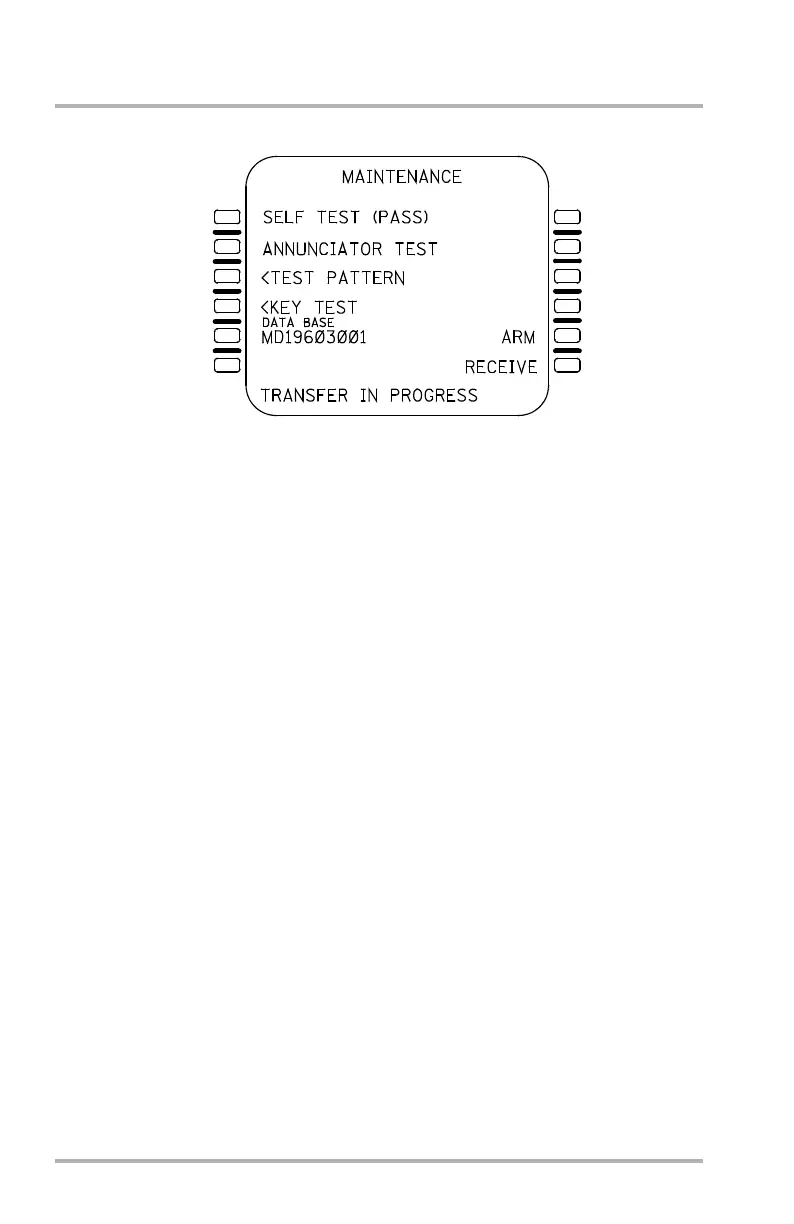
A navigation data base crossload may be armed by entering ARM into the
brackets of 5R. Once ARM is displayed, the user may select either the transmit
designation or the receive designation, thus arming the FMC to transmit or receive
a data base. If the user arms the FMC to transmit the crossload, the receive
designation is cleared. Alternatively, if the user arms the FMC to receive the
crossload the transmit designation is cleared.
Prior to selection of the transmit or receive designations, or following the transmit
designation, the ARM display may be cleared back to brackets with the CLR key.
To enable the crossload function, the transmitting FMC must be armed before the
receiving FMC is armed. Once the receiving FMC is armed, the crossload begins
and TRANSFER IN PROGRESS is displayed in the SP. Once completed,
TRANSFER COMPLETE is displayed in the SP, the transmit and receive
designations are displayed, and 5R once again displays brackets. While the
crossload is in progress the MCDU is nonfunctional. If for any reason the
crossload is interrupted, the transmitting MCDU displays TRANSFER
ABORTED in the SP. The receiving MCDU becomes inoperative and displays
NAV DATABASE LOAD INCOMPLETE in the center of a blank page. A
portable data base loader is then required to complete the load.
If the FMC is armed to receive a crossload before the transmitting FMC is armed,
the crossload function is not performed, and TRANSFER ABORTED is displayed
in the SP.
Exit from the MAINTENANCE page is by mode key, or automatically.
LB1-3-0118
1L
2L
3L
4L
5L
6L
1R
2R
3R
4R
6R
5R
October 02, 2006



 To Next Page