MD-11 Flight Crew Operations Manual
k
FMS -
Controls and Displays
FMS.30.51
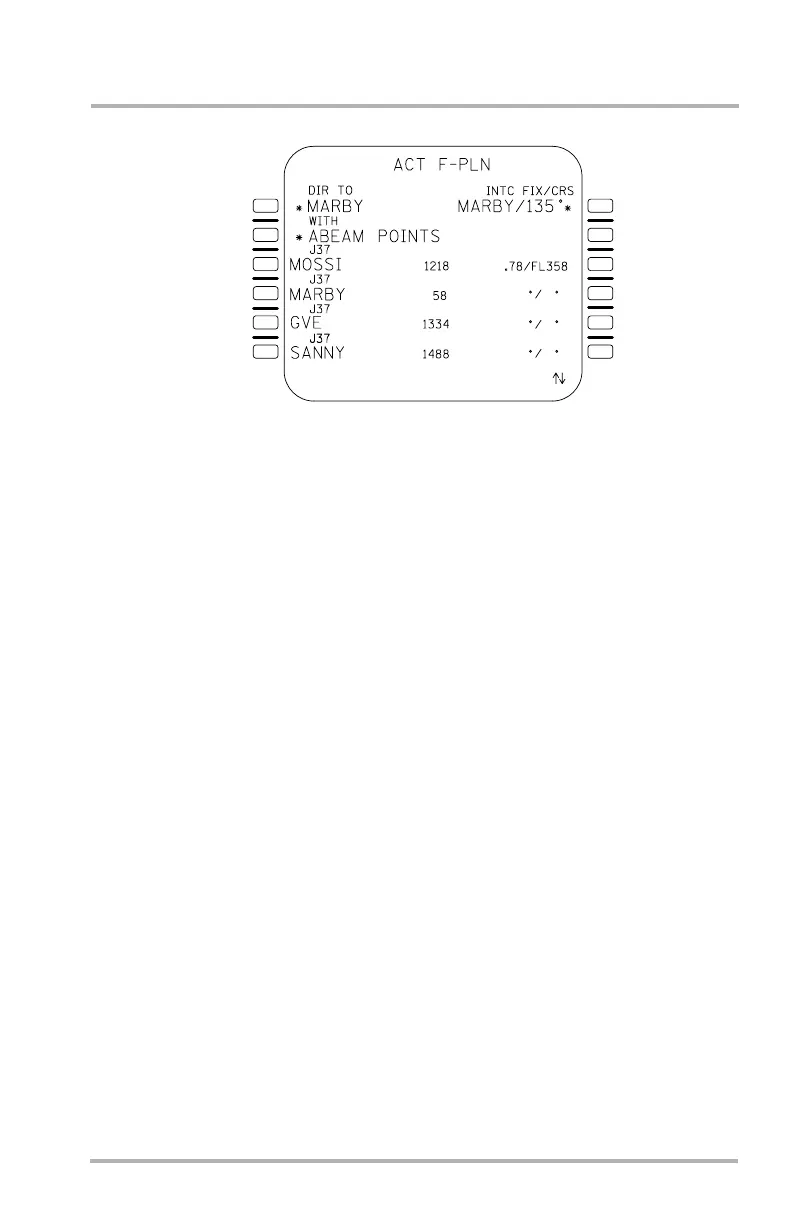
Direct To/Intercept Page
The direct to/intercept page is similar in display to the ACT F-PLN page 1 and
allows initiation of a direct flight leg to a selected waypoint or intercept fix. This
page is accessed by pushing the DIR INTC key.
This page is initially displayed with brackets in 1L and 1R, prompting entry of a
direct to (DIR TO) fixed waypoint or intercept fix/inbound course (INTC
FIX/CRS), respectively.
If the SP is empty, a waypoint entered in line 1 can be selected from the active
flight plan by an adjacent left LSK, or may be manually entered by the flight crew
by means of the SP.
When a left LSK is pushed adjacent to a flight plan fixed waypoint with the SP
empty, the waypoint is displayed in 1L preceded by an asterisk and in 1R followed
by its inbound course (from the flight plan) and an asterisk. Selection of a
pseudo-waypoint, F-PLN marker or nonfixed waypoint is not allowed.
An SP entry must be previously defined by an identifier, either in the database
(navaid, waypoint, airport, or runway), or in the flight plan as a flight
crew-defined waypoint. Waypoints entered as PBD or lat/long will result in a
corresponding pilot-defined waypoint being created.
Upon entry, the CRS prompt in 1R remains displayed as brackets, and the trailing
asterisk is not displayed until the flight crew defines the inbound course to the
entered fix. Course entries are only permitted in 1R. The course entry may be
separate or combined with the entered fix. When the entry is complete, a trailing
asterisk is displayed. If the aircraft's existing heading intersects the chosen course
ahead of the chosen fix, heading hold is maintained to the intercept. Otherwise,
the flight plan is unchanged and the SP message NOT ON INTC HEADING is
displayed.
If the waypoint is displayed in 1L, either by LSK selection or direct entry, the
prompt *WITH ABEAM POINTS is displayed in 2L.
LB1-3-0093
1L
2L
3L
4L
5L
6L
1R
2R
3R
4R
6R
5R
October 02, 2006



 To Next Page