MD-11 Flight Crew Operations Manual
k
Automatic Flight -
Controls and Displays
Auto.30.8
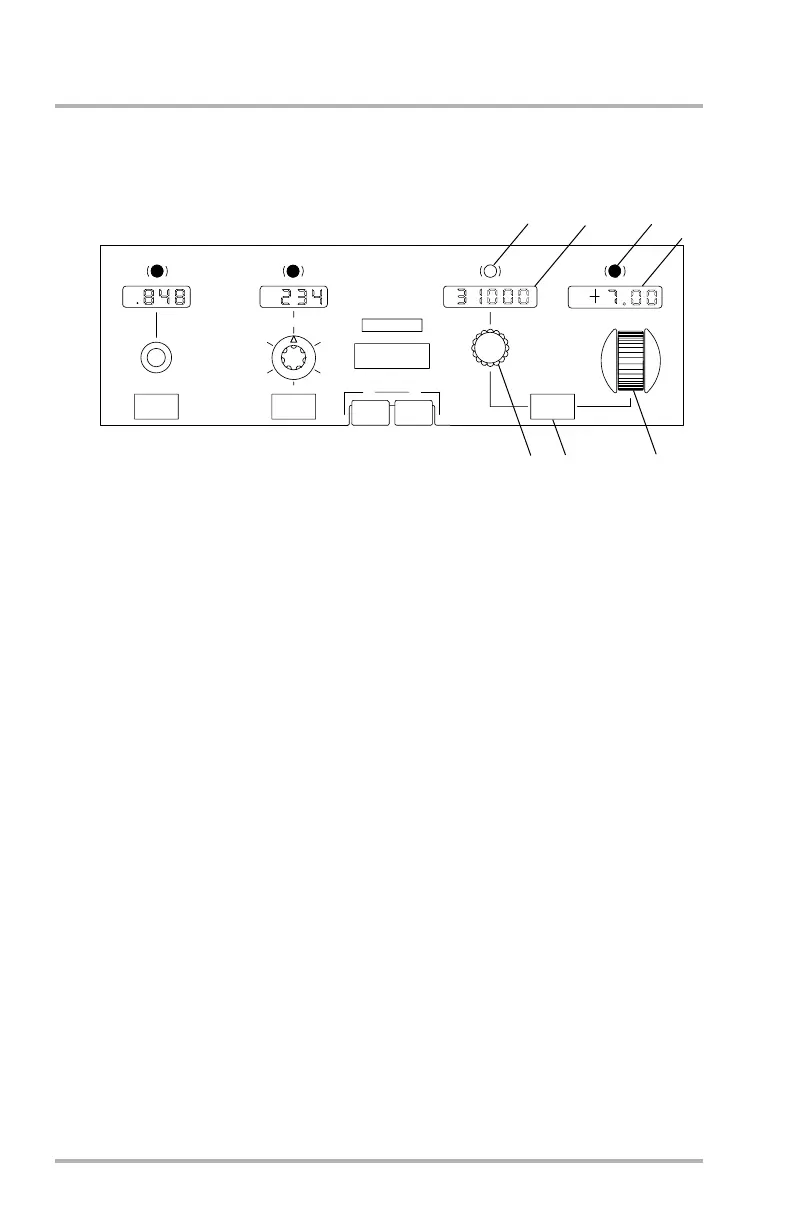
Altitude Controls and Display
1. FEET/METER Changeover Button
The altitude tape on the right side of the PFD is always in feet. Pushing this
button allows the pilot to select feet or meters on the FCP, FMA, and lower
right corner of the PFD. When meters are selected the values are preceded by
an M. When feet are selected the values ar preceded by an FT.
2. Altitude Display Window
Displays the selected or preselected altitude for altitude alerting and AP/FD
altitude control (except during G/S mode). Range is from 0 to 50,000 feet.
Display at initial powerup is 10,000 feet. Window is blank if both air data
computer references fail.
3. Altitude Select Knob
Precision altitude selection increments (one detent) for slow knob rotation
are:
• 500 feet above 10,000 feet.
• 100 feet below 10,000 feet.
• If BARO is selected on the ECP, a one-foot precision selection capability
permits FCP selection of MDA value.
• 50 meters if METER is selected.
Turn to preselect:
• Sets the altitude reference.
LB1-3-0040
1
PROF
15
5
25
AUTO
10
20
NAV
FPA
V/S
FMS
METER
FEET
APPR / LAND
HDG
TRK
HDG
FPA
FT
IAS
MACH
AUTO FLIGHT
AFS OVRD OFF
2
MACH
SPD
CENTER GLARESHIELD
1
1
2
3
4
5
6
7
October 02, 2006


 To Next Page