MD-11 Flight Crew Operations Manual
k
Automatic Flight -
Controls and Displays
Auto.30.3
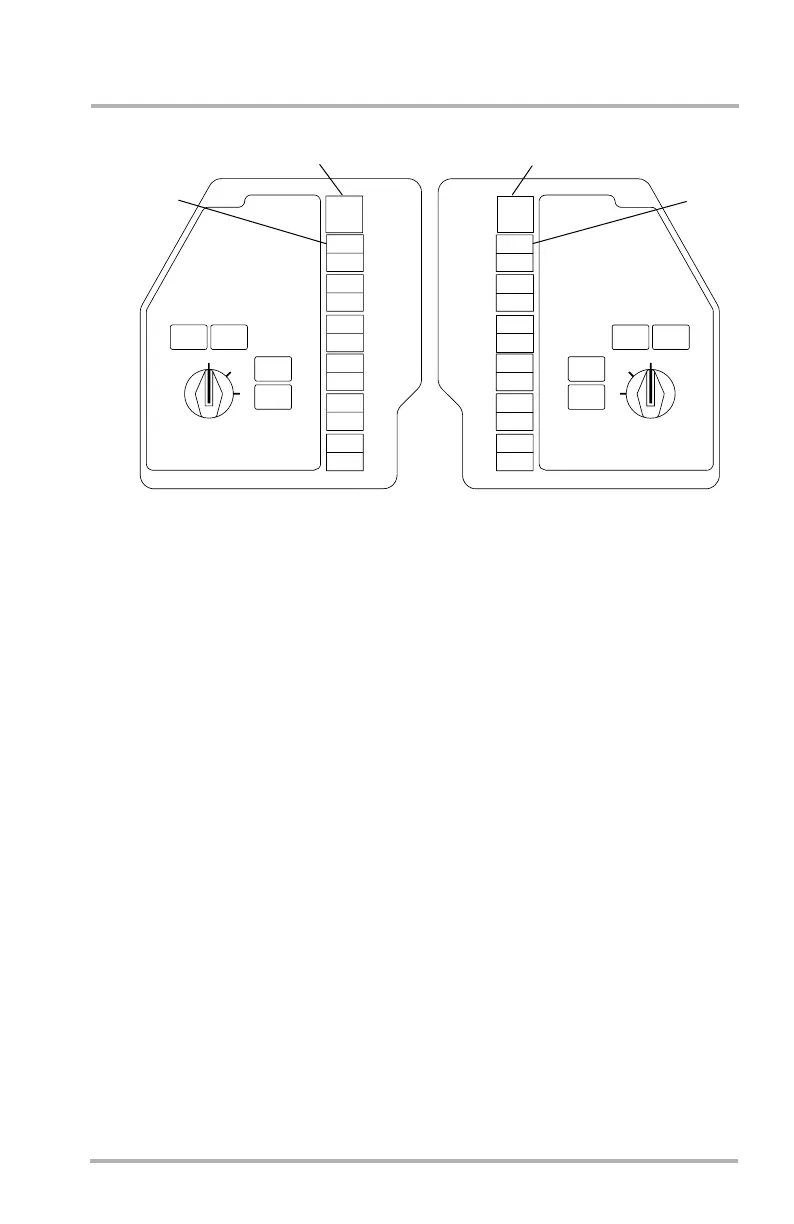
Flight Director Switches
1. Captain’s FLT DIR Switch - amber
Pushing the switch allows the Captain to direct the FD 2 commands to PFD
1. CAPT ON 2 will illuminate amber. Both PFDs will show FD2 in the upper
left corner near the attitude sphere. Pushing the switch again restores normal
on-side FD operation.
2. Captain’s FLT DIR OFF Switch - amber
With the FD on (OFF not illuminated), pushing the switch selects the
Captain’s FD to OFF. OFF then illuminates amber and the command bars are
removed from the PFD. Pushing the switch when OFF is illuminated engages
the FD and extinguishes the light.
3. First Officer’s FLT DIR OFF Switch - amber
With the FD on (OFF not illuminated), pushing the switch selects the First
Officer’s FD to OFF. OFF then illuminates amber and the command bars are
removed from the PFD. Pushing the switch when OFF is illuminated engages
the FD and extinguishes the light.
4. First Officer’s FLT DIR Switch - amber
Pushing the switch allows the First Officer to direct the FD 1 commands to
PFD 2. F/O ON 1 will illuminate amber. Both PFDs will show FD1 in the
upper left corner near the attitude sphere. Pushing the switch again restores
normal on-side FD operation.
LB1-3-0037
FLT DIR
CADC
IRS
FMS
VOR
APPR
EIS SOURCE
AUX
1
OFF
FLT DIR
2
OFF
F O
ON AUX
F O
ON 1
CAPT
ON AUX
CAPT
ON 2
1
2
CAPT
ON 2
F O
ON AUX
F O
ON 1
CAPT
ON AUX
CAPT
ON 2
F O
ON 1
CAPT
ON 2
F O
ON 1
CAPT
ON 2
F O
ON 1
CAPT
ON 2
F O
ON 1
FLT DIR
CADC
IRS
FMS
VOR
APPR
EIS SOURCE
AUX
1
OFF
FLT DIR
2
CAPT
ON 2
F O
ON AUX
F O
ON 1
OFF
CAPT
ON AUX
F O
ON AUX
F O
ON 1
CAPT
ON AUX
CAPT
ON 2
CAPT
ON 2
F O
ON 1
CAPT
ON 2
F O
ON 1
CAPT
ON 2
F O
ON 1
CAPT
ON 2
F O
ON 1
CAPT SOURCE INPUT SELECT PANEL,
OUTBOARD OF CAPT PFD
F/O SOURCE INPUT SELECT PANEL,
OUTBOARD OF F/O PFD
3
4
October 02, 2006



 To Next Page