MD-11 Flight Crew Operations Manual
k
FMS -
Controls and Displays
FMS.30.46
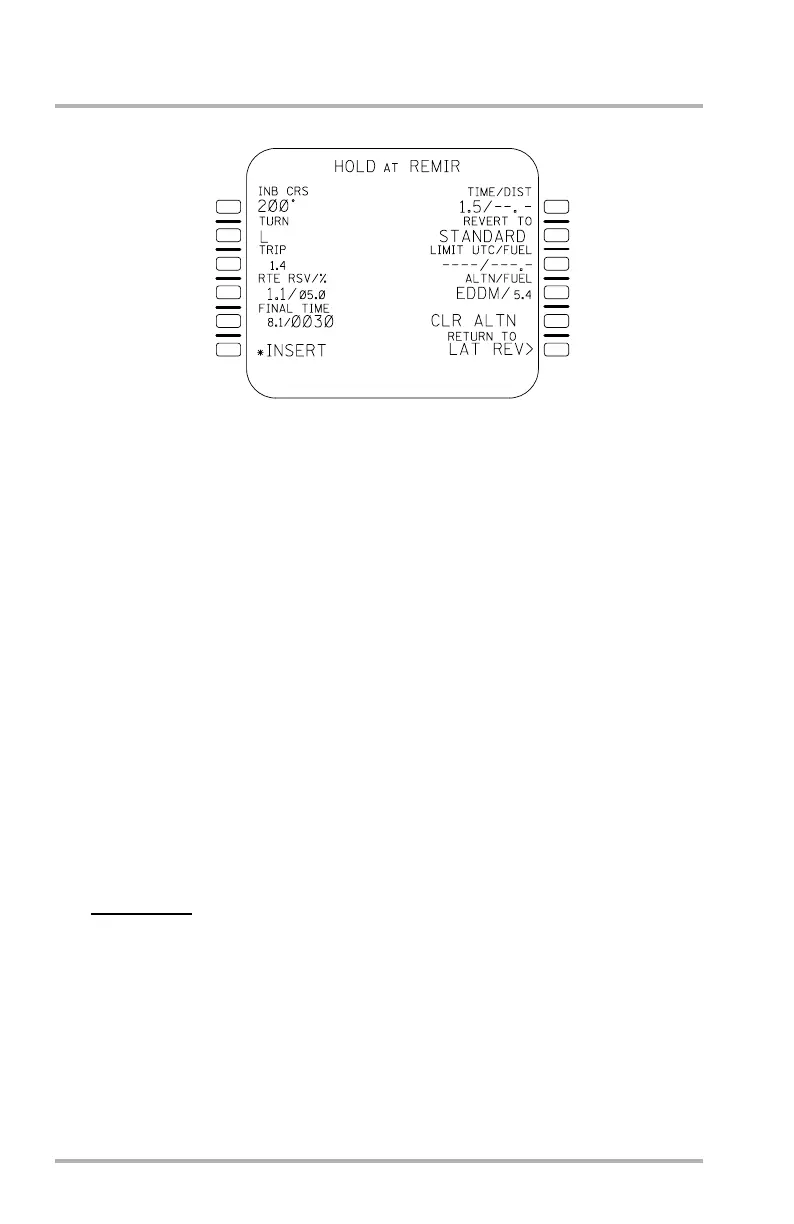
HOLD Page
The holding function is used to insert a holding pattern with a pilot-controlled
termination into the flight plan or to modify an existing holding pattern. The
holding pattern may be inserted at any waypoint or the FROM waypoint for
holding at present position. A revision at an existing holding fix is permitted. Any
inserted change becomes effective upon the crossing of the holding fix. Changes
are activated immediately if made on the active leg prior to entry of the holding
pattern. The HOLD page is accessed by pushing LSK 2R on the LAT REV page.
Titles can be as follows:
HOLD AT (waypoint or PPOS). Previously modified holding pattern or pilot
defined holding already defined for the waypoint. PPOS is a special case FROM
waypoint holding page.
DATABASE HOLD AT (waypoint). Enroute holding pattern defines from the
nav database.
STANDARD HOLD AT (waypoint). Holding pattern parameters were defaulted
by the FMS.
The default speed for a holding pattern inserted into flight plan is max endurance,
subject to applicable ICAO or FAA speed limitations. This speed may be changed
via F-PLN page.
WARNING:
The flight crew has the final responsibility to ensure that
the aircraft stays within limits of the holding airspace.
Line 1L INB CRS. Holding pattern course defaults to: 1. Database or pilot-defined
holding pattern inbound course. 2. Inbound course from flight plan. 3. Current
track (when page accessed) for PPOS or discontinuity holding.
Line 3L TRIP. FMC calculated trip fuel from the holding fix to destination.
Line 4L RTE RSV/%. Route reserve fuel from the holding fix to the destination.
Line 5L FINAL/TIME. Fuel and time allowance for holding at the alternate.
1L
2L
3L
4L
5L
6L
1R
2R
3R
4R
6R
5R
LB1-3-0089
October 02, 2006



 To Next Page