MD-11 Flight Crew Operations Manual
k
FMS -
Controls and Displays
FMS.30.104
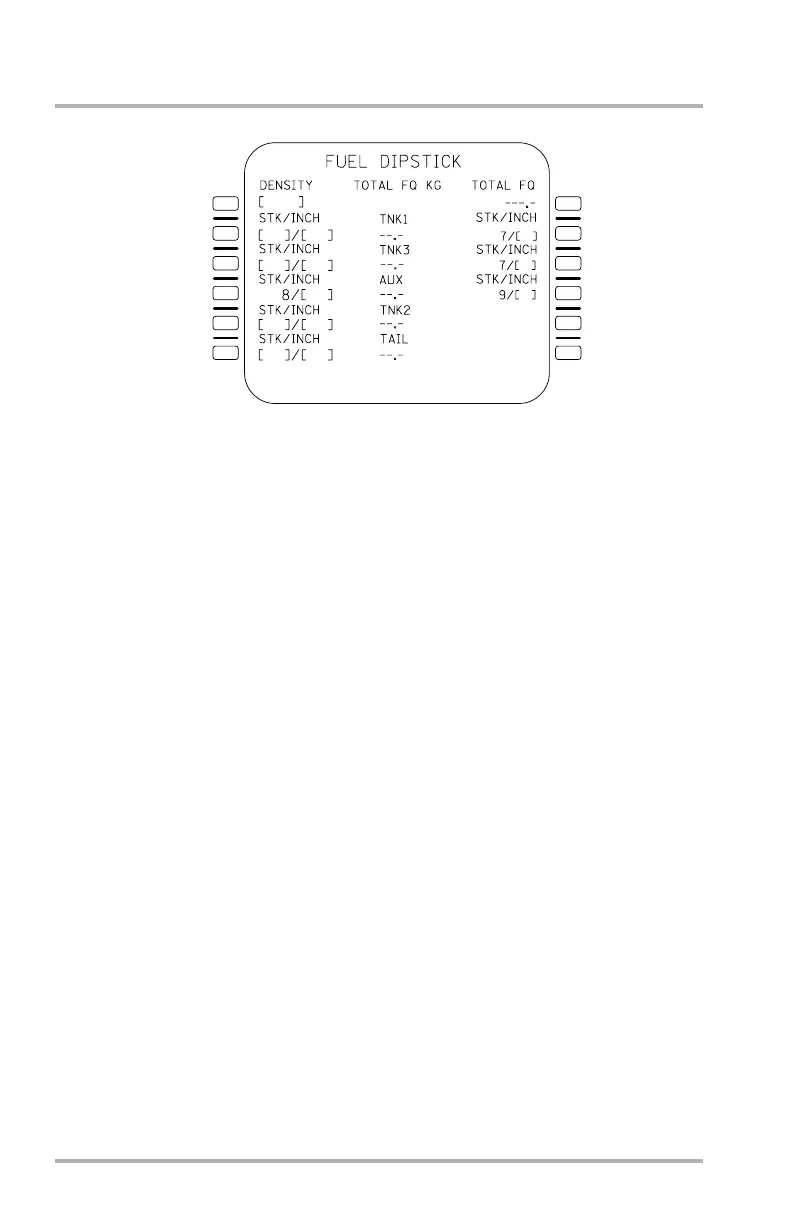
FUEL DIPSTICK Page
Accessed from the FUEL INIT page, if installed, this page provides the flight crew
with an alternate means of viewing the total fuel quantity of the aircraft as well as
the fuel quantity of each separate tank. This page may be exited by pushing a mode
key.
Line 1L DENSITY, displays brackets until a manual entry is made. The entries
into this field are displayed in large font and may be cleared by the flight crew.
The units for this field are determined according to the entered value and are
displayed in small font to the right of the entry.
Line 2L STK/INCH entry, requires also the STK/INCH entry in 2R for
determining the fuel quantity in tank 1. The acceptable stick entries for 2L are 4,
5 and 6. Line 2R stick entry is defaulted to 7, since an inch entry for stick 7 is
necessary in determining the fuel quantity in tank 1. Each stick and inch
measurement is displayed in large font and may be entered as pair, stick/inch, or
individually (stick or /inch). The tank 1 fuel quantity calculation is displayed in
small font. Clearing either or both of the STK/INCH fields causes the tank 1 field
to go dashed and STK/INCH field(s) to display brackets with the STK field in 2R
remaining at 7.
Line 3L, line 3R STK/INCH entries for tank 3 and the tank 3 field work the same
as the tank 1 field and STK/INCH entries for tank 1.
NOTES: The IRUs must be aligned before data can be entered onto this
page.
Data entry is not allowed when engines are started (NOT
ALLOWED appears in SP).
1L
2L
3L
4L
5L
6L
1R
2R
3R
4R
5R
6R
LB1-3-0127
October 02, 2006



 To Next Page