MD-11 Flight Crew Operations Manual
k
Flight Controls -
Controls and Displays
Flt.30.4
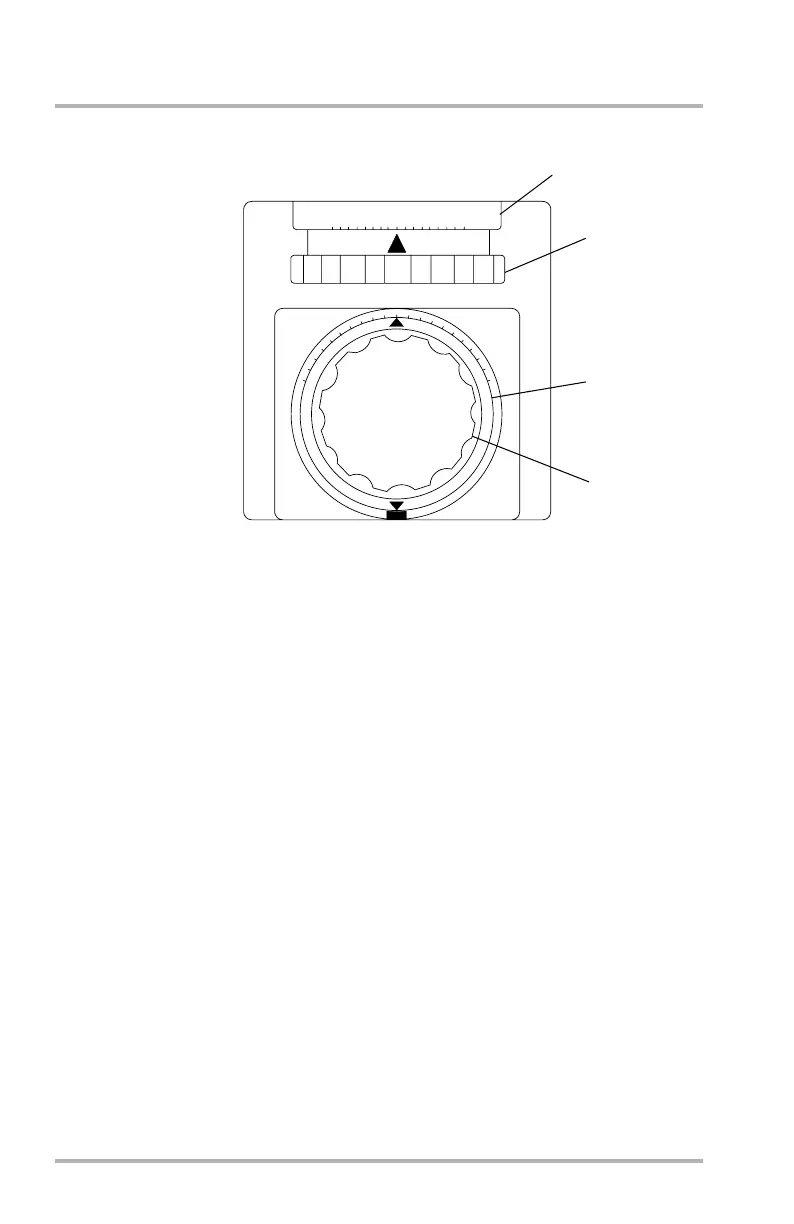
Aileron and Rudder Trim
1. AIL Trim Indicator
LWD - Indicates left wing down as shown in units on scale.
RWD - Indicates right wing down as shown in units on scale.
2. Aileron Trim Knob
When rotated, repositions the aileron load feel and override mechanism,
which repositions the ailerons and the control wheels to effect lateral trim.
If more than 5 units of aileron trim is selected, spoilers are activated. Full
aileron trim extends spoilers 6°.
3. Rudder Trim Indicator
The pointer indicates the direction of rudder displacement from neutral.
NOSE L - Indicates nose left trim as shown in units on scale.
NOSE R - Indicates nose right trim as shown in units on scale.
4. Rudder Trim Knob
When turned, provides manual adjustment to the lower and the upper rudder
trim and load feel mechanism, which repositions the lower and the upper
rudders.
DB1-2-1741
LWD
AIL
RWD
8
4
4
8
0
NOSE
L
NOSE
R
1
2
3
4
AFT PEDESTAL
0
5
1
0
5
1
0
October 02, 2006



 To Next Page