MD-11 Flight Crew Operations Manual
k
Communications Chapter Comm
Controls and Displays Section 30
Comm.30.1
Comm.30 Communications-Controls and Displays
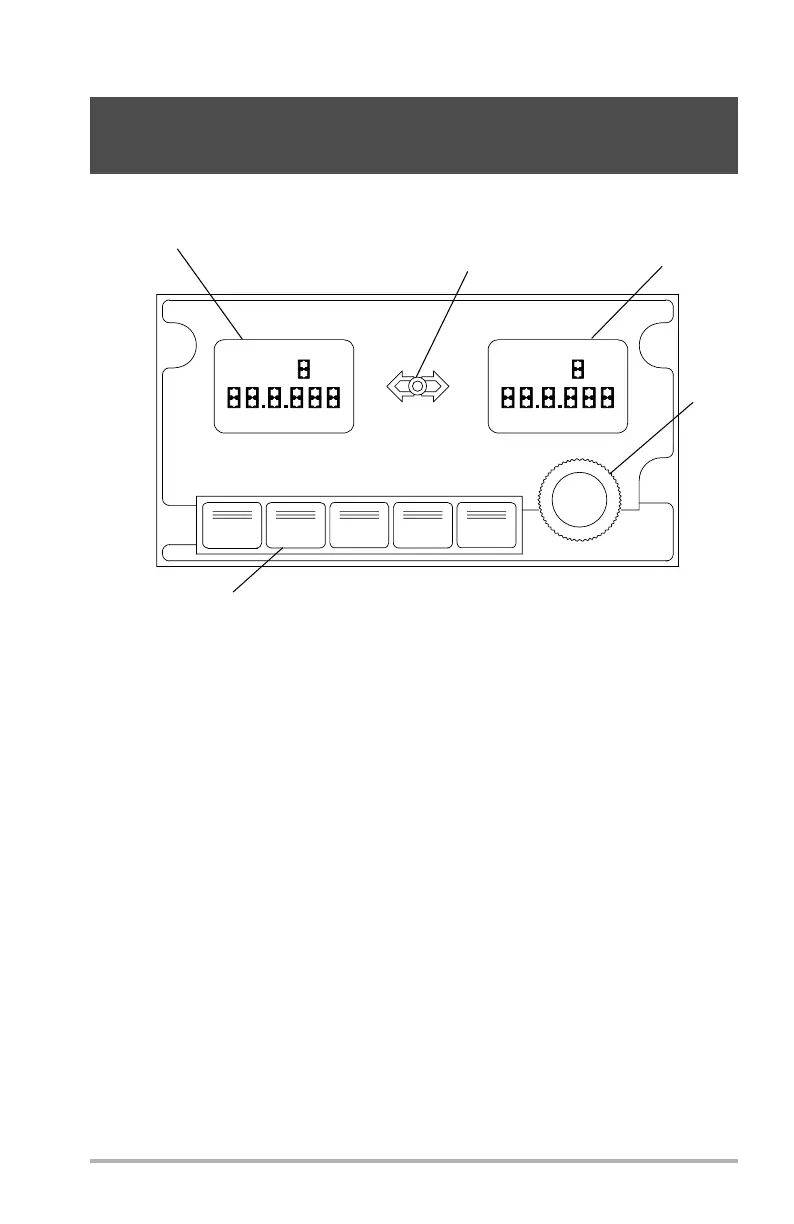
Communication Radio Panel
1. ACTIVE Window
Displays the active frequency and selected radio. Displays ACARS in one of
the windows for VHF-3. Displays FAIL in both windows in case of CRP
failure.
2. Transfer Button
Push to transfer the STBY frequency to the ACTIVE window for
transmission. STBY frequencies cannot be transmitted until transferred to
ACTIVE window.
3. STBY Window
Displays the standby frequency and selected radio.
4. Frequency Selector
Turn knobs to select frequency in STBY window only.
5. Radio Selector Switches (5) - white
Push to select respective radio. Switch illuminates white. Selected radio is
displayed in the STBY/ACTIVE windows.
VHF-1
VHF-2
VHF-3
HF-1
HF-2
ACTIVE
VHF
1
STBY
VHF
AFT PEDESTAL, 2 ON LEFT 1 ON RIGHT
2
3
4
5
DB1-2-1701
October 02, 2006


 To Next Page