MD-11 Flight Crew Operations Manual
k
FMS -
Controls and Displays
FMS.30.115
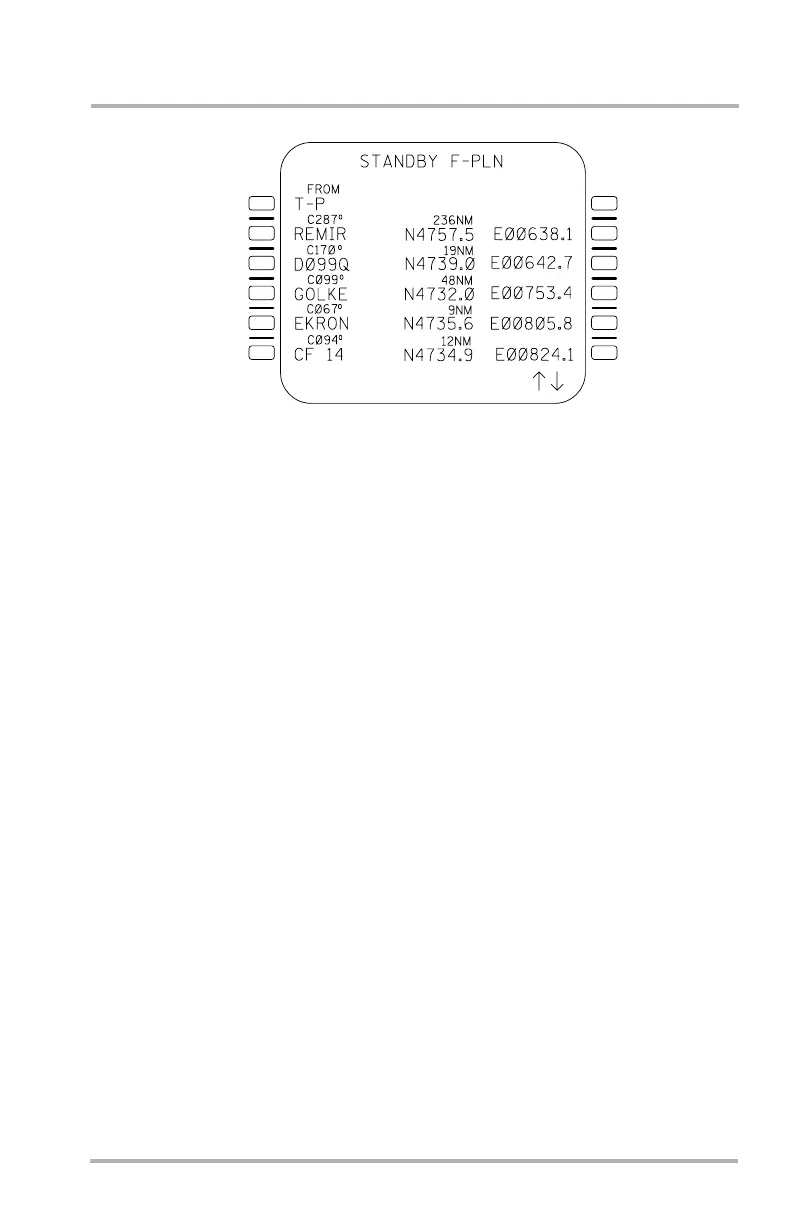
STANDBY F-PLN Page
Pushing the F-PLN key with STANDBY active displays the STANDBY F-PLN
page. This page displays each leg of the active route, provides position data for
each waypoint and computed true course and distance for the connecting legs. The
pilot can make waypoint entries using the left LSKs only. A valid waypoint entry
should consist of an identifier followed by a lat/long or a lat/long only. The NAV
database is not available. A lat/long entry will be assigned a name such as
N51W050. Vertical scrolling is available to review and modify the F-PLN.
During normal flight, the MCDU is continually updating the STANDBY F-PLN
to reflect the FMC flight plan. Thus, on entering the STANDBY mode of
operation, the MCDU is already initialized with the current F-PLN. Up to 118
waypoints can be stored in the MCDU.
Basic F-PLN functions such as sequencing, waypoint entry/deletion,
DISCONTINUITY insertion, DIR TO function, and PPOS/T-P generation are
operable.
NOTES: The STANDBY F-PLN should be reviewed, as only waypoints,
tracks and distances are maintained in the MCDU. Discontinuities
may appear where flight plan data has been lost.
If the STANDBY F-PLN is selected after the onside FMC has
completed an automatic reset then the STANDBY F-PLN will be
cleared.
LB1-3-0130
1L
2L
3L
4L
5L
6L
1R
2R
3R
4R
5R
6R
October 02, 2006



 To Next Page