MD-11 Flight Crew Operations Manual
k
FMS -
Controls and Displays
FMS.30.101
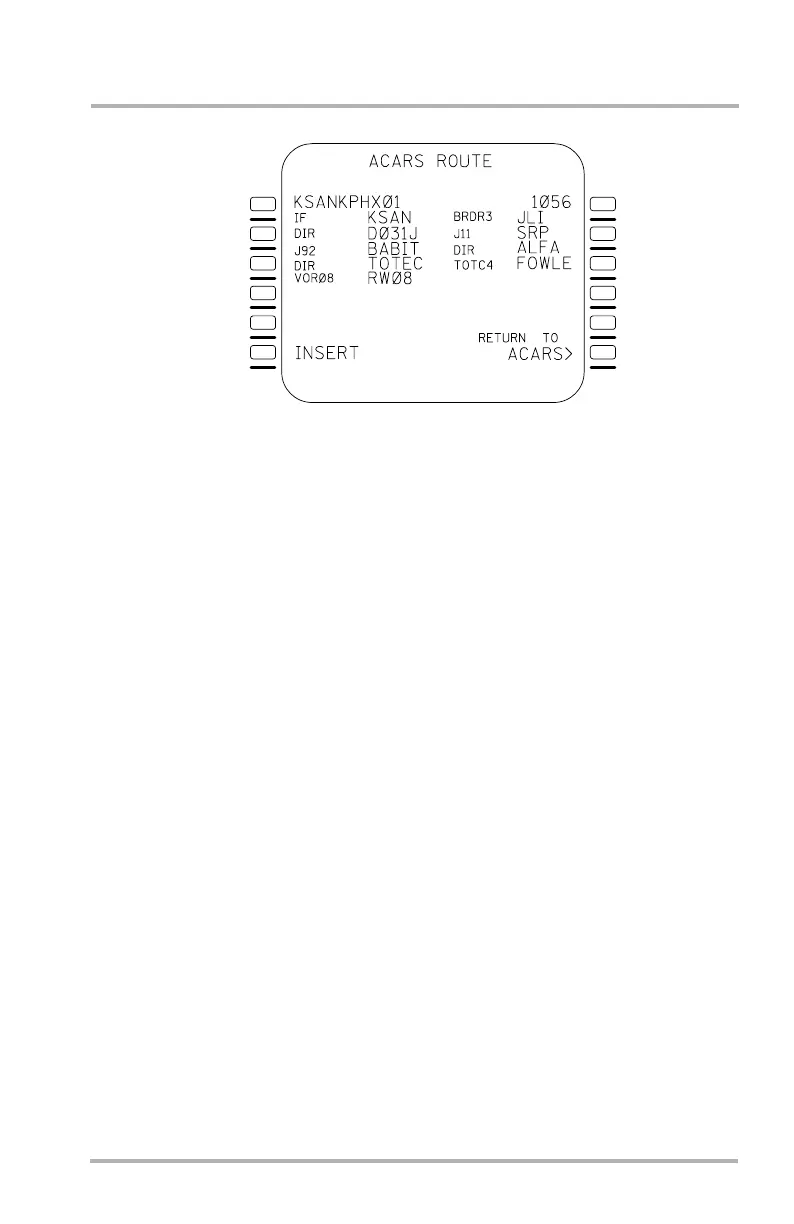
ACARS ROUTE Page
Line 1L displays the company route identifier. Line 1R displays the flight number.
Below lines 1L and 1R, the most recently received route data (read from left to
right) is shown. A longer route will generate additional pages.
Line 6L displays DUPLICATE NAMES when several waypoints, navaids or
airport runways have the same identifier in the ACARS flight plan and cannot be
resolved automatically. When all duplicate names have been resolved, the
DUPLICATE NAMES prompt is replaced by INSERT.
Line 6L INSERT, inserts the ACARS route and any optional performance data
into the secondary flight plan and inserts the flight number into the F-PLN INIT
page. If performance factor is present in the ACARS data, it is also inserted in the
secondary flight plans. After inserting, the page display returns to ACARS
MENU. Access to the ACARS ROUTE page is not allowed following insertion,
until new route data is received.
If the uplinked data contains a non-precision approach, an MDA entry is required
in 5R before the insert prompt is displayed in 6L. The MDA can only be edited
before the insert prompt is pushed. After the route is inserted the MDA will not be
displayed on the ROUTE REVIEW page. Editing the MDA can be accomplished
on a secondary STAR page after the route has been inserted.
Line 6R RETURN TO ACARS, is used to return to the ACARS MENU page
without inserting the data. The route data remains available for later review until
replaced by newly received route data.
NOTES: The DUPLICATE NAMES page lists all the waypoints with
duplicate names and each lat/long. Pushing an LSK next to the
waypoint enters the waypoint and returns to the ACARS ROUTE
review page.
To insert route data into the active flight plan, the ACTIVATE
SECONDARY prompt must be selected on the secondary flight plan
INIT page.
LB1-3-0124
1L
2L
3L
4L
5L
6L
1R
2R
3R
4R
5R
6R
October 02, 2006



 To Next Page