MD-11 Flight Crew Operations Manual
k
FMS -
Controls and Displays
FMS.30.19
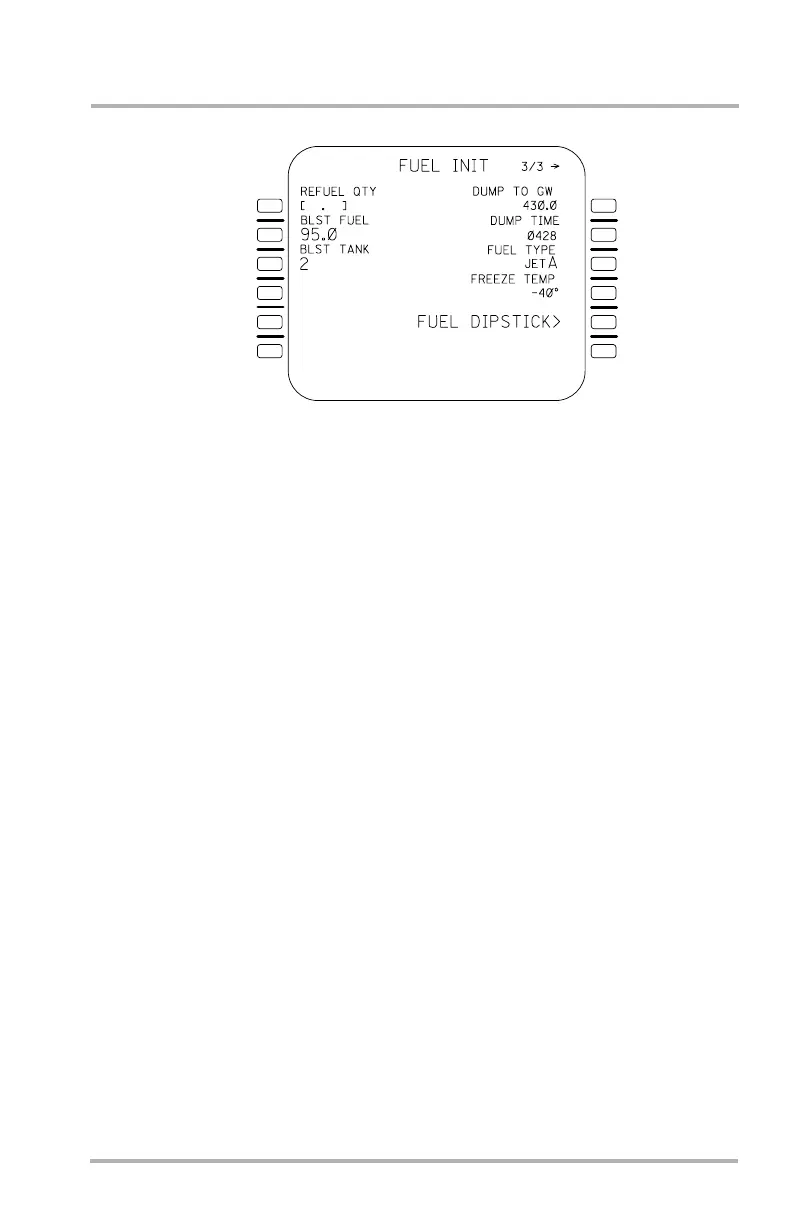
FUEL INIT Page
Accessed from WEIGHT INIT with the PAGE key, this page allows the flight
crew to initialize fuel-related parameters. Pushing the PAGE key returns display
to the F-PLN INIT page.
Refuel quantity may be entered in 1L for the total fuel the flight crew wants on
board after fueling.
2L through 4L are for ballast fuel entries. A BLST FUEL entry in 2L identifies a
certain quantity of fuel onboard as ballast fuel (nonusable fuel). The BLST TANK
field in 3L allows the flight crew to identify the tank that contains the ballast fuel.
This field will not be displayed until an entry has been made in the BLST FUEL
field, at which time boxes will be displayed. If BLST fuel is entered or edited
after engine start, then CHECK ZFW will be displayed in the scratchpad of the
MCDU.
After a flight, if ballast fuel had been in the system, the FMC will retain ballast
fuel quantity and ballast tank identifier on the FUEL INIT page. CHECK
BALLAST FUEL will appear in the SP.
If a BLST FUEL or BLST TANK entry is made that has BLST FUEL greater than
the limit of the BLST TANK, TANK LIMIT EXCEEDED is displayed and the
entry is rejected. If a BLST FUEL entry is greater than the largest tank limit,
ENTRY OUT OF RANGE is displayed and the entry rejected.
1L
2L
3L
4L
5L
6L
1R
2R
3R
4R
5R
6R
LB1-3-0070
October 02, 2006



 To Next Page