MD-11 Flight Crew Operations Manual
k
Landing Gear and Brakes -
Controls and Displays
Land.30.14
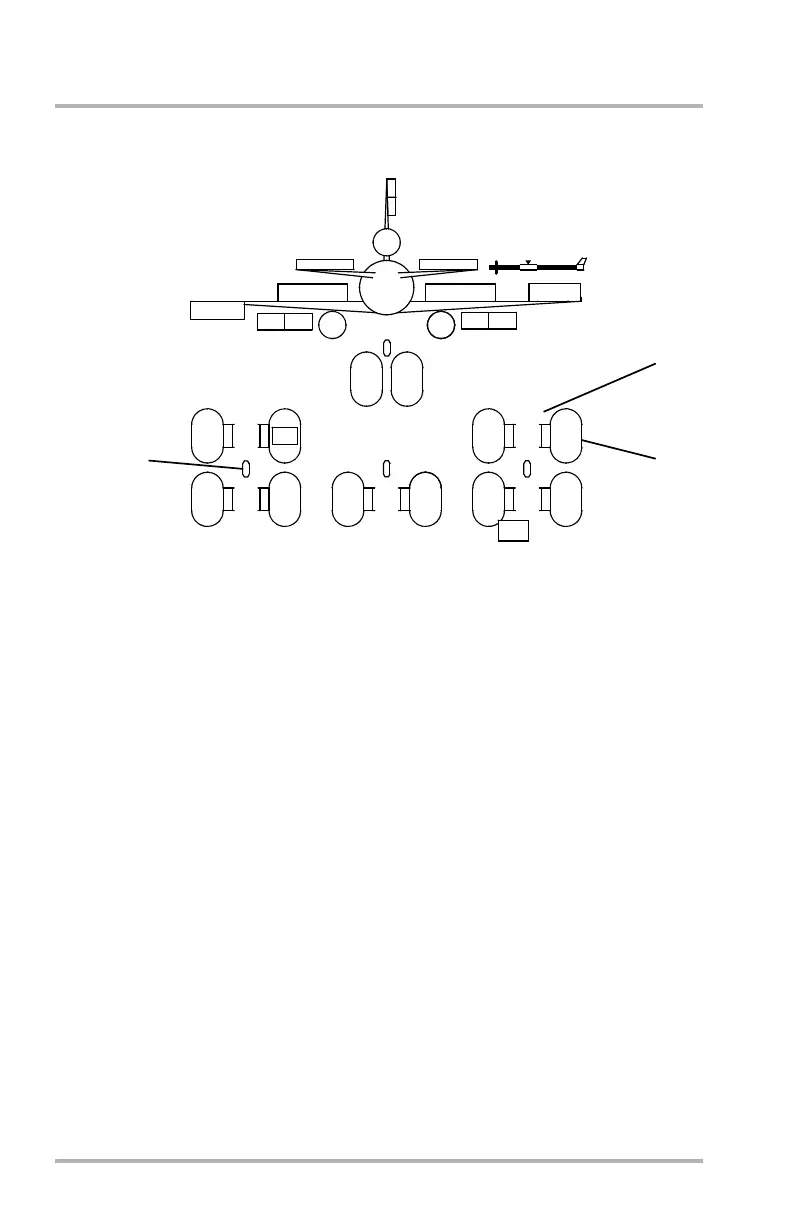
SD Synoptic - Configuration
1. Brake Temperature Readout (Typical)
Brake temperature is shown digitally (°C) adjacent to the brake outline at the
side of the respective wheel. The white digits turn amber and are boxed in
amber when brake temperature is out of limits. If brake temperature is not
available, no data is shown. Temperatures above 936°C cannot be measured.
The display will go blank for the affected brake(s). As the temperature falls
back below 936°C, the temperature(s) will appear again if sensors are not
damaged.
2. Tire Pressure Readout (Typical)
Actual tire pressure is shown digitally (psi) within gray outline of tire. The
white digits turn amber and are boxed in amber if tire pressure is low or
substantially different from adjacent tire. If tire pressure data is not available,
no data is shown.
3. Secondary Gear Lights (Typical)
Green - Landing gear is down and locked.
Red - Indicates one of the following:
• Landing gear is not down and locked and gear handle is down.
• Landing gear is in transit or not in agreement with gear handle.
• Any unsafe gear condition exists.
CONFIGURATION
625
SLAT EXT
250 250
250
250
250
250
250 250
250
DB1-2-1771A
NOTE:
View is from tail looking forward.
180
206
55
208
175 178
204
182
11
15
10
9
206 206
206208
1
2
3
STAB
6.1
ANU
October 02, 2006



 To Next Page