MD-11 Flight Crew Operations Manual
k
FMS -
Controls and Displays
FMS.30.60
NAVAID Page
Upon initial access the NAVAID page displays information on navaids then being
tuned by the FMS. Data on the navaids being tuned are presented on separate
NAVAID pages as follows:
Page 1 - Navaid for bearing pointer display.
Pages 2 and 3 - Navaids for radio position computation.
Page 4 - ILSDME/MLSDME for display.
If a navaid for bearing pointer display is also being used for positioning, then the
navaid for ILSDME/MLSDME display, if present, will move up to page 3.
The NAVAID page can also display information on any navaid in the database
upon definition of that navaid by the flight crew.
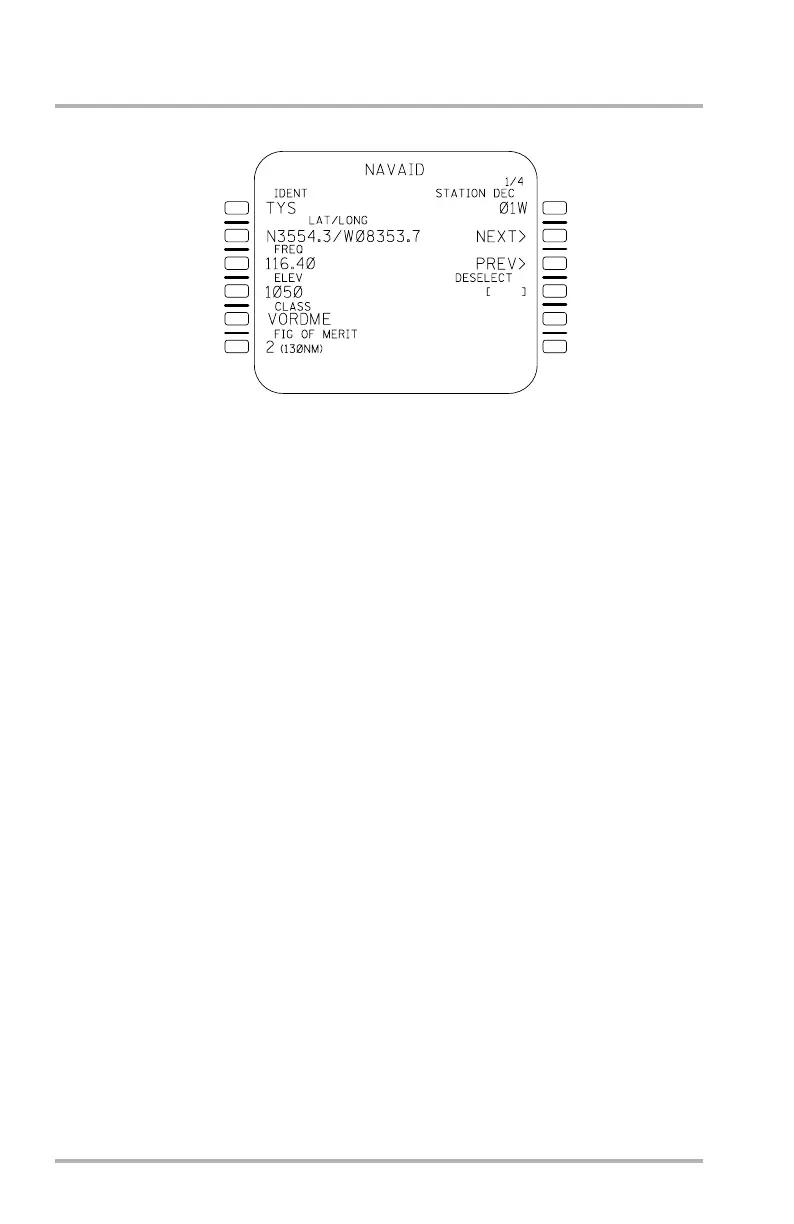
The illustration is an example of a NAVAID page as first accessed from the REF
INDEX page. It shows the data displayed for a VORDME: Identifier,
latitude/longitude, elevation, class, figure of merit, and magnetic declination. The
illustration also indicates that there are four navaids being tuned by the FMS (1/4
in title line). Information on the others may be obtained by use of the NEXT and
PREV prompts.
If the navaid had been a DME, the declination field would have been blank. If it
had been a non collocated VORDME, the CLASS would have been VORDME
NON-COLLOCATED.
If no navaids were being tuned when the page was accessed, the data fields would
have been blank except for boxes in 1L.
If the flight crew enters a navaid identifier in 1L, the same types of information
will be displayed but only one page of data will be available. NEXT and PREV
will not appear and no numbers (1/4) will be in the title line.
For reference, the maximum allowable navaid distances for tuning are shown in
6L. For the four figures of merit the distances are: 0, 40 NM; 1, 70 NM; 2, 130
NM; 3, 250 NM.
1L
2L
3L
4L
5L
6L
1R
2R
3R
4R
6R
5R
LB1-3-0100A
October 02, 2006



 To Next Page