MD-11 Flight Crew Operations Manual
k
Communications -
Controls and Displays
Comm.30.11
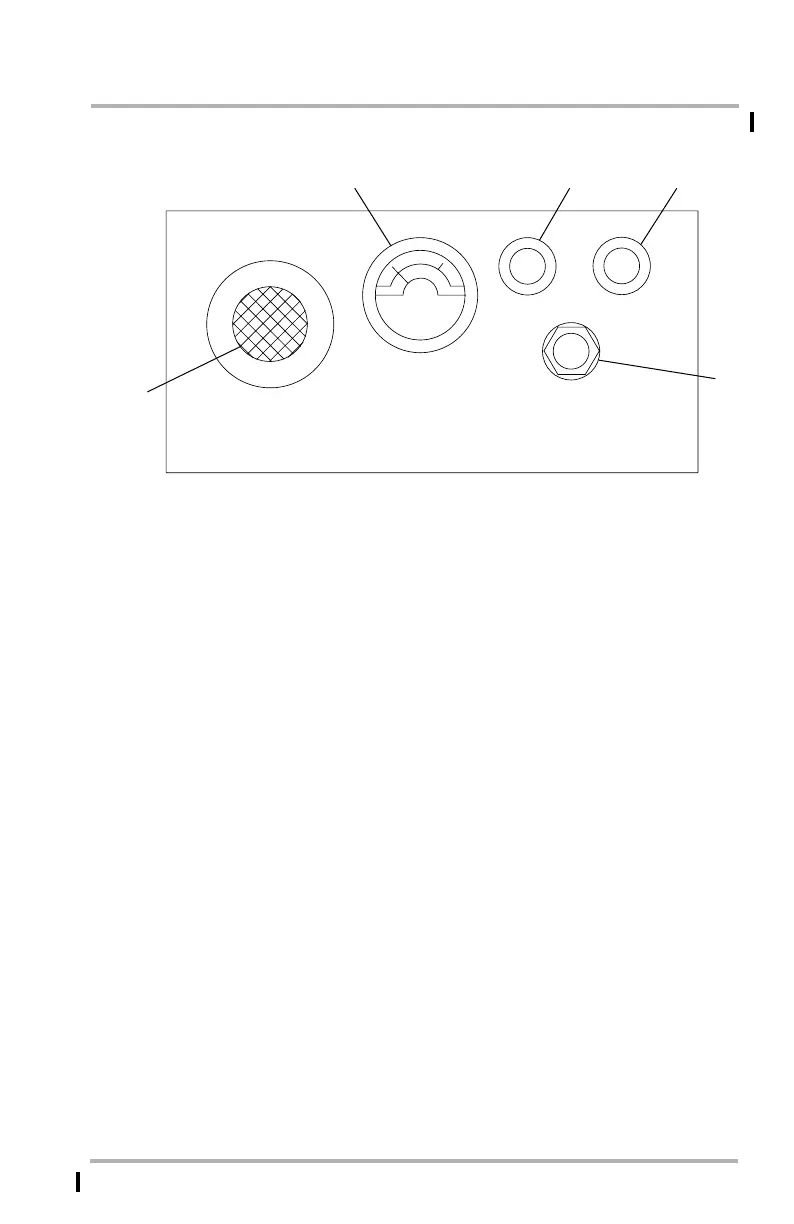
Cockpit Voice Recorder Panel
1. Test Monitor Meter
Indicates the recording level during a test. When the TEST button is pushed,
the meter should read in the green band.
2. TEST Button
TEST - Push to initiate a timed test signal, applied at preset intervals, for each
channel. The complete test cycle lasts approximately 5 seconds and is
accompanied by an aural tone heard through the headset.
3. ERASE Button
ERASE - Push and hold for 2 seconds, when the airplane is on the ground and
the parking brake is set, to erase previously recorded cockpit sounds.
4. HEADSET Jack
When the headset is plugged in to this jack and the TEST button is pushed,
an aural tone indicates that the system is operational.
5. Cockpit Monitor Microphone
All audible sounds in the cockpit are recorded through the cockpit monitor
microphone.
CAG(IGDS)
LB1-3-0055
TEST
ERASE
HEADSET
600 OHMS
COCKPIT VOICE RECORDER
1
2
3
4
5
FORWARD OVERHEAD PANEL
November 10, 2008



 To Next Page