MD-11 Flight Crew Operations Manual
k
FMS -
Controls and Displays
FMS.30.25
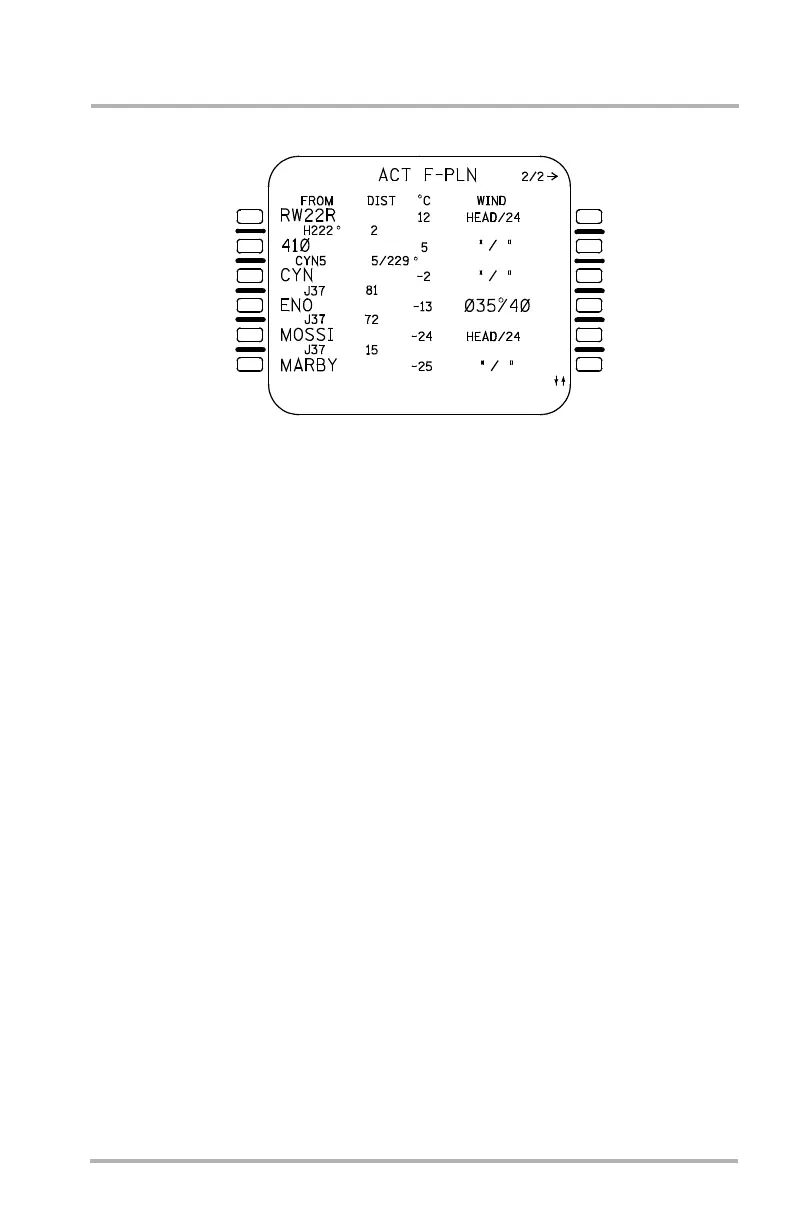
ACT F-PLN Page 2/2
The ACT F-PLN page 2/2 displays great circle distance to the next waypoint, the
flight plan outbound course for the next leg, and temperature and wind
information for the same waypoints displayed on page 1. Pushing the PAGE key
with the ACT F-PLN page 1 displayed accesses the ACT F-PLN page 2/2.
Waypoints, navaids, or flight plan events are displayed on the left side (1L through
6L). The FROM waypoint is displayed in 1L.
The distance between the flight plan waypoints is displayed in the center field
between the lines for the corresponding waypoints. The departure runway surface
temperature is displayed in the center of line 1. This temperature defaults to ISA
temperature. Actual temperature can be entered on the CLIMB FORECAST page
LSK 5R. After it is changed, it is displayed in large font on the page. If the
magnetic course between two waypoints is different than the previous leg, the
course is displayed next to the distance in the center field.
Temperature and winds for the waypoints are displayed on the same line as the
waypoint identifier (or event name) on the right side (1C/R through 6C/R). The
temperature defaults to ISA temperature unless there is a value entered on the
F-PLN INIT page. Then it is a calculated value for that altitude. Winds default to
HD/000 unless there is a value entered on the F-PLN INIT page.
The temperature and winds for climb are from the CLIMB FORECAST page. If
parameters do not change on successive legs of the flight plan, ditto marks (“) are
displayed.
1L
2L
3L
4L
5L
6L
1R
2R
3R
4R
5R
6R
LB1-3-0076A
October 02, 2006



 To Next Page