MD-11 Flight Crew Operations Manual
k
FMS -
Controls and Displays
FMS.30.85
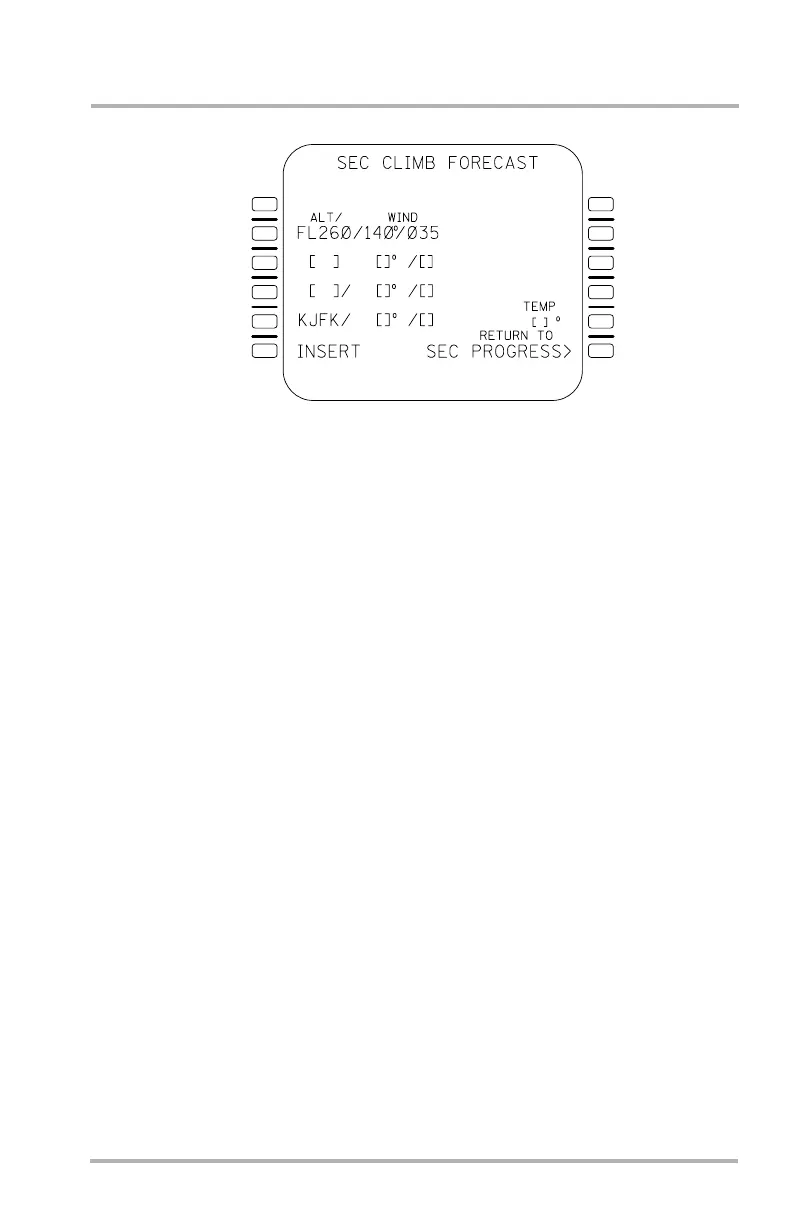
CLIMB and SEC CLIMB FORECAST Pages
A maximum of three different altitude/wind combinations may be entered in lines
2L, 3L, and 4L. The FMS automatically arranges the entries in descending order.
Entries of altitude only, or altitude and wind are acceptable and displayed in large
font. The wind bearing and wind magnitude may only be entered without the
altitude when the altitude already exists. Each altitude entry may be entered as
either flight levels (FL200) or as pressure altitudes (20000). Wind entries may be
changed by any of the following format examples: /102/69, 102/69, or 102/069.
The altitude/wind field in 5L automatically displays the origin in large font, only
allowing the winds to be entered.
The temperature at the origin can be entered in 5R. This field is displayed in large
font and may be cleared back to brackets.
After an entry/edit is made, the insert prompt is displayed in 6L with the asterisk
(*) on the CLIMB FORECAST page and without the asterisk (*) on the SEC
CLIMB FORECAST page.
The CLIMB FORECAST page provides a RETURN TO PERF MODE page
prompt in 6R. The SEC CLIMB FORECAST page provides a RETURN TO SEC
PROGRESS page prompt in 6R. Both the CLIMB FORECAST and SEC
FORECAST pages may be exited by pushing a mode key.
1L
2L
3L
4L
5L
6L
1R
2R
3R
4R
5R
6R
LB1-3-0111
October 02, 2006



 To Next Page