MD-11 Flight Crew Operations Manual
k
FMS -
Controls and Displays
FMS.30.87
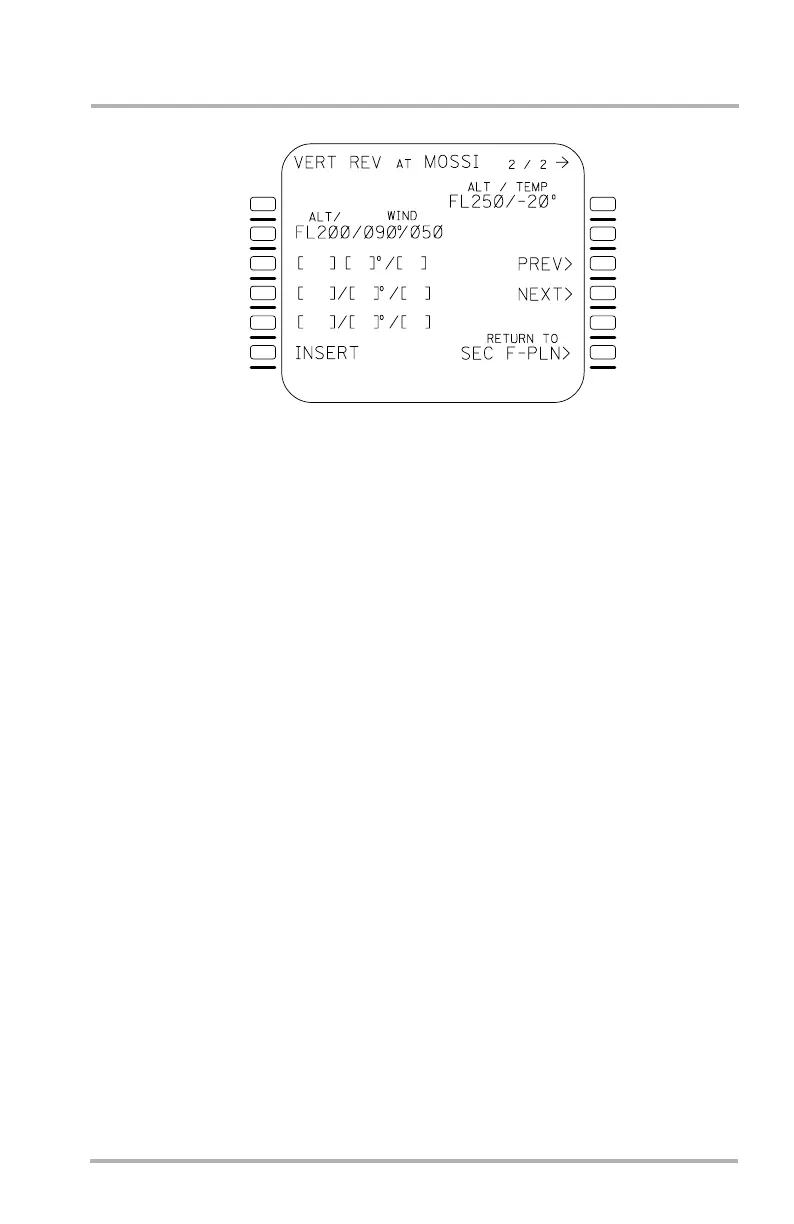
VERT REV Page 2/2
The ALT/TEMP field in 1R allows the pilot to enter a specific altitude with a
known temperature (in degrees C). Both the altitude and temperature are required
for entry, but edits may be made to either field once they are both entered.
If TRIP WIND has been entered on the F-PLN INIT page and there are no entries
in 2L, 3L, 4L, and 5L, then TRIP WIND is displayed in field 2R.
VERT REV page 1 is a flight plan modification page and can be accessed from
VERT REV page 2 by use of the PAGE key.
Winds are always referenced to true north. Unless pilot entered, origin winds
default to HD/000 kts and destination winds default to 0 kts.
The INSERT prompt is displayed in 6L whenever an altitude/wind entry or edit is
performed. The data entered or edited on this page has no effect on the system
until the INSERT prompt is pushed. If the page is exited without pushing
INSERT, then the entered or edited data is not retained.
The PREV> prompt is displayed in 3R. Selecting LSK 3R will slew back to the
previous waypoint. Should the VERT REV page 2 correspond to the active
waypoint the PREV> prompt will not be displayed.
The NEXT> prompt is displayed in 4R. Selecting LSK 4R will slew to the next
waypoint with the exception of the destination. Should a next waypoint be the
destination the NEXT> prompt will not be displayed.
The RETURN TO ACT F-PLN page prompt is displayed in 6R.
The SEC VERT REV page 2 functions the same for the secondary flight plan as
the VERT REV page 2 does for the primary flight plan, except there is no asterisk
by the INSERT prompt.
LB1-3-0113
1L
2L
3L
4L
5L
6L
1R
2R
3R
4R
5R
6R
October 02, 2006



 To Next Page