87
Settin
Checkers
Cha
ter 6
Examples of function settings
Items Description Example
Setting of
Reference
checker
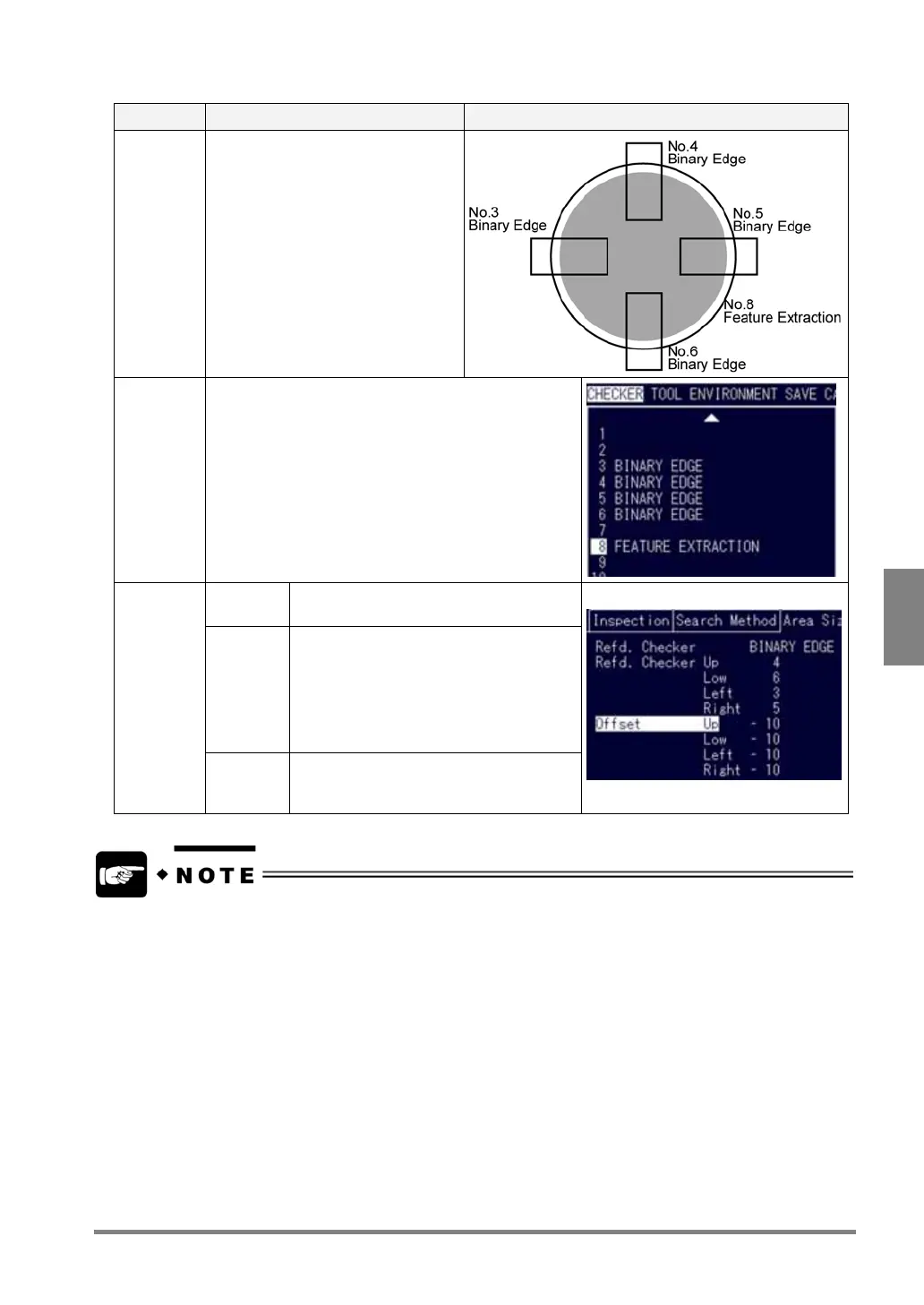
Set a binary edge checker, gray edge
checker or smart matching checker in
the position where a change in size of
the object can be recognized.
In the figure shown on the right,
reference checkers are set to the up,
down, right and left sides of the object,
but you can set a reference checker to
one of the sides.
Note on a
checker
number
The number of referred checker (binary or gray edge
checker for detecting the size of an object) must be lower
than the number of the referring checker (, which uses the
Area Size Adjustment function).
In the figure shown on the right, No.8 is assigned to the
checker having the Area Size Adjustment function, and
No. 3, 4, 5 and 6 are assigned to referenced binary edge
checkers.
Reference
checker
Select binary edge checker, gray edge
checker or smart matching checker.
Reference
checker
No.
Specify the checker number to detect the
size of an object.
Reference checkers are set only in the
positions of the start and end points
depending on the reference checker.
Or, one of left/right/up/down side of the
object can be expanded and contracted.
Area size
adjustment
tab
Offset Specify the distance from a detection point
where you want to set an area. Refer to the
next section for more details.
One of Binary Edge, Gray Edge or Smart Matching checker can be set as a reference checker for one checker.
Different type of checkers cannot be referred in each side of a checker, upper/lower/left/right side.
• Example of wrong setting:
Upper side: Binary edge checker, Lower side: Smart Matching checker
When Smart Matching checker is used, the position extracted as the coordinates of a reference checker is the
“Output Point”. Use an offset value when the Output Point is set within a template (middle point, for example).



 To Next Page